
Plugins
111 files
-
Best Player MOTD
☄ Description
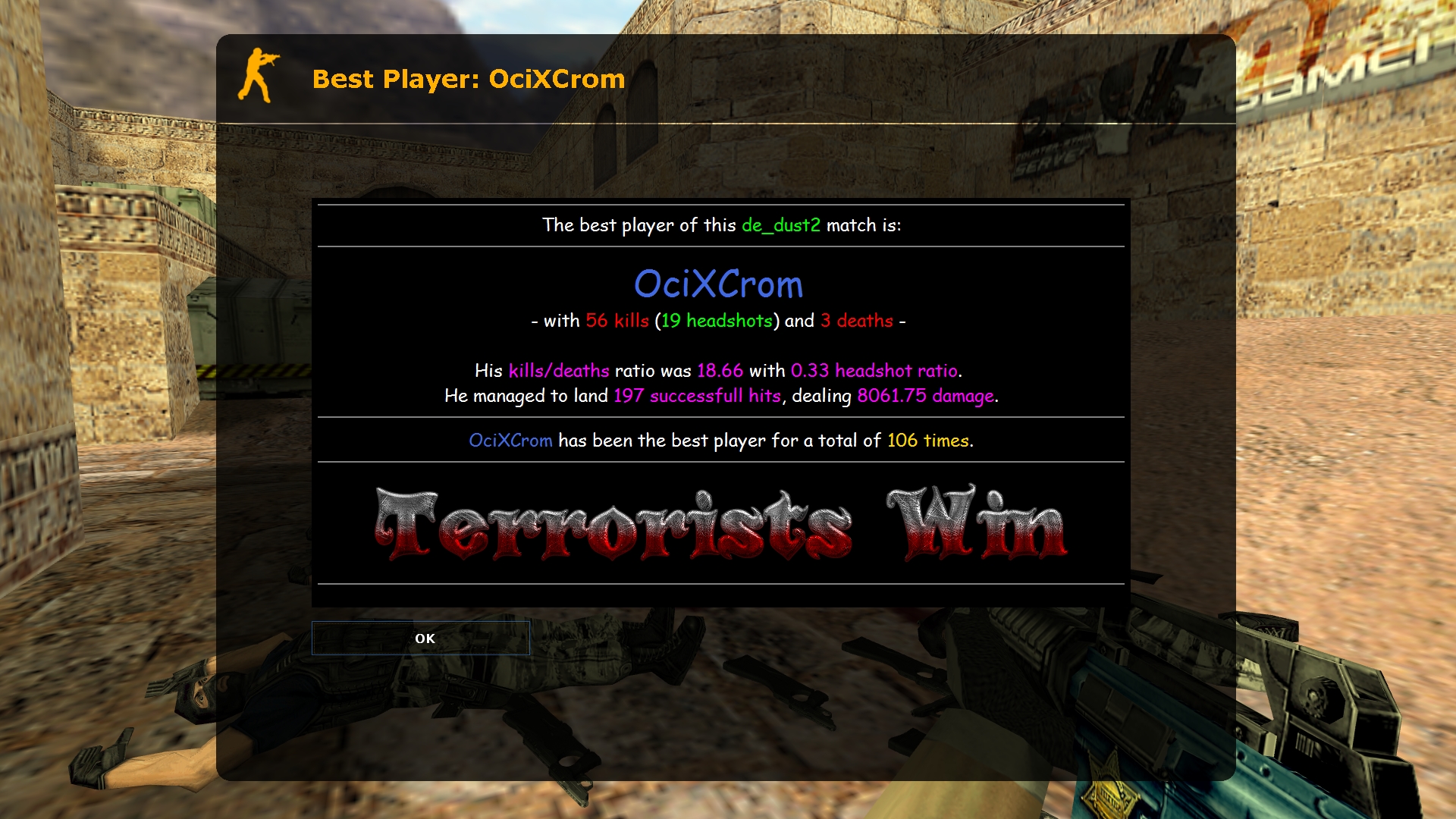
At the end of each map, the best player is displayed in a MOTD window, along with their stats. The information in the MOTD window, as well as the way of determining the best player, can be completely changed in a fairly easy way. ☄ Commands
bpm_formula "157" -- way to determine the best player (more info below) bpm_min_players "6" -- minimum number of players needed at the end of the map to show the MOTD window bpm_motd_header "Best Player: $name$" -- the title of the MOTD window for the best player bpm_motd_stats "Player Stats: $name$" -- the title of the MOTD window for the own stats bpm_obey_team "0" -- if on, the best player will be selected from a given team (0 = off; 1 = terrorists; 2 = counter-terrorists; 3 = winning team) bpm_save_type "0" -- way to save "wins" (0 = nickname; 1 = IP address; 2 = SteamID) say /mystats -- shows your current stats
☄ Substitutes
Placeholders in $dollars may be used in MOTD files and header files.
Substitutions enclosed in (brackets) can be used in the "bpm_formula" bug.
$map$ -- the name of the map
$name$ -- the player's name
$wins$ -- number of wins (0)
$kills$ -- number of kills (1)
$kills_sb$ -- the number of kills according to the scoreboard (2)
$deaths$ -- the number of deaths (3)
$deaths_sb$ -- the number of deaths according to the result in the scoreboard (4)
$headshots$ -- the number of headshots (5)
$hits$ -- number of hits (6)
$damage$ -- amount of damage done (7)
$kdratio$ -- the ratio of kills to deaths (8)
$kdratio_sb$ -- the ratio between kills and deaths according to the scoreboard (9)
$hsratio$ -- the ratio between headshots and kills (a)
$ctscore$ -- the number of counter-terrorist victories
$tscore$ -- the number of terrorist victories
$best_team$ -- winning team (ct/t/draw)
☄ Determination of the best player
To find the best player, the plugin first checks the number of kills of all players and selects the one with the most kills. In case it selects more than one player with the same number of kills, the plugin compares the number of kills with the headshot of those players. If there is a duplicate again, the plugin will now compare the amount of damage done by the players and choose the one who did the most. This entire procedure can be edited by changing the "bpm_formula" bug, which is set to "157" by default. As you can see from the placeholder list, 1 means number of kills, 5 is number of headshots, and 7 is damage done, so the plugin will check these 3 parameters one by one. If you want, for example, to first check the damage (7), then the number of deaths (3), and the ratio of headshots (a), the kvar will need to set it to "73a".- Free
- 51 Downloads
Updated -
Aim Precision
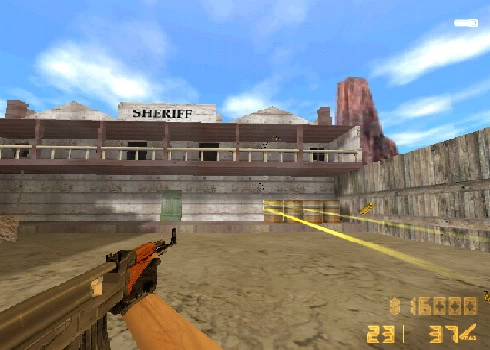
Reversed enginered Counter-Strike's pseudo random for shot spread and precision real time visualization with laser beams for training purposes. Implemented for AK-47 and Deagle only. (Why would you use anything else?)
Command Description
say /precisionEnable /disable AimPrecision laserbeam.
- Free
- 10 Downloads
Updated -
Respawn Players!
Command: amx_revive target
#include <amxmodx> #include <amxmisc> #include <hamsandwich> #define PLUGIN "amx_revive" #define VERSION "1.0" #define AUTHOR "COSMIN" public plugin_init() { register_plugin(PLUGIN, VERSION, AUTHOR) register_concmd("amx_revive", "revive_user", ADMIN_RCON, "<target>") } public revive_user(id, level, cid) { if (!cmd_access(id, level, cid, 0 )) { console_print(id, "No Access To This Command"); return PLUGIN_HANDLED; } new s_Name[32]; read_argv ( 1, s_Name, charsmax ( s_Name ) ); new i_Target = cmd_target ( id, s_Name, 2 ); if(read_argc() != 2) { console_print(id, "Usage is : amx_revive <target>") return PLUGIN_HANDLED; } if ( !i_Target ) { console_print ( id, "( - ! - ) Invalid Player ( - ! - )" ); return PLUGIN_HANDLED; } if(!is_user_alive(i_Target)) { new targetname[32]; get_user_name(i_Target, targetname, charsmax(targetname)) ExecuteHamB(Ham_CS_RoundRespawn, i_Target) client_print(id, print_chat, "User %s Respawned", targetname) } return PLUGIN_HANDLED; } /* AMXX-Studio Notes - DO NOT MODIFY BELOW HERE *{\\ rtf1\\ ansi\\ deff0{\\ fonttbl{\\ f0\\ fnil Tahoma;}}\n\\ viewkind4\\ uc1\\ pard\\ lang1033\\ f0\\ fs16 \n\\ par } */- Free
- 17 Downloads
Updated -
MOTD Rules
Simple file based MOTD viewer with custom path defined by cvar.
Just configure your filename.html or filename.txt and point the configuration cvar to the right path.
Uses a regex based filename checker to guarantee that file is a html or txt file.
Command Description
say /rules Show Rules MOTD
Cvar Default Description
amx_rulesfile "rules.html" Rules file Absolute path. By default has its roots on cstrike/ folder.
- Free
- 18 Downloads
Submitted -
Plugin allow transfer bomb from AFK terrorist to closest non-AFK teammate.
Plugin will have no effect:
- at the freezetime
- if bomb is planting
- on non-bomb maps (comment #define BOMB_MAP_CHECK to suppress)
Instalare:
1 - Fisierul afkbombtransfer.sma il puneti in addons/amxmodx/scripting 2 - Fisierul afkbombtransfer.amxx il puneti in addons/amxmodx/plugins 3 - Intrati in fisierul addons/amxmodx/configs/plugins.ini si adaugati la urma: afkbombtransfer.amxx 5 - Cvar-uri (se adauga in fisierul amxmodx\configs\amxx.cfg afk_bombtransfer_spawn (N: seconds, default: 7) - max. allowed bomb carrier AFK time
affects on spawned AFK bomb carrier which never moved after spawn
afk_bombtransfer_time (N: seconds, default: 15) - max. allowed bomb carrier AFK time
affects on any AFK bomb carrier except one which obey previous CVAR
6 - Comenzi administrative (se tasteaza in consola si trebuie sa fiti administrator): Nu are
7 - Comenzi publice (se tasteaza in joc prin apasarea tastei Y): Nu are
8 - Module necesare (se sterge ; din fata modulului de mai jos; acestea le gasiti in fisierul amxmodx\configs\modules.ini fakemeta
- Free
- 46 Downloads
Updated -
Descriere!
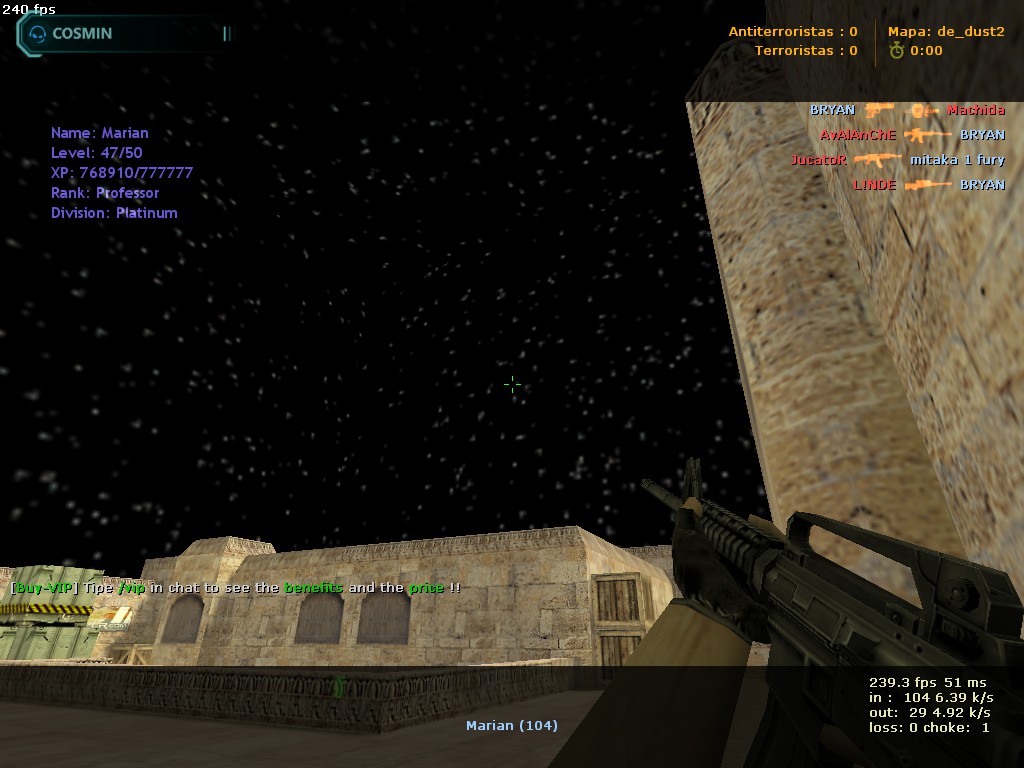
Dupa cum spune si numele, acest plugin face ca cerul sa fie intunecat pe toate hartile.
Instalare:
1. Fisierul cerinstelat.amxx il puneti in addons/amxmodx/plugins
2. Intrati in fisierul addons/amxmodx/configs/plugins.ini si adaugati la urma: cerinstelat.amxx
3. Alti pasi necesari....
Cvar-uri (se adauga in fisierul amxmodx\configs\amxx.cfg):
Nu detine.
Comenzi administrative (se tasteaza in consola si trebuie sa fiti administrator):
Nu detine.
Comenzi publice (se tasteaza in joc prin apasarea tastei Y):
Nu detine.
Module necesare (se sterge ; din fata modulului de mai jos; acestea le gasiti in fisierul amxmodx\configs\modules.ini):
- Free
- 133 Downloads
Submitted -
Teams Manager All-In-One
Version 0.0.6
by Exolent
Introduction
Instead of all of the separate team management plugins that I have made, I decided to write a complete one.
It includes:
auto-join for teams
a ratio for teams
a limit for each team
immunity for admins from all of the above
Cvars
team_immunity <0/1>
- Allows immune admins to not be affected by plugin
- 0 = Affect admins with plugin
- 1 = Admins are not affected by ratio, team switching or auto-join, but will be affected by balancing
- 2 = Admins are not affected by ratio, team switching, auto-join, or balancing
- Default: 0
team_immunity_flag <flag(s)>
- Flag(s) required to be considered immune
- If multiple flags, admins must have them all
- Default: "a"
team_autojoin_team <0/1/2/5/6>
- Team for players to auto-join
- 0 = Disabled
- 1 = Terrorists
- 2 = Counter-Terrorists
- 5 = Random (Terrorist or Counter-Terrorist)
- 6 = Spectator
- Default: 0
team_autojoin_favor <0/1/2>
- If you have team_autojoin_team set to 5 and a player is able to join both teams,
- This will force a specific team to choose when both teams are viable choices
- 0 = Disabled
- 1 = Terrorists
- 2 = Counter-Terrorists
- Default: 0
team_autojoin_class_t <1/2/3/4/5>
team_autojoin_class_ct <1/2/3/4/5>
- Class for players to choose for auto-join
- 1-4 = Normal models
- 5 = Random model
- Default: 5
team_allow_switch <0/1>
- Controls whether players on a team can choose a new team
- 0 = Cannot choose new team
- 1 = Allow choose new team
- Default: 1
team_limit_t <limit>
team_limit_ct <limit>
- The max players for each team
- 0 or 32 = Don't set a limit
- Default: 32
team_ratio_t <factor>
team_ratio_ct <factor>
- The ratio for T:CT players
- Example: If T is 3 and CT is 1, then there will be 3 Terrorists for every 1 Counter-Terrorists (or 3x more Terrorists).
- If both factors are equal or one of them is 0, then no ratio will be put into effect.
- Default: 1
team_balance <method>
- How the teams should be checked to be balanced every round
- This is for ensuring the limits/ratios are still in effect in case of other plugins moving players
- Methods:
0, no, off, none
1, spec, spectate, spectater, spectator
2, move, switch, transfer
3, kick
- Method Descriptions:
0 = Don't check to balance the teams
1 = Move excess players to spectator
2 = Move excess players to other team (if not breaking the limit/ratio) or move to spectator
3 = Kick players from server
- Default: "off"
Requirements
AMX Mod X version 1.8.1 or higher
Steam WITHOUT dproto installed
Changelog
Version 0.0.6 (edited by Arkshine)
- Fixed typo resulting balancing issue
Version 0.0.5
- Added value "2" functionality for cvar team_immunity
- Added team_autojoin_favor cvar
- Added support for mp_limitteams cvar
- Forced mp_limitteams and mp_autoteambalance to 0 after grabbing values to not let the game break the plugin
Version 0.0.4
- Rewrote how ratio is calculated
Version 0.0.3
- Fixed auto-join bug when value was 5 or 6
Version 0.0.2
- Fixed transferring bug when balancing teams
Version 0.0.1
- Initial release
Notes
If you have auto-join turned on to a specific team,
or if you have a team ratio set into place,
make sure you have mp_limitteams set to 0 or 32 in your server.cfg file!
If you have auto-join set to 5 and mp_limitteams is not 0 or 32,
then the auto-join will pick a proper team to not break mp_limitteams.
The auto-join feature overrides the allow switching,
so if you have auto-join to 1 team, then players cannot switch.
If you have any other team managing ideas,
please ask as I am always willing to have more features.
- Free
- 7 Downloads
Submitted -
Description:
This plugin simulates the bullet time effect from the movies series The Matrix.
Cvars:
bt_bulletspeed - Normal bullet speed. default: 800
bt_sniperspeed - Sniper bullet speed. default: 2000
bt_red - Amount of red in bullet trail. default: 193
bt_green - Amount of green in bullet trail. default: 193
bt_blue - Amount of blue in bullet trail. default: 191
Commands:
bt_toggle - <1/on | 0/off>. default: on
Compiling:
If you wish to compile this plugin by yourself you'll need to download the FakeMeta Utilities by VEN.
It took me a while to finally update this so sorry to all of you who have been waiting. I plan on adding functionality for shotguns and weapons who have burst fire. I will also add some voting to this plugin just for some kicks.
This plugin hasn't been extensivley tested so be sure to post any bugs you find in this forum. Enjoy!
- Free
- 12 Downloads
Submitted -
Adds a menu that allows you to view all admins, VIP users, etc. The menu can be accessed by the commands set in the .ini file.
? Description
Adds a menu that allows you to view all admins, VIP users, etc. The menu can be accessed by the commands set in the .ini file. By default they are (in chat): /admins, /admin, /vips, /vip, /users.
? Settings
The settings can be found in the [Settings] section in the file configs/AdminGroups.ini. MENU_COMMANDS = /admin, /admins, /vip, /vips, /users -- commands that open the menu. If the first character is "/" or "!", it will be registered as a chat command. MENU_ACCESS = 0 -- the flag needed to access the menu. If set to "0", everyone will have access. MENU_PERPAGE = 7 -- number of groups per page in the menu. MENU_SOUND = buttons/blip1.wav -- the sound when the menu is opened. CHAT_PREFIX = &x04[Admin Groups] -- the chat prefix. FLAGS_METHOD = 1 -- whether players need to have all or at least one of the needed group flags. EXIT_TO_MAIN = 1 -- whether or not to go back to the main menu after exiting the group sub-menu.
? Setting up the groups
The groups can be added/changed/removed in the [Settings] section in the file configs/AdminGroups.ini. On a new line add the name of the group, the character "=" and the flag(s). Example: Test Admin = e -- players with flag "e" will be in the group "Test Admin" You can also add a separate flag for viewing the players in the group. Example: Server Admin = abcdeimnu l -- players with flags "abcdeimnu" will be in the group "Server Admin", but only players with flag "l" will be able to see them.- Free
- 20 Downloads
Submitted -
R E T A K E S v1.0
The plugin sets up a retake situation in a random site in the map. TT plant bomb and CT have 40 seconds to defuse.
TT spawned on bombsite( A or B), CT on random spwan depending of where c4 plant(A or B).
Features:
- Warm Up for 30 seconds on map start.
- Auto plant Bomb.
- If CT win, team will be swap.
- If TT win 3(cvar) rounds in row, team well be swap.
- Playing 15(cvar) rounds and map change on nextmap.
- c4 Hud timer.
- Unlock/Remove buy zones.
- Buy Time for 5seconds(cvar).
- If bomb don't plant, round will be restarted. Rounds and player money/kill/deats be returned on same.
Spawn
Every map must have spawn for Site A and B. For now i create 6 CT and 6 T spawn for this map:
- de_dust2, de_inferno, de_mirage, de_train, de_tuscan.
API:
isRetakes() // Check if retakes start.
Rounds() // Check round number.
Cvars:
retakes_rounds "15" // How much playing round for one map
retakes_rowwin "3" // How much T Team can win round in row
retakes_prefix "!g[RETAKES]" // Prefix in chat message
retakes_random_weapons "3" // In which round start giving random weapon(granades and awp)
retakes_autoplant "1" // Auto Plant Bomb is on/off
retakes_buyzone 1 // Unlock/remove buy zone
retakes_warmup_time "30" // Warm Up time min=1
retakes_infohud "1" // Info hud on/off
retakes_buytime "5" // Buy Time
retakes_swapct "1" // On/off Swap CT
retakes_swapt "1" // On/off Swap T
retakes_hudc4timer "1" // On/off c4 hud timer
Important Notes :
You must enable nextmap.amxx.
Auto Plant Bomb don't work with ReGameDLL!!!
Edit mapcycle.txt with maps for retakes.
- Free
- 16 Downloads
Updated -
Description:
This plugin simulates the bullet time effect from the movies series The Matrix.
Cvars:
bt_bulletspeed - Normal bullet speed. default: 800
bt_sniperspeed - Sniper bullet speed. default: 2000
bt_red - Amount of red in bullet trail. default: 193
bt_green - Amount of green in bullet trail. default: 193
bt_blue - Amount of blue in bullet trail. default: 191
Commands:
bt_toggle - <1/on | 0/off>. default: on
Compiling:
If you wish to compile this plugin by yourself you'll need to download the FakeMeta Utilities by VEN.
It took me a while to finally update this so sorry to all of you who have been waiting. I plan on adding functionality for shotguns and weapons who have burst fire. I will also add some voting to this plugin just for some kicks.
This plugin hasn't been extensivley tested so be sure to post any bugs you find in this forum. Enjoy!
- Free
- 7 Downloads
Submitted -
VIP Player ( flag t ) have several privileges, which will not give much advantage over other players.
You can adjust everything with cvar.
Features:
- Free he, smoke and flash bomb.
- Kevlar and Helmet
- Defuse for CT
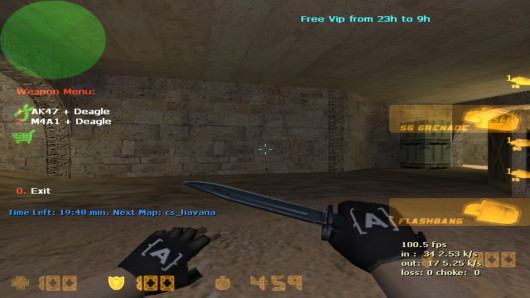
- Menu with free weapon ( ak47/m4a1 + deagle ). Menu will be remove after 15 ( cvar ) seconds.
- Only VIP can buy AWP.
- Show damage.
- Happy Hour.
How set VIP?
- Put flag "t" on player STEAM ID, IP or NAME.
Cvars :
// 0 = off / 1 = on
- spv_menu 1 = Show Menu
- spv_awp 1 = Only VIP can buy Awp
- spv_menuremove 15 = Remove Menu after seconds
- spv_he 1 = Give He
- spv_smoke 1 = Give Smoke
- spv_fb 1 = Give flash
- spv_fb2 1 = Give flash
- spv_def 1 = Give defuse fot ct player
- spv_damage 1 = Show damage
- spv_hh 1 = Happy Hour
- spv_infohud 1 = Show hud about happy hour
- spv_start 23 = When Start Happy Hour 2 = 2 am and 14 = 2 pm
- spv_end 9 = When End Happy Hour 2 = 2 am and 14 = 2 pm
- spv_armor 1 = Give Armor ( Kevlar and Helmet )
- spv_roundsmenu 3 = Menu with free weapon will be show on third ( cvar ) round
- Free
- 144 Downloads
Submitted -
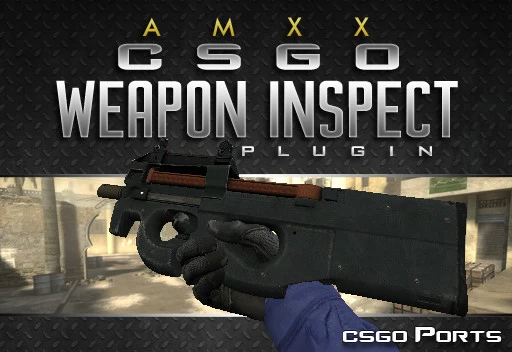
PREREQUISITES:
Counter-Strike 1.6 with the latest AMXmodX installed. Know-how in installing plugins. Weapon models with inspect animations, like CSGO Ports' Weapons Pack 3.
REQUIRED MODULES:
amxmodx | cstrike | fakemeta | hamsandwich
CONSOLE COMMANDS:
inspect - Activates inspect animation. Can be bound to a key, preferably the 'F' key. On the console, type bind f inspect to do so. cl_inspect - Same as 'inspect' command but client-side.
INSTRUCTIONS:
Once installed, you can now use the 'inspect' console command. Type 'inspect' in the console to activate. You can bind this command to, for example, the 'f' key by typing bind f inspect in the console before entering the game.- Free
- 45 Downloads
Submitted -
About This File
Based on the gameplay introduced in CSGO's Operation Hydra. When activated, players can only do damage through headshots.
Plugins that have custom kill icons/messages (like Death and Money or CSWS weapons) can mess up the HeadHunter's kill messages, showing a headshot kill in a no headshot game and vice versa. This is only in the HUD and not in the game mechanic. If this bothers you, disable other plugins using custom kill messages.
bot_kill will not work consistently anymore. If you really need this feature, use this plugin. Just type kill_em_all in the console to activate.
AMXmodX 1.8.2 or later installed.
Instalare:
1. Fisierul headhunter.amxx il puneti in addons/amxmodx/plugins
2. Intrati in fisierul addons/amxmodx/configs/plugins.ini si adaugati la urma: headhunter.amxx
3. Alti pasi necesari....
Cvar-uri (se adauga in fisierul amxmodx\configs\amxx.cfg):
hh_mode [default "0"] - Choose between 3 HeadHunter modes: 0 - disabled, 1 - headshots only, 2 - no headshots
Comenzi administrative (se tasteaza in consola si trebuie sa fiti administrator):
Nu detine.
Comenzi publice (se tasteaza in joc prin apasarea tastei Y):
Nu detine.
Module necesare (se sterge ; din fata modulului de mai jos; acestea le gasiti in fisierul amxmodx\configs\modules.ini):
amxmodx fakemeta hamsandwich- Free
- 3 Downloads
Submitted -
About This File
☄ Descriere
Acest plugin ofera jucatorilor cu steam urmatoarele beneficii:
- Armura - HE, x2FB - Deagle - Defuse Kit Instalare:
1. Compliati fisierul steambonus.sma
2. Fisierul steambonus.amxx il puneti in addons/amxmodx/plugins
3. Intrati in fisierul addons/amxmodx/configs/plugins.ini si adaugati la urma: steambonus.amxx
4. Alti pasi necesari....
Cvar-uri (se adauga in fisierul amxmodx\configs\amxx.cfg):
Nu detine.
Comenzi administrative (se tasteaza in consola si trebuie sa fiti administrator):
Nu detine.
Comenzi publice (se tasteaza in joc prin apasarea tastei Y):
Nu detine.
Module necesare (se sterge ; din fata modulului de mai jos; acestea le gasiti in fisierul amxmodx\configs\modules.ini):
Nu detine.
- Free
- 108 Downloads
Submitted -
About This File
☄ Descriere
Pluginul mareste dmg la toate armele. Doar cine detine flagul "t"
Instalare:
1. Fisierul damage.amxx il puneti in addons/amxmodx/plugins
2. Intrati in fisierul addons/amxmodx/configs/plugins.ini si adaugati la urma: damage.amxx
3. Alti pasi necesari....
Cvar-uri (se adauga in fisierul amxmodx\configs\amxx.cfg):
Nu are
Comenzi administrative (se tasteaza in consola si trebuie sa fiti administrator):
Nu are
Comenzi publice (se tasteaza in joc prin apasarea tastei Y):
Nu detine
Module necesare (se sterge ; din fata modulului de mai jos; acestea le gasiti in fisierul amxmodx\configs\modules.ini):
Nu are.
- Free
- 19 Downloads
Submitted -
☄ Descriere
Pluginul este conceput pentru servere AWP, elimină automat toate armele la inceputul rundei și vă oferă un AWP și un cuțit.
Instalare:
1. Fisierul crx_auto_awp.sma il puneti in addons/amxmodx/scripting
2. Fisierul crx_auto_awp.amxx il puneti in addons/amxmodx/plugins
3. Intrati in fisierul addons/amxmodx/configs/plugins.ini si adaugati la urma: crx_auto_awp.amxx
4. Alti pasi necesari....
Cvar-uri (se adauga in fisierul amxmodx\configs\amxx.cfg):
autoawp_ammo "30" - how many rounds to have the AWP. If set to "-1", there will be endless cartridges without reloading. autoawp_knife "1" - whether to receive a knife. autoawp_health "-1" - how much blood to have players. -1 disables the option. autoawp_armor "-1" - how much armor to have players. -1 disables the option. autoawp_block_drop "1" - if enabled, players will not be able to throw their weapons.
Comenzi administrative (se tasteaza in consola si trebuie sa fiti administrator):
nu are
Comenzi publice (se tasteaza in joc prin apasarea tastei Y):
Module necesare (se sterge ; din fata modulului de mai jos; acestea le gasiti in fisierul amxmodx\configs\modules.ini):
- Free
- 13 Downloads
Updated -
Descriere: Cu ajutorul acestui plugin boti trimesi pentru reclama nu vor mai putea scrie nimic in chat.
Instalare:
1. Fisierul blocare_chat.sma il puneti in addons/amxmodx/scripting
2. Fisierul blocare_chat.amxx il puneti in addons/amxmodx/plugins
3. Intrati in fisierul addons/amxmodx/configs/plugins.ini si adaugati la urma: blocare_chat.amxx
4. Alti pasi necesari....
Cvar-uri (se adauga in fisierul amxmodx\configs\amxx.cfg):
Nu are
Comenzi administrative (se tasteaza in consola si trebuie sa fiti administrator):
nu are
Comenzi publice (se tasteaza in joc prin apasarea tastei Y):
/chat
Module necesare (se sterge ; din fata modulului de mai jos; acestea le gasiti in fisierul amxmodx\configs\modules.ini):
-amxmodx
-amxmisc
- Free
- 24 Downloads
Submitted -
Descriere:
Acest plugin arata orele jucate pe server + are si un top cu cei care au cele mai multe ore.
Instalare:
1. Fisierul playedtime.sma il puneti in addons/amxmodx/scripting 2. Fisierul playedtime.amxx il puneti in addons/amxmodx/plugins 3. Intrati in fisierul addons/amxmodx/configs/plugins.ini si adaugati la urma: playedtime.amxx 4. Alti pasi necesari....
Cvar-uri (se adauga in fisierul amxmodx\configs\amxx.cfg
Nu are Comenzi administrative (se tasteaza in consola si trebuie sa fiti administrator):
amx_topore amx_ore amx_removetop
Comenzi publice (se tasteaza in joc prin apasarea tastei Y):
/ore /topore Module necesare (se sterge ; din fata modulului de mai jos, acestea le gasiti in fisierul amxmodx\configs\modules.ini):
nvault fakemeta- time plugin
- cs16
- cs 16
- mod cs16steam
-
Tagged with:
- Free
- 76 Downloads
Submitted -
Descriere:
Acest plugin face ca runda sa dureze atata timp cat mai e din mapa folositor pentru serverele CSDM
Instalare:
1. Fisierul TimeleftRoundtime.sma il puneti in addons/amxmodx/scripting
2. Fisierul TimeleftRoundtime.amxx il puneti in addons/amxmodx/plugins
3. Intrati in fisierul addons/amxmodx/configs/plugins.ini si adaugati la urma: TimeleftRoundtime.amxx
- Free
- 10 Downloads
Submitted -
Descriere:
Acest plugin face ca top15 sa fie luat DOAR dupa fraguri si nimic altceva. ATENTIE: Ca sa functioneze pluginul CORECT trebuie inlocuit pluginul statsx.amxx cu acesta care-l descarcati acum pentru ca se foloseste de acelasi modul.
Instalare:
1. Fisierul statsnew.sma il puneti in addons/amxmodx/scripting 2. Fisierul statsnew.amxx il puneti in addons/amxmodx/plugins 3. Intrati in fisierul addons/amxmodx/configs/plugins.ini si adaugati la urma: statsnew.amxx 4. Alti pasi necesari....
Atentie din nou. Pentru a functiona corect acest plugin trebuie sa dezactivati statsx.amxx.
Cvar-uri (se adauga in fisierul amxmodx\configs\amxx.cfg
Nu are Comenzi administrative (se tasteaza in consola si trebuie sa fiti administrator):
Nu are Comenzi publice (se tasteaza in joc prin apasarea tastei Y):
/rank /top15 Module necesare (se sterge ; din fata modulului de mai jos, acestea le gasiti in fisierul amxmodx\configs\modules.ini):
csx
- Free
- 16 Downloads
Submitted -
Descriere:
Acest plugin, in functie de playeri, schimba singur harta.
Instalare:
1. Fisierul maps.sma il puneti in addons/amxmodx/scripting 2. Fisierul maps.amxx il puneti in addons/amxmodx/plugins 3. Intrati in fisierul addons/amxmodx/configs/plugins.ini si adaugati la urma: maps.amxx 4. Alti pasi necesari....
Cvar-uri (se adauga in fisierul amxmodx\configs\amxx.cfg
amx_mpm_map "nume mapa" - Ce mapa sa dea la vot pluginu cand sunt putini playeri pe server amx_mpm_players 10 - Daca sunt mai putini de 10 jucatori pe server, se incepe o votarea pentru a schimba harta. Comenzi administrative (se tasteaza in consola si trebuie sa fiti administrator):
Nu are Comenzi publice (se tasteaza in joc prin apasarea tastei Y):
Nu are Module necesare (se sterge ; din fata modulului de mai jos, acestea le gasiti in fisierul amxmodx\configs\modules.ini):
Nu necesita
- Free
- 28 Downloads
Submitted -
Descriere:
Cu acest plugin jucatorii isi pot alege o tinta de csgo
Instalare:
1. Fisierul crosshair.sma il puneti in addons/amxmodx/scripting 2. Fisierul crosshair.amxx il puneti in addons/amxmodx/plugins 3. Intrati in fisierul addons/amxmodx/configs/plugins.ini si adaugati la urma: crosshair.amxx 4. Alti pasi necesari....
Folder-ul SPRITES in copiati in cstrike
Cvar-uri (se adauga in fisierul amxmodx\configs\amxx.cfg
Nu are Comenzi administrative (se tasteaza in consola si trebuie sa fiti administrator):
Nu are Comenzi publice (se tasteaza in joc prin apasarea tastei Y):
/tinta .tinta Module necesare (se sterge ; din fata modulului de mai jos, acestea le gasiti in fisierul amxmodx\configs\modules.ini):
cstrike fakemeta hamsandwich
- Free
- 50 Downloads
Submitted -
Descriere:
Acest plugin afiseaza adminii online..
Instalare:
1. Fisierul amx_who.sma il puneti in addons/amxmodx/scripting 2. Fisierul amx_who.amxx il puneti in addons/amxmodx/plugins 3. Intrati in fisierul addons/amxmodx/configs/plugins.ini si adaugati la urma: amx_who.amxx 4. Alti pasi necesari....
Cvar-uri (se adauga in fisierul amxmodx\configs\amxx.cfg
Nu are Comenzi administrative (se tasteaza in consola si trebuie sa fiti administrator):
Nu are Comenzi publice (se tasteaza in joc prin apasarea tastei Y):
/who who /admini /admin /admins Module necesare (se sterge ; din fata modulului de mai jos, acestea le gasiti in fisierul amxmodx\configs\modules.ini):
Nu necesita
- Free
- 82 Downloads
Submitted -
Descriere:
Acest plugin face ca, cadavrele playerilor morti sa para pe jos ca si skelet
Instalare:
1. Fisierul DeathBones.sma il puneti in addons/amxmodx/scripting 2. Fisierul DeathBones.amxx il puneti in addons/amxmodx/plugins 3. Intrati in fisierul addons/amxmodx/configs/plugins.ini si adaugati la urma: DeathBones.amxx 4. Alti pasi necesari....
Modelul skeleton.mdl in puneti in models
Cvar-uri (se adauga in fisierul amxmodx\configs\amxx.cfg
Nu are Comenzi administrative (se tasteaza in consola si trebuie sa fiti administrator):
Nu are Comenzi publice (se tasteaza in joc prin apasarea tastei Y):
Nu are Module necesare (se sterge ; din fata modulului de mai jos, acestea le gasiti in fisierul amxmodx\configs\modules.ini):
engine fakemeta
- Free
- 5 Downloads
Submitted