
Search the Community
Showing results for tags 'cs16'.
-
Salutare, gameri! În acest tutorial vom învăța cum putem să ne schimbăm HUD-ul (interfața jocului) și crosshair-ul (ținta) din CS 1.6 pentru un stil unic și mai mult confort în joc. 1. Ce este HUD-ul? HUD = Heads-Up Display, adică tot ce vezi pe ecran: viața și armura ammo & grenades arma selectată timer rundă / bombă Poți schimba culorile, fonturile și stilul pentru un aspect diferit. 2. Personalizarea HUD-ului Pas 1: Fișierul hud.txt Intră în folderul jocului: Acest fișier conține toate setările pentru fonturi, mărimi, poziționări. Pas 2: HUD colorat Poți folosi comenzi în consolă pentru a schimba culoarea HUD-ului: Există și pachete cu HUD-uri gata făcute, pe care doar le copiezi în cstrike\resource\. 3. Personalizarea crosshair-ului Comenzi din consolă Culoare: Dimensiune: Transparență: Fix sau dinamic: Crosshair personalizat (fișiere externe) În folderul cstrike/sprites/ găsești fișierele pentru crosshair. Poți descărca pachete custom (crosshair-uri colorate, puncte, linii subțiri). Doar înlocuiești fișierele din sprites și repornești jocul. 4. Salvarea setărilor După ce găsești combinația perfectă, salvează în userconfig.cfg: Astfel, setările tale vor fi mereu aplicate la pornirea jocului. 5. Recomandări Verde sau galben sunt cele mai vizibile crosshair-uri. Crosshair fix (static) = mai bun pentru precizie. HUD minimalist = mai multă concentrare pe joc. Concluzie Un HUD & crosshair personalizat îți face experiența de joc mai plăcută și îți poate îmbunătăți precizia. Experimentează culori, dimensiuni și stiluri până găsești combinația perfectă pentru tine! Tu ce crosshair preferi? Fix sau dinamic? Scrie mai jos și hai să vedem care e mai bun!
-

63 downloads
Author: Gary Description: The module fixes incorrect player hitboxes on the server side. Fixes completely incorrect hitboxes when numbends = 1 (crouched/standing reloading weapon or laying C4). Client-side based hitbox calculations. Fixes incorrect spawn hitboxes. Requirements: ReHLDS MetaMod 1.20(p) or later Installation: Unzip hitbox_fix-bin-X_X.zip Add hitbox_fix_mm_i386.so or hitbox_fix_mm.dll (depending on OS) to addons/hitbox_fix (create hitbox_fix folder) Open addons/metamod/plugins.ini and add For Linux For Windows Copy hbf.cfg to addons/hitbox_fix/ directory Install:Free -
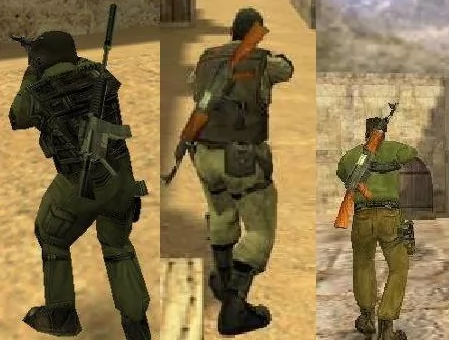
View File Back Weapons Caracteristici generale Pluginul adauga un plus de realism jocului, afisand celorlalti jucatori arma principala in spate cand nu o folosesti, exact la fel ca in cazul bombei (C4). Fisierul backweapons.amxx il punem in folderul addons/amxmodx/plugins Fisierul backweapons.sma il punem in addons/amxmodx/scripting Apoi luam backweapons.mdl si il punem in folderul cstrike/models Submitter Back4Blood Submitted 10/13/2023 Category Plugins
- 1 reply
-
- 1
-

-
- back weapons
- back
- (and 2 more)
-
67 downloads
Caracteristici generale Pluginul adauga un plus de realism jocului, afisand celorlalti jucatori arma principala in spate cand nu o folosesti, exact la fel ca in cazul bombei (C4). Fisierul backweapons.amxx il punem in folderul addons/amxmodx/plugins Fisierul backweapons.sma il punem in addons/amxmodx/scripting Apoi luam backweapons.mdl si il punem in folderul cstrike/modelsFree -
View File [ CS16 ] dm_azteca Filesize: 2,84 Mb Author: Chaosmedia90 Date: 07-07-2017 Before we begin the installation, we would like to tell you about what can be the folders in the archive with the penalty and their purpose. The "maps" folder is the card itself. The folder "gfx" is the graphic elements of the map. The "sound" folder is the sounds of the map. The "models" folder is the new map models. Folder "sprites" - sprites of the map. Below you can see the list of files with different extensions and the place where they need to be placed. The .txt file - "Your server / cstrike / maps" The .bsp file - "Your server / cstrike / maps" The .tga file - "Your server / cstrike / gfx / env" The .wav file is "Your server / cstrike / sound" The .spr file is "Your server / cstrike / sprites" The .mdl file is "Your server / cstrike / models" The .nav file - "Your server / cstrike / maps" The .res file - "Your server / cstrike / maps" File .wad - "Your server / cstrike" Besides all this I want to say one important thing. If there are folders in the archive with the downloaded map: maps, gfx, sound, sprites, models and files with the .wad extension, then all these folders and files can be downloaded to "Your server / cstrike" and confirm the merge of the folders. This is the most simple and convenient way to install maps for CS 1.6, but you want to notice that this method is only valid when there are these folders. (It does not have to be all the folders) After when you unzip all the files in the necessary folders, open the file "Your server / cstrike / addons / amxmodx / configs / maps.ini" and assign a new name to the card without an extension! Example: awp_india. Next, open one more file "Your server / cstrike / mapcycle.txt" and again, prescribe the name of the installed card without an extension. Installation completed. We wish you a pleasant game. If you suddenly have any questions about installing the card on the server CS 1.6, then ask them in the comments. Submitter COSMIN Submitted 07/25/2024 Category Maps
-
![More information about "[ CS16 ] dm_azteca"](https://www.gamemodd.com/uploads/posts/2017-07/medium/1499385106_dm_azteca.jpg)
0 downloads
Filesize: 2,84 Mb Author: Chaosmedia90 Date: 07-07-2017 Before we begin the installation, we would like to tell you about what can be the folders in the archive with the penalty and their purpose. The "maps" folder is the card itself. The folder "gfx" is the graphic elements of the map. The "sound" folder is the sounds of the map. The "models" folder is the new map models. Folder "sprites" - sprites of the map. Below you can see the list of files with different extensions and the place where they need to be placed. The .txt file - "Your server / cstrike / maps" The .bsp file - "Your server / cstrike / maps" The .tga file - "Your server / cstrike / gfx / env" The .wav file is "Your server / cstrike / sound" The .spr file is "Your server / cstrike / sprites" The .mdl file is "Your server / cstrike / models" The .nav file - "Your server / cstrike / maps" The .res file - "Your server / cstrike / maps" File .wad - "Your server / cstrike" Besides all this I want to say one important thing. If there are folders in the archive with the downloaded map: maps, gfx, sound, sprites, models and files with the .wad extension, then all these folders and files can be downloaded to "Your server / cstrike" and confirm the merge of the folders. This is the most simple and convenient way to install maps for CS 1.6, but you want to notice that this method is only valid when there are these folders. (It does not have to be all the folders) After when you unzip all the files in the necessary folders, open the file "Your server / cstrike / addons / amxmodx / configs / maps.ini" and assign a new name to the card without an extension! Example: awp_india. Next, open one more file "Your server / cstrike / mapcycle.txt" and again, prescribe the name of the installed card without an extension. Installation completed. We wish you a pleasant game. If you suddenly have any questions about installing the card on the server CS 1.6, then ask them in the comments.Free -

5 downloads
Description: Using the method I've used you will no longer have the reload glitch like the rest of the unlimited ammo plugins. This is a lot smoother. It will also give you unlimited nades as well depending on a cvar's flags. The only downside would be that it requires three modules in order for it to run and it's limited to only Counter-Strike. Commands: amx_ammo <nick,#userid> <0|1> Cvars: ammo_nade_flags "ac" a: Give HE grenades b: Give smoke grenades c : Give flashbangs Required Modules: Engine Cstrike Fun This plugin requires the latest version of AMX Mod X in order to run!Free -
View File Unlimited Ammo ( CS16 ) Description: Using the method I've used you will no longer have the reload glitch like the rest of the unlimited ammo plugins. This is a lot smoother. It will also give you unlimited nades as well depending on a cvar's flags. The only downside would be that it requires three modules in order for it to run and it's limited to only Counter-Strike. Commands: amx_ammo <nick,#userid> <0|1> Cvars: ammo_nade_flags "ac" a: Give HE grenades b: Give smoke grenades c : Give flashbangs Required Modules: Engine Cstrike Fun This plugin requires the latest version of AMX Mod X in order to run! Submitter COSMIN Submitted 05/16/2024 Category Plugins
-
View File 35hp_vice_city Autor: CZ|Luther Descriere: 35hp_vice_city for CS 1.6 Sloturi: 24 Instalare: Pentru steam (Se copiaza folderele din arhiva in C./program files/steam/SteamApps/common/Half-Life/cstrike_download) Pentru Non Steam (Se copiaza folderele din arhiva in C./program files/counter strike/cstrike/maps) Submitter COSMIN Submitted 10/21/2020 Category Maps
-
View File PACK HARTI CS 1.6 - 2021 MAPS PACK CS 1.6 @ 2021 by GameLife Romania Pack contain all map files, including gfx, sounds, models, etc. Password: www.gamelife.ro Submitter aEEk.# Submitted 03/05/2021 Category Maps
-
View File fun_lakehouse Pentru steam (Se copiaza folderele din arhiva in C./program files/steam/SteamApps/common/Half-Life/cstrike_download) Pentru Non Steam (Se copiaza folderele din arhiva in C./program files/counter strike/cstrike/maps Submitter COSMIN Submitted 03/15/2021 Category Maps
-
View File dm_niveles Pentru steam (Se copiaza folderele din arhiva in C./program files/steam/SteamApps/common/Half-Life/cstrike_download) Pentru Non Steam (Se copiaza folderele din arhiva in C./program files/counter strike/cstrike/maps) Submitter COSMIN Submitted 03/15/2021 Category Maps
-
View File zm_front_2020 Pentru steam (Se copiaza folderele din arhiva in C./program files/steam/SteamApps/common/Half-Life/cstrike_download) Pentru Non Steam (Se copiaza folderele din arhiva in C./program files/counter strike/cstrike/maps) Submitter Back4Blood Submitted 03/27/2021 Category Maps
-
View File cs_74732 Autor: - Descriere: cs_74732 for CS 1.6 Sloturi: 32 Instalare: Dupa ce descarcati, extrageti fisierele in counter-strike-folder/cstrike Submitter Back4Blood Submitted 05/31/2021 Category Maps
-
View File csdm_fallout Autor:- Alberto, Hipshot Descriere: map for CS 1.6 Sloturi: 32 Instalare: Pentru steam (Se copiaza folderele din arhiva in C./program files/steam/SteamApps/common/Half-Life/cstrike_download) Pentru Non Steam (Se copiaza folderele din arhiva in C./program files/counter strike/cstrike/maps) Submitter COSMIN Submitted 06/24/2021 Category Maps
-
View File Played Time Descriere: Acest plugin arata orele jucate pe server + are si un top cu cei care au cele mai multe ore. Instalare: 1. Fisierul playedtime.sma il puneti in addons/amxmodx/scripting 2. Fisierul playedtime.amxx il puneti in addons/amxmodx/plugins 3. Intrati in fisierul addons/amxmodx/configs/plugins.ini si adaugati la urma: playedtime.amxx 4. Alti pasi necesari.... Cvar-uri (se adauga in fisierul amxmodx\configs\amxx.cfg Nu are Comenzi administrative (se tasteaza in consola si trebuie sa fiti administrator): amx_topore amx_ore amx_removetop Comenzi publice (se tasteaza in joc prin apasarea tastei Y): /ore /topore Module necesare (se sterge ; din fata modulului de mai jos, acestea le gasiti in fisierul amxmodx\configs\modules.ini): nvault fakemeta Submitter COSMIN Submitted 10/19/2020 Category Plugins
-
View File Blocare CHAT Descriere: Cu ajutorul acestui plugin boti trimesi pentru reclama nu vor mai putea scrie nimic in chat. Instalare: 1. Fisierul blocare_chat.sma il puneti in addons/amxmodx/scripting 2. Fisierul blocare_chat.amxx il puneti in addons/amxmodx/plugins 3. Intrati in fisierul addons/amxmodx/configs/plugins.ini si adaugati la urma: blocare_chat.amxx 4. Alti pasi necesari.... Cvar-uri (se adauga in fisierul amxmodx\configs\amxx.cfg): Nu are Comenzi administrative (se tasteaza in consola si trebuie sa fiti administrator): nu are Comenzi publice (se tasteaza in joc prin apasarea tastei Y): /chat Module necesare (se sterge ; din fata modulului de mai jos; acestea le gasiti in fisierul amxmodx\configs\modules.ini): -amxmodx -amxmisc Submitter COSMIN Submitted 10/22/2020 Category Plugins
-
View File Auto AWP ☄ Descriere Pluginul este conceput pentru servere AWP, elimină automat toate armele la inceputul rundei și vă oferă un AWP și un cuțit. Instalare: 1. Fisierul crx_auto_awp.sma il puneti in addons/amxmodx/scripting 2. Fisierul crx_auto_awp.amxx il puneti in addons/amxmodx/plugins 3. Intrati in fisierul addons/amxmodx/configs/plugins.ini si adaugati la urma: crx_auto_awp.amxx 4. Alti pasi necesari.... Cvar-uri (se adauga in fisierul amxmodx\configs\amxx.cfg): autoawp_ammo "30" - how many rounds to have the AWP. If set to "-1", there will be endless cartridges without reloading. autoawp_knife "1" - whether to receive a knife. autoawp_health "-1" - how much blood to have players. -1 disables the option. autoawp_armor "-1" - how much armor to have players. -1 disables the option. autoawp_block_drop "1" - if enabled, players will not be able to throw their weapons. Comenzi administrative (se tasteaza in consola si trebuie sa fiti administrator): nu are Comenzi publice (se tasteaza in joc prin apasarea tastei Y): Module necesare (se sterge ; din fata modulului de mai jos; acestea le gasiti in fisierul amxmodx\configs\modules.ini): Submitter COSMIN Submitted 10/26/2020 Category Plugins
-
View File Steam Bonus About This File ☄ Descriere Acest plugin ofera jucatorilor cu steam urmatoarele beneficii: - Armura - HE, x2FB - Deagle - Defuse Kit Instalare: 1. Compliati fisierul steambonus.sma 2. Fisierul steambonus.amxx il puneti in addons/amxmodx/plugins 3. Intrati in fisierul addons/amxmodx/configs/plugins.ini si adaugati la urma: steambonus.amxx 4. Alti pasi necesari.... Cvar-uri (se adauga in fisierul amxmodx\configs\amxx.cfg): Nu detine. Comenzi administrative (se tasteaza in consola si trebuie sa fiti administrator): Nu detine. Comenzi publice (se tasteaza in joc prin apasarea tastei Y): Nu detine. Module necesare (se sterge ; din fata modulului de mai jos; acestea le gasiti in fisierul amxmodx\configs\modules.ini): Nu detine. Submitter COSMIN Submitted 01/06/2021 Category Plugins
-
View File Realistic Bullets Tracer Description: This plugin simulates the bullet time effect from the movies series The Matrix. Cvars: bt_bulletspeed - Normal bullet speed. default: 800 bt_sniperspeed - Sniper bullet speed. default: 2000 bt_red - Amount of red in bullet trail. default: 193 bt_green - Amount of green in bullet trail. default: 193 bt_blue - Amount of blue in bullet trail. default: 191 Commands: bt_toggle - <1/on | 0/off>. default: on Compiling: If you wish to compile this plugin by yourself you'll need to download the FakeMeta Utilities by VEN. It took me a while to finally update this so sorry to all of you who have been waiting. I plan on adding functionality for shotguns and weapons who have burst fire. I will also add some voting to this plugin just for some kicks. This plugin hasn't been extensivley tested so be sure to post any bugs you find in this forum. Enjoy! Submitter Back4Blood Submitted 03/23/2021 Category Plugins
-
Teams Manager All-In-One View File Teams Manager All-In-One Version 0.0.6 by Exolent Introduction Instead of all of the separate team management plugins that I have made, I decided to write a complete one. It includes: auto-join for teams a ratio for teams a limit for each team immunity for admins from all of the above Cvars team_immunity <0/1> - Allows immune admins to not be affected by plugin - 0 = Affect admins with plugin - 1 = Admins are not affected by ratio, team switching or auto-join, but will be affected by balancing - 2 = Admins are not affected by ratio, team switching, auto-join, or balancing - Default: 0 team_immunity_flag <flag(s)> - Flag(s) required to be considered immune - If multiple flags, admins must have them all - Default: "a" team_autojoin_team <0/1/2/5/6> - Team for players to auto-join - 0 = Disabled - 1 = Terrorists - 2 = Counter-Terrorists - 5 = Random (Terrorist or Counter-Terrorist) - 6 = Spectator - Default: 0 team_autojoin_favor <0/1/2> - If you have team_autojoin_team set to 5 and a player is able to join both teams, - This will force a specific team to choose when both teams are viable choices - 0 = Disabled - 1 = Terrorists - 2 = Counter-Terrorists - Default: 0 team_autojoin_class_t <1/2/3/4/5> team_autojoin_class_ct <1/2/3/4/5> - Class for players to choose for auto-join - 1-4 = Normal models - 5 = Random model - Default: 5 team_allow_switch <0/1> - Controls whether players on a team can choose a new team - 0 = Cannot choose new team - 1 = Allow choose new team - Default: 1 team_limit_t <limit> team_limit_ct <limit> - The max players for each team - 0 or 32 = Don't set a limit - Default: 32 team_ratio_t <factor> team_ratio_ct <factor> - The ratio for T:CT players - Example: If T is 3 and CT is 1, then there will be 3 Terrorists for every 1 Counter-Terrorists (or 3x more Terrorists). - If both factors are equal or one of them is 0, then no ratio will be put into effect. - Default: 1 team_balance <method> - How the teams should be checked to be balanced every round - This is for ensuring the limits/ratios are still in effect in case of other plugins moving players - Methods: 0, no, off, none 1, spec, spectate, spectater, spectator 2, move, switch, transfer 3, kick - Method Descriptions: 0 = Don't check to balance the teams 1 = Move excess players to spectator 2 = Move excess players to other team (if not breaking the limit/ratio) or move to spectator 3 = Kick players from server - Default: "off" Requirements AMX Mod X version 1.8.1 or higher Steam WITHOUT dproto installed Changelog Version 0.0.6 (edited by Arkshine) - Fixed typo resulting balancing issue Version 0.0.5 - Added value "2" functionality for cvar team_immunity - Added team_autojoin_favor cvar - Added support for mp_limitteams cvar - Forced mp_limitteams and mp_autoteambalance to 0 after grabbing values to not let the game break the plugin Version 0.0.4 - Rewrote how ratio is calculated Version 0.0.3 - Fixed auto-join bug when value was 5 or 6 Version 0.0.2 - Fixed transferring bug when balancing teams Version 0.0.1 - Initial release Notes If you have auto-join turned on to a specific team, or if you have a team ratio set into place, make sure you have mp_limitteams set to 0 or 32 in your server.cfg file! If you have auto-join set to 5 and mp_limitteams is not 0 or 32, then the auto-join will pick a proper team to not break mp_limitteams. The auto-join feature overrides the allow switching, so if you have auto-join to 1 team, then players cannot switch. If you have any other team managing ideas, please ask as I am always willing to have more features. Submitter Back4Blood Submitted 03/23/2021 Category Plugins
-
View File Plugin Santa Hat This plugin simply puts a santa hat on all the players. Submitter COSMIN Submitted 11/08/2023 Category Plugins
-

32 downloads
This plugin simply puts a santa hat on all the players.Free

.thumb.png.e82d2cf337ff5338cbffd7bd8e892062.png)

