


Plugins
112 files
-
AIO (All-In-One) Winter Plugin
Description
After researching a lot on a variety of forums, I could not find what i needed to customize my server for Winter. Instead of installing 100 plugins, I created an AIO one!
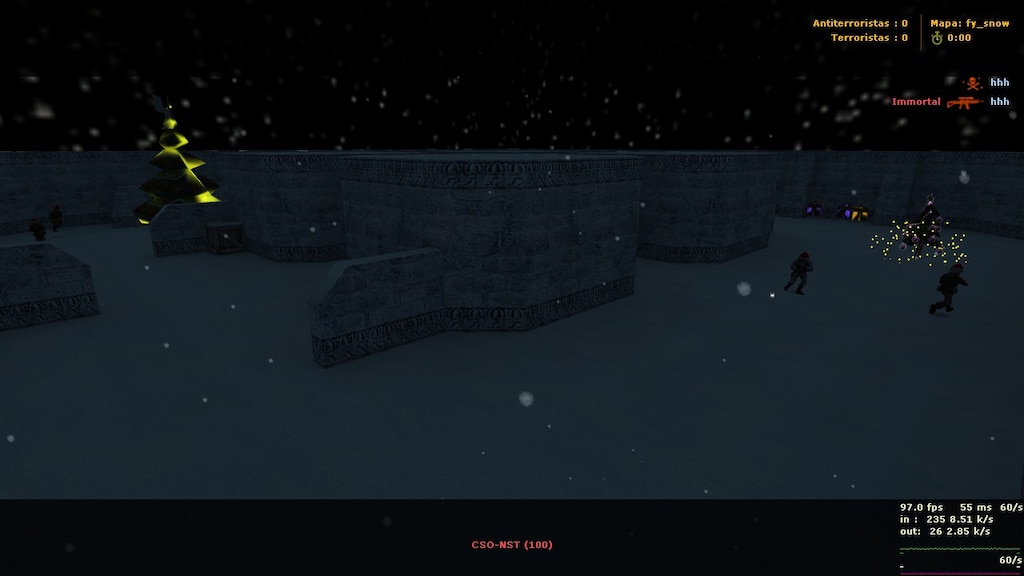
With this plugin you can bring the Christmas Environment to your Counter Strike server! Very customizable, this plugin unique style is beyond all the existing Christmas plugins here.
I know there are a LOT of plugins for winter here, but most of them aren't complete, or they contain bugs. Well in this plugin I tried to create an All-In-One Winter plugin that includes almost all the functionalities for a Christmas Server! Merry Christmas everyone!
What does this plugin contains?
Gun Snowball Bullets
Custom Sky name for the Christmas Environment
Custom Darkness on the map, to make it more Environmental (enables mp_flashlight server cvar)
Custom Christmas Bomb Sounds (Planted, Exploded, Defused)
Custom BOMB replacement
Weather Menu (For those who do not have cl_weather cvar enabled. Plugin offers to set it up for the user, asking USER PERMISSION. No slow-hacking)
An AWESOME coloured musical tree on each team spawn that plays music and have lightning styles (YEAH!)
Santa Hat for each player, or Admin only.
Picking up presents, somethimes you get GLOW on your SANTA HAT (HECK YEAH!)
Better models, a variety of customizations and model replacements (Christmas Themed, Grenades, Knife, Bomb)
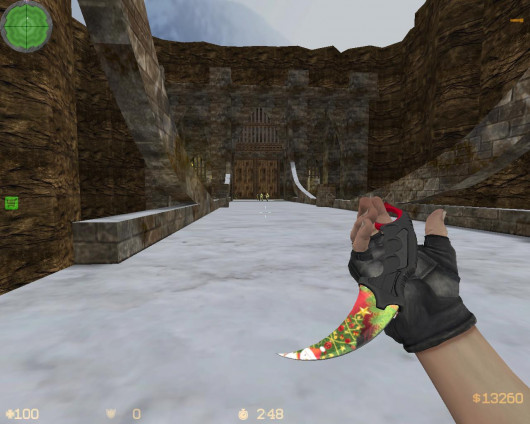
Candy Cane knife replacement with player model ! WOAH.
Players will drop Presents when they die!
Support for maps that has rain built in! (adding snow environment instead of rain)
FUN! FUN! FUN!
A variety of configurations, including it's own config file!
To see what kind of presents you can pick up, read the configuration file!
Grenade glow and trails, customizable by 3 different types: 1. All grenades trail/glow is white, 2. HE has red glow/trail, FB has blue glow/trail and SG has green trail/glow. 3. All grenades have random glow/trail colours
Why is it so unique?
Has a lot of Half-Life resources
Up to date
Own configuration file, with a variety of customizable cvars
Different Christmas models, new and unique
Musical Christmas Trees, on every map, located to each team spawns!
2 different models for Christmas Trees, Santa Hats!
Unseen new snowball models for grenades, with trail and glow effects!
3 different models for presents
2 different unique models for the BOMB replacement
Cvars:
// --| -------------------------------------------------------------
// --| AIO (All-In-One) Winter plugin by: tuty
// --| Feel free to modify the configuration file as you please
// --| Special thanks to: xPaw, Alka, ConnorMcLeod, VEN, v3x and others
// --| -------------------------------------------------------------
// --| When player shoots with his weapon on the wall, it will leave white snowflakes
// --| Value: 1 / 0
// --| Explanation: Enabled / Disabled
aio_winter_gun_snowball "1"
// --| If Snowballs are enabled, for how long will snowflakes stay alive?
// --| Value: < your amount > in seconds. Must be a floating point number
// --| Explanation: aio_winter_gun_snowball_duration "10.0" - snowflakes will stay alive for 10 seconds
aio_winter_gun_snowball_duration "5.0"
// --| Change the server sky texture to "space" ( Nice themed christmas sky )
// --| Value: 1 / 0
// --| Explanation: Enabled / Disabled
aio_winter_changesky "1"
// --| Set a nice darkness effect on the map, also enabling player flashlights (Christmas night theme)
// --| Value: 1 / 0
// --| Explanation: Enabled / Disabled
aio_winter_darkness "1"
// --| Enabled custom themed bomb event sounds ( Planted, Exploded, Defused )
// --| Value: 1 / 0
// --| Explanation: Enabled / Disabled
aio_winter_bombsounds "1"
// --| Some clients does not have "cl_weather" variable set to 1, 2 or 3 in their main game client
// --| After they entered the server, yhis will enable a menu, reminding/teaching them how to enable snow effects on their client
// --| Has an option to auto set-up for them, WITH THEIR PERMISSION !
// --| Value: 1 / 0
// --| Explanation: Enabled / Disabled
aio_winter_weathermenu "1"
// --| If the previous cvar is set as Enabled, after how long will display the menu to the player?
// --| Value: < x seconds > in seconds. Must be a floating point number
// --| Explanation: aio_winter_weathermenu "10.0" - Will display the menu after 10 seconds
aio_winter_weathermenu "8.0"
// --| Bomb model replacement with a shiny Snow-Man
// --| Value: 1 / 0
// --| Explanation: Enabled / Disabled
aio_winter_custombomb "1"
// --| A shiny, AWESOME musical tree with custom lights, effects and christmas themed song!
// --| Spawned on each side of CT/T spawns.
// --| Value: 1 / 0 - NOTE: Cvars are affected after map change!
// --| Explanation: Enabled / Disabled
aio_winter_tree "1"
// --| Enable santa hats for each players! Yoinnkss!
// --| Value: 1 / 0
// --| Explanation: Enabled / Disabled
aio_winter_hat "1"
// --| If Santa Hats are enabled, are them only for ADMINS ?
// --| Value: 1 / 0
// --| Explanation: Admin Only / Everyone
aio_winter_hat_adminonly "0"
// --| Spawn Christmas presents on dead enemies. Can be picked up by anyone!
// --| When picked up, you will be granted with a random gift.
// --| Gifts:
// --| * Armor
// --| * Armor + Helmet
// --| * Some Ammunition
// --| * Bonus Health
// --| * Random Grenade (HE, FB, SG)
// --| * Bonus Frag/s
// --| * Invisibility (for a certain amount of time)
// --| * Random Glow
// --| * Random Glow on your Santa Hat (lasts one round, only if hats are enabled)
// --| * Defuser Kit (for CT only)
// --| * Camouflage: [You look like enemy until you die]
// --| * Money ( a certain amount )
// --| Value: 1 / 0
// --| Explanation: Enabled / Disabled
aio_winter_presents "1"
// --| If the gifts are enabled, when you pick up the "Bonus Health", how much HP should be added to player?
// --| Value: < x amount > - from 0 to 99999?
// --| Explanation aio_winter_bonus_health_amount "250" - Adds additional 250 HP to the player
aio_winter_bonus_health_amount "50"
// --| If the gifts are enabled, when you pick up the "Armor" or "Armor + Helmet" how much AP should be added to player?
// --| Value: < x amount > - from 0 to 99999?
// --| Explanation: aio_winter_gift_armor "250" - Adds additional 250 AP to the player
aio_winter_gift_armor "100"
// --| If the gifts are enabled, when you pick up the "Bonus Frag/s" how many frags should be added to player?
// --| Value: < x amount > - from 0 to 99999?
// --| Explanation: aio_winter_bonus_frag "5" - 5 Frags will be added to the player
aio_winter_bonus_frag "2"
// --| If the gifts are enabled, when you pick up the "Invisibility" for how long shall be enabled?
// --| Value: < x amount > - from 0 to 99999?
// --| Explanation: aio_winter_invis_duration "5" - Invisiblity lasts 5 seconds
aio_winter_invis_duration "15"
// --| If the gifts are enabled, when you pick up the "Money" how much cash shall be added to player?
// --| Value: < x amount > - from 0 to 99999?
// --| Explanation: aio_winter_gift_money "1500" - $1500 will be added to the player
aio_winter_gift_money "1500"
// --| Enable support for rainy maps. Removing rain from it and replacing it with snow
// --| Value: 1 / 0
// --| Explanation: Enabled / Disabled
aio_winter_rainymap_support "1"
// --| Replace the default knife model with a candy cane!
// --| Value: 1 / 0
// --| Explanation: Candy Cane / Default Knife
aio_winter_candyknife "1"
// --| Replace all grenades ( Flashbang, He, Smoke ) with a custom Christmas themed model
// --| Also adds render and trail for each of them
// --| Value: 1 / 0
// --| Explanation: Custom Grenades / Default Grenades
aio_winter_grenade "1"
// --| If the previous cvar is enabled, we have three options to set up this one, to differentiate the grenades between them.
// --| Value: 0 / 1 / 2
// --| Explanation: 0 - All grenades has a white glow/trail
// --| 1 - HE Grenade has a red glow/trail, FB Grenade has a blue glow/trail and SG Grenade has a green glow/trail
// --| 2 - All grenades has random glow/trail
// --| -------------------------------------------------------------------------
aio_winter_grenade_type "0"
Requirements:
I would recomment a sv_downloadurl for fast downloading, since this plugin contains a "few" resources
Client side cvar enabled: cl_weather 1/2/3
Latest AMX Mod X Version
Installation Guide:
Place the AIO_Winter.cfg file into addons/amxmodx/configs folder
Place the aio_winter sounds folder into cstrike/sounds/ server directory
Place the aio_winter models folder into cstrike/models/ server directory
Place the AIO_Winter.amxx file into cstrike/addons/amxmodx/plugins/ server directory
Open plugins.ini file located into addons/amxmodx/configs/plugins.ini and add AIO_Winter.amxx then save it.
Done.
Credits:
xPaw
Alka
ConnorMcLeod
VEN
v3x
HamletEagle
Others
Modules:
cstrike
engine
fakemeta
fun
hamsandwich
- Free
- 56 Downloads
Updated -
Compile both plugins. Then put them in addons.
OciXCrom's Rank System [XP|Levels|Ranks]
☄ Description
A fully optimized and easy to use rank system, containing tons of options and an API for creating sub-plugins. Unlike other plugins like this where in order to add/remove or change ranks and the required XP for them, the end-user has to make changes in the .sma file and recompile the plugin, this one does everything through a configuration file that doesn't require any scripting skills nor recompiling the plugin after a change has been made. The plugin has an option to set different XP rewards for different in-game events, such as killing a player, headshot, suicide, teamkill, planting/defusing the bomb and so on. You can even specify different rewards for any weapon in the game.
☄ Information
- Free
- 258 Downloads
Updated -
[AMXX] Bad Camper – Plugin Anti-Camp pentru CS 1.6
Descriere
Bad Camper este un plugin pentru serverele Counter-Strike 1.6, creat pentru a combate campatul excesiv. Acesta detectează jucătorii care stau prea mult într-un singur loc și le aplică diferite sancțiuni, în funcție de configurația serverului.
Pluginul este util în special pentru serverele Respawn și Classic, unde se dorește un gameplay mai dinamic.
📦 Fișiere necesare
După instalare, fișierele trebuie să se afle în următoarele locații:
gamemod/addons/amxmodx/plugins/bad_camper.amxx
gamemod/addons/amxmodx/data/lang/bad_camper.txt
gamemod/sounds/misc/snore.wav
Module necesare:
fun – obligatoriu
fakemeta – obligatoriu
csx – obligatoriu pentru CS și CS
cstrike – necesar dacă folosești sancțiunea de reducere a banilor
⚙️ Instalare
Copiază bad_camper.amxx în folderul plugins.
Copiază bad_camper.txt în folderul data/lang.
Copiază snore.wav în folderul sounds/misc.
Deschide fișierul configs/plugins.ini.
Adaugă la final următoarea linie:
bad_camper.amxx
Verifică dacă modulele necesare sunt activate în configs/modules.ini.
Schimbă harta sau repornește serverul.
🔧 Configurarea pluginului (CVARS)
CVARS-urile se configurează în configs/amxx.cfg sau într-un fișier de configurare separat, încărcat de server.
1. Sancțiunile pentru campat
badcamper_punish 12
Alege ce sancțiuni primește jucătorul care campează prea mult.
0 – dezactivează pluginul.
1 – Slap: jucătorul este lovit.
2 – Health Reduction: îi scade viața.
4 – Sound: redă un sunet.
8 – Blind: jucătorul este orbit temporar.
16 – Money Reduction: îi scade banii.
32 – Snark Attack: atac cu snark-uri, necesită Monster Mod compatibil.
Valorile se pot combina prin adunare. De exemplu, 12 înseamnă sunet (4) + orbire (8), aceasta fiind configurația implicită.
2. Sunetul sancțiunii
badcamper_sound 1
1 – Snore (sforăit).
2 – Heartbeat (bătăi ale inimii).
3. Timpul permis pentru campat
badcamper_limit 35
Numărul de secunde în care un jucător poate sta într-un loc înainte ca indicatorul de campat să ajungă la 100%.
4. Afișarea indicatorului
badcamper_display 1
Stabilește procentul de la care începe afișarea indicatorului de campat. Valorile acceptate sunt între 0 și 100.
0 – indicatorul nu este afișat.
1 – indicatorul se afișează de la 1%.
5. Verificarea spectatorilor
badcamper_show_spec 1
0 – spectatorii nu văd indicatorul altor jucători.
1 – spectatorii pot vedea indicatorul.
6. Verificarea ambelor echipe
badcamper_check_all 1
0 – verifică doar echipa care are obiectivul principal în runda respectivă.
1 – verifică ambele echipe.
7. Imunitate pentru administratori
badcamper_immunity_flags "a"
Permite acordarea imunității jucătorilor care au flagurile specificate. Flagul a corespunde, în configurația standard AMXX, imunității de administrator.
Pentru a dezactiva imunitatea, lasă valoarea goală:
badcamper_immunity_flags ""
Atenție: imunitatea funcționează printr-un mecanism special de detectare a nemișcării și a privirii, conform pluginului.
8. Pornirea verificării în rundă
badcamper_start 4
Numărul de secunde după terminarea freeze time-ului până când începe verificarea campatului.
9. Resetarea indicatorului după damage
badcamper_damage_reset 3
Stabilește când se resetează indicatorul după ce un jucător provoacă sau primește damage.
0 – nu resetează niciun indicator.
1 – resetează indicatorul atacatorului.
2 – resetează indicatorul victimei.
3 – resetează ambii indicatori.
10. Reluarea verificării după damage
badcamper_damage_restart 4
Numărul de secunde după provocarea sau primirea damage-ului până când verificarea campatului se reia.
11. Reducerea vieții
badcamper_health 10
Numărul de puncte de viață eliminate la fiecare două secunde când indicatorul ajunge la 100%, dacă sancțiunea de reducere a vieții este activată.
12. Permisiunea de campat
badcamper_allow 0
Stabilește când o echipă poate campa în funcție de numărul jucătorilor rămași în viață.
Exemple:
badcamper_allow 0 – campatul nu este permis prin această regulă.
badcamper_allow 2 – campatul este permis când echipa are cel mult 2 jucători în viață.
badcamper_allow 40% – campatul este permis când echipa reprezintă cel mult 40% din numărul jucătorilor în viață ai echipei adverse.
13. Numărul minim de jucători
badcamper_min_players 0
Stabilește numărul minim de jucători conectați necesar pentru aplicarea regulilor de verificare a echipelor și de permisiune a campatului.
14. Anunțarea jucătorilor care campează
badcamper_announce 3
0 – fără anunțuri.
1 – anunț în chat.
2 – anunț prin HUD.
3 – anunț în chat și HUD.
📋 Exemplu de configurare
Poți adăuga următoarele linii în configs/amxx.cfg:
badcamper_punish 12 badcamper_sound 1 badcamper_limit 35 badcamper_display 1 badcamper_show_spec 1 badcamper_check_all 1 badcamper_start 4 badcamper_damage_reset 3 badcamper_damage_restart 4 badcamper_health 10 badcamper_allow 0 badcamper_min_players 0 badcamper_announce 3Această configurație folosește sancțiunile implicite: sunet și orbire, cu un prag de 35 de secunde.
💻 Comandă disponibilă
Introdu în consola serverului:
badcamper list
Comanda afișează sancțiunile configurate și indică ce sancțiuni sunt active.
✅ Recomandare
După instalare, testează pluginul pe server înainte de a-l folosi permanent. Ajustează timpul de campat și sancțiunile în funcție de modul serverului, astfel încât să nu afecteze jucătorii care se deplasează tactic sau apără un obiectiv.
Autor: conform arhivei originale a pluginului
Compatibilitate: AMX Mod X – Counter-Strike 1.6
Categorie: Anti-Camp / Gameplay- Free
- 3 Downloads
Submitted -
Introduction:
This plugin allows admins to delete entities in any map.
Admin Commands:
er_remove
- removes the entity you are currently looking at
- requires admin kick flag "c"
- Note: you cannot remove players! (It will crash the server!)
er_undo
- brings back last entity you deleted
- requires admin kick flag "c"
- Note: this will undo any deleted entities that you deleted while you were in the server
- Note: this will not work after you disconnect or map changes!
er_reset
- resets all of the removed entities
- requires admin kick flag "c"
Translations:
Swedish by Dr. Jan Itor
Spanish by IneedHelp
Latvian by The_Thing
Lithuanian by hleV
French by arkshine
Dutch by P34nut
Norwegian by Senatix
Brazilian Portuguese by commonbullet
Danish by fjollerik
Polish by BeAfraid
Russian by Deag1y
Czech by jab
Macedonian by tomashacker4e
Romanian by dorin2oo7
German by Mordekay
Notes:
This plugin requires AMX Mod X version 1.8.0 or higher!
- Free
- 0 Downloads
Submitted -
📌 [PLUGIN] Steam Slot – oferă slot gratuit jucătorilor STEAM
Denumire: Steam Slot
Descriere: Jucătorii care intră cu Steam primesc automat slot prin tastarea comenzi /steam
Autor: kidd0x
Versiune: 1.0
📥 Instalare
Copiați fișierul .sma în amxmodx/scripting
Compilați folosind un compiler local sau Link1 , Link2
Copiați fișierul generat .amxx în amxmodx/plugins
Adăugați numele pluginului în amxmodx/configs/plugins.ini
Reporniți serverul ⚡
📘 Comenzi publice
Se tastează în chat (tasta Y în joc):
/steam – verifică dacă ai Steam și dacă ai slot rezervat.
📝 Funcționalități
✔ Oferă automat slot jucătorilor cu SteamID real (STEAM_)
✔ Simplu de instalat, compatibil cu orice server AMX Mod X
- Free
- 13 Downloads
Updated -
Nume: vip_clasic_9.0-c (VIP Clasic)
Versiune: v9-c
Autor: www.gamelife.ro
Running: (Care este versiunea de amxmodx) 1.8.1 1.8.2 1.8.3 1.9.0 1.10.0
Poze: Nu
Descriere: Acest plugins ofera privilegii playerilor. Priveste in poza. VIP acces flag "t" . VIP-ul este automat. Daca vrei ca vipul sa fie accesat din manual prin comanda /vipmenu sau /vmenu schimba in .sma g_Cvar[0] = register_cvar("vip_mode", "1"); (manual say/vemenu ) "vip_mode", "1" (vip automat din runda 2)
VIP-ul poate fi setat Intre anumite ore.
* Instalare:
1. Fisierul vip_clasic_9.0-c.amxx il puneti in addons/amxmodx/plugins
2. Fisierul vip_clasic_9.0-c.sma il puneti in addons/amxmodx/scripting
3. Intrati in fisierul addons/amxmodx/configs/plugins.ini si adaugati la urma:
[[[[[Module necesare]]]]]]
cstrike
fun
hamsandwich
engine
fakemeta
csx
Instalare
Compilați fișierul .sma pe versiunea de amxmodx pe care o aveți pe server. Apoi fișierul .amxx îl puneți în folderul plugins.
Copiați fisierul vipInfo.txt în addons\amxmodx\configs
Copiați folderul models în rădăcina serverului.
Deschideți addons\amxmodx\configs\plugins.ini și adăugați la urmă:
vip_clasic_9.0-c.amxx
INFO
În folderul addons/amxmodx/configs se vor crea 2 fisiere vipConfig.cfg și vipMaps.ini.
vipConfig.cfg - setați vipul exact cum doriți
vipMaps.ini - adaugați mapele pe care meniul de arme va fi dezactivat
* Comenzi administrative (se tasteaza in consola si trebuie sa fiti administrator):
* Comenzi publice (se tasteaza in joc prin apasarea tastei Y):
/vmenu - deschide meniul vipului oricui tasteaza comanda, dar poate fi folosit doar de cei care au flagul 'R'
/vip - deschide motd-ul ce ofera informatii despre vip
/vips - arata vipii online in chat
Vipul merge este testat de mine ! Doar ca trebuie setat din config sa ii puneti ce doriti.
- Free
- 55 Downloads
Updated -
Revive Teammates descriere instalare plugin funny cs 1.6
Fisierul revive_teammates.txt addons/amxmodx/data/lang Fisierul revive_teammates.cfg addons/amexmodx/configs/plugin Fisierul revive_teammates.amxx addons/amexmodx/plugin Fisierul revive_teammates.amxx addons/amexodx/configs/plugins adaugati linia :
- Free
- 331 Downloads
Updated -
Author: MPNumbB
Accuracy Fix repairs one of the least-known bugs in Counter-Strike related to weapon accuracy.
In the original game, bullet accuracy is calculated based on the previous shot, not the time passed before firing the next bullet. This is why players often feel that hit registration is broken or inconsistent.
This plugin fully fixes that issue and improves weapon behavior to be much more realistic and precise.
🎯 What this plugin does:
✅ Fixes:
The "use accuracy from previous shot" bug.
✅ Improvements:
Smooth spread transition while firing automatic weapons.
Fixes spread cooldown at low FPS.
Corrects Glock burst-fire accuracy (moving & standing).
Improves accuracy when standing still.
Increased precision when crouching.
Major accuracy improvement for SG550.
Improved Scout accuracy while standing.
🚀 Result:
✔ Better bullet registration
✔ More realistic weapon behavior
✔ Less random misses
✔ Improved gameplay experience
🛠️ Installation
1️⃣ Upload plugin
Copy file:
accuracy_fix.amxx
to:
addons/amxmodx/plugins
2️⃣ Enable plugin
Open file:
addons/amxmodx/configs/plugins.ini
and add at the end:
accuracy_fix.amxx
3️⃣ Restart server
Restart the server completely.
✅ Check if it's running
Type in-game console:
amxx plugins
You should see:
accuracy_fix.amxx Running
⚠ Note:
This plugin does NOT change recoil, it only corrects accuracy and spread calculation.
- Free
- 65 Downloads
Updated -
Detalii: Un model de cutit CS:GO pentru serverele de CS 1.6
Instalare: Fisierul gl_chrrisstmas.sma il puneti in addons/amxmodx/scripting Fisierul gl_chrrisstmas.amxx il puneti in addons/amxmodx/plugins Fisierul gl_chrrisstmas.mdll il pueti in Models Intrati in fisierul addons/amxmodx/configs/plugins.ini si adaugati la urma: gl_chrrisstmas.amxx.
Cvar-uri (se adauga in fisierul amxmodx\configs\amx.cfg): Nu detine.
Comenzi administrative (se tasteaza in consola si trebuie sa fiti administrator): Nu are
Comenzi publice (se tasteaza in joc prin apasarea tastei Y):
nu detine
Module necesare (se sterge ; din fata modulului de mai jos; acestea le gasiti in fisierul amxmodx\configs\modules.ini): Nu detine
- Free
- 52 Downloads
Updated -
🪂 Parachute Plugin (No Model)
📄 Description:
This is a lightweight parachute plugin that works without any external model files. Simple, clean, and functional.
🛠️ Installation:
Place the amx_parachute.amxx file into: addons/amxmodx/plugins
Open the file: addons/amxmodx/configs/plugins.ini
and add the following line at the bottom: amx_parachute.amxx
Save and restart your server.
⚙️ CVARs (add these to amxmodx/configs/amxx.cfg):
🛡️ Admin Commands (via console):
❌ No admin commands available.
🎮 Public Commands (in chat, using the Y key):
❌ No public commands required. The parachute works automatically.
📦 Required Modules:
✅ No additional modules required.
You do not need to enable anything in modules.ini.
- Free
- 121 Downloads
Updated -
Cvars:
amx_antisk_enable - Enables the plugin ( Default: 1)
amx_antisk_type - 0 = gives godmode on spawn, 1 = prevents damage from players ( personally used in surf to allow damage to self a.k.a fall damage ( Default: 1)
amx_antisk_timer - For how long will the SK protection be active ( Default: 1)
amx_antisk_shoot - Whether shooting or second attack ( mostly sniper ) will disable SK Protection ( Default: 1)
- Free
- 6 Downloads
Updated -
Amx Mod X 1.9.0, Amx Mod X 1.10.0 dev
Multilingual
RU, EN
Requirements
Using the latest versions of Re-* products for:
1. Compiling the plugin. (reapi)
2. Servers where the plugin is installed. (regamedll, reapi)
- Free
- 94 Downloads
Updated -
Plugin Description
This plugin displays on your HUD the remaining time until the bomb explodes!
Installation
Copy the bcd_hudtimer.sma file into: addons/amxmodx/scripting
Copy the bcd_hudtimer.amxx file into: addons/amxmodx/plugins
Open the file addons/amxmodx/configs/plugins.ini and add this line at the end:
Follow any additional compilation or setup steps as needed.
Settings (Cvars)
No configurable settings in amxx.cfg
Commands
Admin commands: None
Public commands: None
Required Modules
Make sure the csx module is enabled in: amxmodx\configs\modules.ini (remove the semicolon ; at the beginning of the line if present)
- Free
- 49 Downloads
Updated -
🎭 Ping Faker – Simularea pingului în scoreboard (TAB)
Descriere:
Ping Faker este un plugin pentru AMXX ce permite afișarea unui ping fals în panoul de scor (vizibil cu tasta TAB), indiferent de pingul real al jucătorului.
De exemplu, un jucător cu ping real de 428 poate apărea cu 20–24, în funcție de valorile definite în cvar-uri. Acest plugin este util pentru a ascunde problemele de conexiune sau pentru a oferi un aspect „curat” serverului.
🛠️ Instalare:
Copiază fișierul pingfaker2.sma în:
addons/amxmodx/scripting
Copiază fișierul pingfaker2.amxx în:
addons/amxmodx/plugins
Deschide fișierul:
addons/amxmodx/configs/plugins.ini
și adaugă pe ultima linie:
pingfaker2.amxx
Salvează și repornește serverul.
⚙️ Configurare CVAR-uri
(adaugă-le în amxmodx/configs/amxx.cfg)
pingfake_ping "12"
→ Valoarea de bază a pingului fals afișat pentru toți jucătorii.
pingfake_flux "4"
→ Fluctuația permisă a pingului. Cu exemplul de mai sus, pingul afișat va varia între 8 și 16.
🔐 Comenzi administrative:
Nu sunt necesare – pluginul funcționează automat.
💬 Comenzi publice:
Nu sunt disponibile pentru jucători.
📦 Module necesare:
Niciun modul suplimentar necesar. Pluginul funcționează direct, fără alte dependențe.
📌 Notă: Acest plugin este util în special pe serverele publice sau competitive, pentru a masca lag-ul real sau pentru a preveni speculații privind conexiunile jucătorilor.
- Free
- 132 Downloads
- 1 Comments
Updated -
🇬🇧 📢 Banner Ads Plugin for AMXX – CS 1.6
Author: jopmako - Lex - COSMIN
Game Mod: Counter-Strike 1.6
This plugin allows you to display a custom .tga banner image on the spectator screen in Counter-Strike 1.6. It's perfect for promoting your community or customizing the server visually.
🔧 Installation Instructions:
Create a .tga image named name.tga (or any name you prefer).
Place the .tga file into the folder:
cstrike/gfx
Compile the .sma file to generate adscs16.amxx.
Copy adscs16.amxx into:
cstrike/addons/amxmodx/plugins
Add the following cvar in amxx.cfg to set the banner:
⚠️ Replace lgnbanner.tga with your own banner's file name!
⚠️ Important Notes:
The .tga file must be saved in 24-bit color format.
The included banner is optimized for 800x600 resolution. If most players use a different resolution, resize the image accordingly.
- Free
- 67 Downloads
Updated -
Author: Safety1st
Description:
ban cfg is a plugin that bans players by a certain value set by you, and so, they can no longer enter the server, even if they change their ip/even if they have a dynamic ip or with another nickname.
This is the latest version at the moment, the author does not provide the sma file, but the version is compiled by a moderator at cs.net ua and is 100% clean.
Cvars:
(the most important bancfg_key )
Add it in amxx.cfg
Example:
bancfg_key "jalqdahdkvjsd"(not more than 15 characters)
so by this value, "jalqdahdkvjsd", the plugin will judge whether to allow it to the server or not.
Commands:
amx_bancfgmenu - displays a menu with player nicknames.
amx_bancfg <nick or #userid> <time in minutes> [reason]
amx_unbancfg <exact nick or IP address> [reason] - unban the player by IP or nick
amx_unbancfg_clear - clears the entire ban list.
amx_bancfg_bantimes 0 10 60 1440 - set menu ban time in minutes (server command, for use in amxx.cfg). For permanent ban, set 0
For console bans it is good to use the player's #userid).
Example:
amx_bancfg #479 0 amx_unbancfg "Fair Player" "demo"
Setting:
bancfg_key jalqdahdkvjsd It should be the same on all your servers. Make up your own, no spaces and max 15 characters.
bancfg_cmdformat 0 – amx_bancfg command form:
0 – amx_bancfg <name or #userid> <minutes> [reason]
1 – amx_bancfg <minutes> <name or #userid> [reason]
bancfg_bantype 0 – shows the ban system of the server.
0- no ban-system: the plugin will make a record in the AMXX-log, which is analogous to the AMXX ban-system and will remember the IP address).
1- ban will be set with command amx_ban player, time (AMXBans 6, Advanced Bans);
2 - amx_ban time player (AMXBans # Gm 1.6, AMXBans 5)
3 - fb_ban time player (Fresh Bans).
Attention! When using another ban system, players must be banned both in that system and in BanCfg.
The plugin maintains its own database of banned IP addresses (file data\amx_bancfg_bannedips.txt, the so-called local storage).
If over time, the specific IP address is recognized as statistical (the player uses it for several days), then it is added to the list of IP bans on the server ((listip.cfg)
bancfg_keepip 10 - how many days to keep a record for a specific IP address, by default 10 days).
0- turn off local storage (not recommended!)
bancfg_treatasstatic 5 – (how many days the player has to use this IP to be recognized as static (statistically, by default 5 days.
File amx_bancfg.txt is placed in data/lang
- Free
- 57 Downloads
Updated -
Description:
When a player gets killed, this plugin checks if another player, from the same team, did enough damage to the victim so that he could be an accomplice to the kill and the assister will also receive a frag (all of these are cvar controlled)
Configuration variables and default values:
- amx_killassist_enable 0/1/2 (default: 1)
Enable modes: 0 = Disable / 1 = Enable with DeathMsg / 2 = Enable with HUD message
- amx_killassist_mindamage 1-9999 (default: 50)
Minimum amount of damage to deal to be nominated for an assisted kill
- amx_killassist_givefrags 0/1 (default: 1)
Give or not give the assister frags
- amx_killassist_givemoney 0-16000 (default: 300)
Give or not give the assister some money, 0 disables, 1 or more sets how much money
- amx_killassist_onlyalive 0/1 (default: 0)
Only alive players can be of assistance in killing other players
Modules required:
- hamsandwich
- cstrike
- engine
- fun
- Free
- 135 Downloads
Updated -
After downloading the sma, you can compile it using the web compiler
Description:
VIP plugin for the classic mode, this version is different from the plugin you know.
Info:
- After activating the plugin, a Vip folder with 2 files (vips-list.ini and vip-config.cfg) will appear in your configs
- Compared to the previous version, now there is no need for flags. To add a vip, go to configs/Vip/vips-list.ini and add the player's name or steamid
- The Cvars have been moved to configs/Vip/vip-config.cfg (where they are explained)
- In order to use amx_addvips and amx_vips you will need the "l" flag, i.e. the RCON one
- The weapon menu is currently composed of M4a1 and Ak47 (the Deagle from the previous version was moved to the round items)
- The weapon menu and the items you receive each round are disabled when an awp map is running on the server
- The design of /vips has been modified, now the Vips will appear in the Hud
- The menu weapons will appear from the 3rd round (since the map changed or the rounds were restarted)
- I gave up on motd, you can make a separate plugin
- You can modify it yourself and compile it as you please (but at least keep the author:) )
- Cvars are only modified from vip-config.cfg, you don't have to do with sma and amxx.cfg
Installation:
1.Put the VIP.sma file in addons/amxmodx/scripting
2.Put the VIP.amxx file in addons/amxmodx/plugins
4. Go to the addons/amxmodx/configs/plugins.ini file and add at the end: VIP.amxx
4. Other necessary steps....
Cvars (added to the amxmodx\configs\amxx.cfg file):
vip_bulletdamage "1" - Displays the dmg done to a player
vip_hud "1" - Shows online VIPs in the HUD by typing the command /vips in the chat
vip_hp_kill "10" - HP received on a kill
vip_hp_hs "25" - HP received on a hs
vip_hp_max "100" - Maximum hp value that the VIP can have
vip_money_damage "3" - Money received on a damage
vip_money_kill "500" - Money received on a kill
vip_money_hs "1000" - Money received on a hs
vip_gun_menu "1" - Displays the weapon menu
vip_jumps "1" - Allows multiple jumps at once
vip_maxjumps "1" - How many extra jumps can he do at once
vip_items_round "abcdefg" - Receive various items at the beginning of each round
a - He Grenade
b - Flashbang (x2)
c - Smoke Grenade
d - Deagle
e - Vest + Helm
f - Defuse Kit (CT Only)
g - NightVision
Administrative commands (typed in the console and you must be an administrator):
amx_addvips <Name or SteamID> - Add Vips to the list
amx_vips - Show all Vips in the list
Public commands (typed in the game by pressing the Y key):
/vips - show Vips on the server Required
modules (delete ; in front of the module below; you can find these in the amxmodx\configs\modules.ini file):
fun
fakemeta_util
hamsandwich
engine
- Free
- 70 Downloads
Updated -
Installing:
Download the plugin below
Download the sounds.zip
Place ultimate_sounds.amxx in your server's addons/amxmodx/plugins folder
Add the following line at the bottom of the file: ultimate_sounds.amxx
Save and close plugins.ini
Unzip Ultimat_Sounds_Pack.zip onto either your desktop and place the sounds in the moddir/sound/misc dir
-(Same with the Female_Sounds.zip / f_ultimate_sounds.amxx below -sounds go into moddir/sound/misc/female, In post #2)
Place ultimate_sounds.txt in your amxmox/data/lang folder (already organized in the zip)
Restart your server or change the map
Done!
- Free
- 58 Downloads
Updated -
Descriere:
Un plugin care il cauta majoritatea detinatorilor de servere de war/mix, are toate comenzile necesare. Are rezolvate niste bug-uri cu care se enervau multi. (un bug la skinuri prin care orice iti poate pica server/ la spec all)
Instalare:
1. Fisierul warmix.sma il puneti in addons/amxmodx/scripting
2. Fisierul warmix.amxx il puneti in addons/amxmodx/plugins
3. Intrati in fisierul addons/amxmodx/configs/plugins.ini si adaugati la urma: warmix.amxx
4. Alti pasi necesari....
Cvar-uri (se adauga in fisierul amxmodx\configs\amxx.cfg
Nu are
Comenzi administrative (se tasteaza in consola si trebuie sa fiti administrator):
/war sau /mix - arata meniul de administrare
/demo <nume> - face demo pe un player
/ss <nume> - face o poza unui jucator
/spec /ct /t <nume> - transfera jucatorii
amx_spec/ct/t <nume> - transfera jucatorii
/setari - impune anumite setari jucatorilor
Comenzi publice (se tasteaza in joc prin apasarea tastei Y):
/score
Module necesare (se sterge ; din fata modulului de mai jos, acestea le gasiti in fisierul amxmodx\configs\modules.ini):
cstrike
engine
- Free
- 79 Downloads
Updated -
Tested Amxmodx version: 1.9.0
Non-Steam Only
Cvar Commands:
dc_enabled 1: Enable/Disable discord connect plugin
dc_serverid #: d62nAJA9Ek Your discord invide id(e.g dc_serverid d62nAJA9Ek )
dc_waittime 2(default 3): Cllient wait until X seconds to connect in motd message.
dc_lang 1 (0: Turkish, 1: English(Default)): Set Motd descripting language
Say Commands:
/dc
/discord
Client can connect automaticly(meta) your discord group using /dc and /discord chat commands.
You can must be set first dc_serverid cvar to use this addons.
E.g if your invide adress is: https://discordapp.com/invite/d62nAJA9Ek , you can set dc_serverid d62nAJA9Ek
(https://discordapp.com/invite/iaddress, dc_serverid iaddress)
- Free
- 11 Downloads
Updated -
This plugin remove all door from maps. Like door on the de_nuke map and other doors.
Cvars:
// Remove doors from maps [0-none // 1-rotating only // 2-all doors]
amx_remove_doors "2"
Requirements:
Fakemeta module
More_info_about_plugin_source_code:
This "remove doors" code cutting from plugin "zp50_gameplay_fixes.sma" from Zombie Plague 5.0.8a. Cvar name changed from zp_remove_doors to amx_remove_doors - this new plugin "remove_doors.sma" works independently. So, you do not need a zombie mod to this plugin works.
- Free
- 3 Downloads
Submitted -
Nume: CS2 Card
Versiune: v.2.0
Autor: Yvezzaint
* Instalare:
1. Fisierul cs2-cards.amxx il puneti in addons/amxmodx/plugins
2. Folderul sprites il puneti in cstrike
3. Intrati in fisierul addons/amxmodx/configs/plugins.ini si adaugati la urma:
- Free
- 189 Downloads
Updated -
Autor: Wilian M + COSMIN
Plugin for those who are changing their IP , with it you will be able to redirect your old server to the new one.
( This version of the plugin works for no-steam Players )
CVAR: put on the amxx.cfg
ip_new "162.19.172.145"
port_new "27015"
time_redirect "10" // Time to change to the new IP
- Free
- 74 Downloads
Updated














.thumb.png.e82d2cf337ff5338cbffd7bd8e892062.png)


