
Search the Community
Showing results for tags 'ocixcrom'.
Found 4 results
-
View File Rank System [XP|Levels|Ranks] Compile both plugins. Then put them in addons. OciXCrom's Rank System [XP|Levels|Ranks] ☄ Description A fully optimized and easy to use rank system, containing tons of options and an API for creating sub-plugins. Unlike other plugins like this where in order to add/remove or change ranks and the required XP for them, the end-user has to make changes in the .sma file and recompile the plugin, this one does everything through a configuration file that doesn't require any scripting skills nor recompiling the plugin after a change has been made. The plugin has an option to set different XP rewards for different in-game events, such as killing a player, headshot, suicide, teamkill, planting/defusing the bomb and so on. You can even specify different rewards for any weapon in the game. ☄ Information Submitter COSMIN Submitted 09/12/2020 Category Plugins
-
![More information about "Rank System [XP|Levels|Ranks]"](https://gamelife.ro/forum/uploads/monthly_2024_01/68747470733a2f2f7261772e67697468756275736572636f6e74656e742e636f6d2f4f63695843726f6d2f52616e6b53797374656d2f696d616765732f78706c6973742e706e67.thumb.png.8de986b0d3f5c3b297d9120357c3280a.png)
Version 3.10
253 downloads
Compile both plugins. Then put them in addons. OciXCrom's Rank System [XP|Levels|Ranks] ☄ Description A fully optimized and easy to use rank system, containing tons of options and an API for creating sub-plugins. Unlike other plugins like this where in order to add/remove or change ranks and the required XP for them, the end-user has to make changes in the .sma file and recompile the plugin, this one does everything through a configuration file that doesn't require any scripting skills nor recompiling the plugin after a change has been made. The plugin has an option to set different XP rewards for different in-game events, such as killing a player, headshot, suicide, teamkill, planting/defusing the bomb and so on. You can even specify different rewards for any weapon in the game. ☄ InformationFree -
50 downloads
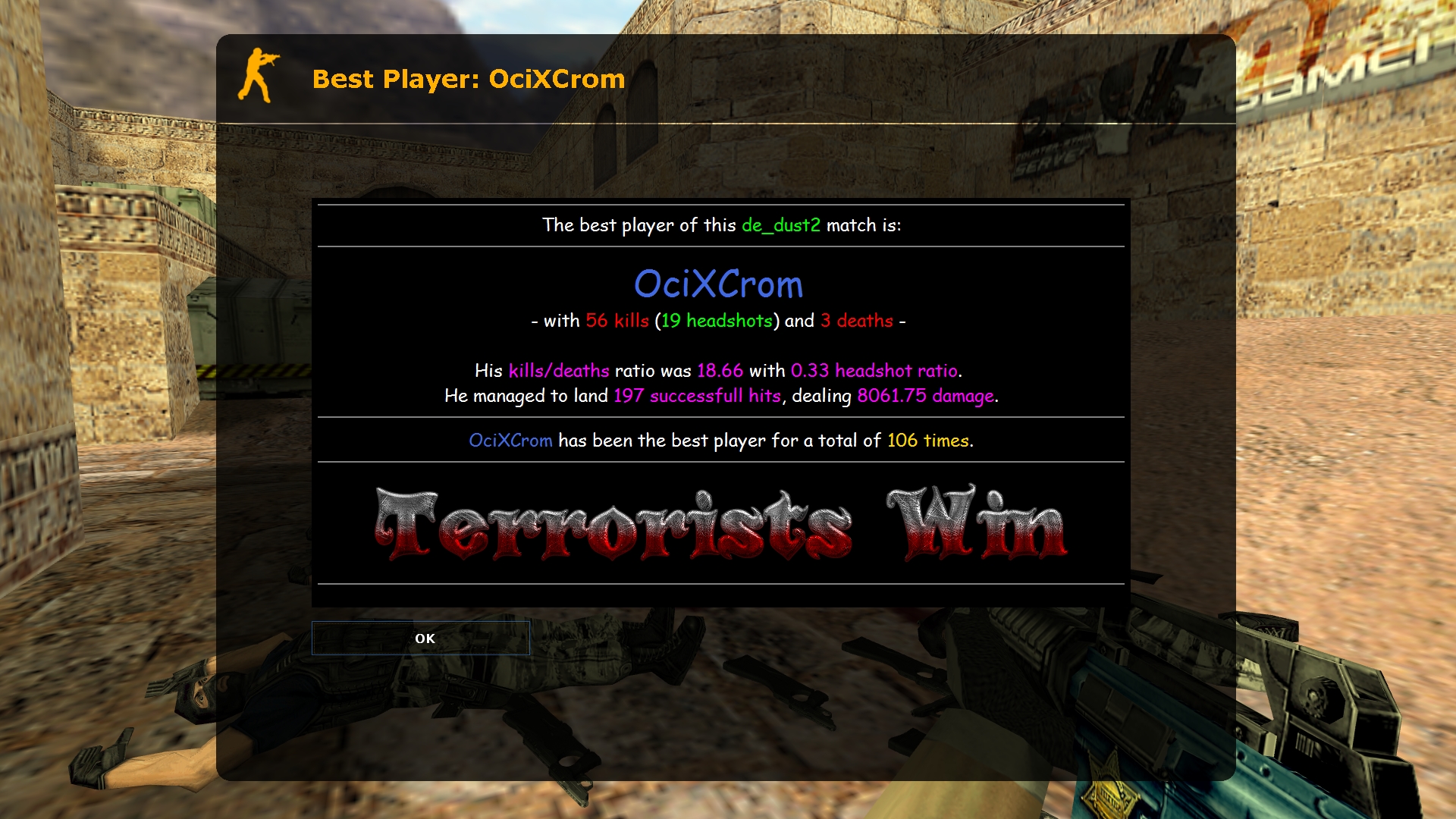
Best Player MOTD ☄ Description At the end of each map, the best player is displayed in a MOTD window, along with their stats. The information in the MOTD window, as well as the way of determining the best player, can be completely changed in a fairly easy way. ☄ Commands bpm_formula "157" -- way to determine the best player (more info below) bpm_min_players "6" -- minimum number of players needed at the end of the map to show the MOTD window bpm_motd_header "Best Player: $name$" -- the title of the MOTD window for the best player bpm_motd_stats "Player Stats: $name$" -- the title of the MOTD window for the own stats bpm_obey_team "0" -- if on, the best player will be selected from a given team (0 = off; 1 = terrorists; 2 = counter-terrorists; 3 = winning team) bpm_save_type "0" -- way to save "wins" (0 = nickname; 1 = IP address; 2 = SteamID) say /mystats -- shows your current stats ☄ Substitutes Placeholders in $dollars may be used in MOTD files and header files. Substitutions enclosed in (brackets) can be used in the "bpm_formula" bug. $map$ -- the name of the map $name$ -- the player's name $wins$ -- number of wins (0) $kills$ -- number of kills (1) $kills_sb$ -- the number of kills according to the scoreboard (2) $deaths$ -- the number of deaths (3) $deaths_sb$ -- the number of deaths according to the result in the scoreboard (4) $headshots$ -- the number of headshots (5) $hits$ -- number of hits (6) $damage$ -- amount of damage done (7) $kdratio$ -- the ratio of kills to deaths (8) $kdratio_sb$ -- the ratio between kills and deaths according to the scoreboard (9) $hsratio$ -- the ratio between headshots and kills (a) $ctscore$ -- the number of counter-terrorist victories $tscore$ -- the number of terrorist victories $best_team$ -- winning team (ct/t/draw) ☄ Determination of the best player To find the best player, the plugin first checks the number of kills of all players and selects the one with the most kills. In case it selects more than one player with the same number of kills, the plugin compares the number of kills with the headshot of those players. If there is a duplicate again, the plugin will now compare the amount of damage done by the players and choose the one who did the most. This entire procedure can be edited by changing the "bpm_formula" bug, which is set to "157" by default. As you can see from the placeholder list, 1 means number of kills, 5 is number of headshots, and 7 is damage done, so the plugin will check these 3 parameters one by one. If you want, for example, to first check the damage (7), then the number of deaths (3), and the ratio of headshots (a), the kvar will need to set it to "73a".Free -
View File Best Player MOTD Best Player MOTD ☄ Description At the end of each map, the best player is displayed in a MOTD window, along with their stats. The information in the MOTD window, as well as the way of determining the best player, can be completely changed in a fairly easy way. ☄ Commands bpm_formula "157" -- way to determine the best player (more info below) bpm_min_players "6" -- minimum number of players needed at the end of the map to show the MOTD window bpm_motd_header "Best Player: $name$" -- the title of the MOTD window for the best player bpm_motd_stats "Player Stats: $name$" -- the title of the MOTD window for the own stats bpm_obey_team "0" -- if on, the best player will be selected from a given team (0 = off; 1 = terrorists; 2 = counter-terrorists; 3 = winning team) bpm_save_type "0" -- way to save "wins" (0 = nickname; 1 = IP address; 2 = SteamID) say /mystats -- shows your current stats ☄ Substitutes Placeholders in $dollars may be used in MOTD files and header files. Substitutions enclosed in (brackets) can be used in the "bpm_formula" bug. $map$ -- the name of the map $name$ -- the player's name $wins$ -- number of wins (0) $kills$ -- number of kills (1) $kills_sb$ -- the number of kills according to the scoreboard (2) $deaths$ -- the number of deaths (3) $deaths_sb$ -- the number of deaths according to the result in the scoreboard (4) $headshots$ -- the number of headshots (5) $hits$ -- number of hits (6) $damage$ -- amount of damage done (7) $kdratio$ -- the ratio of kills to deaths (8) $kdratio_sb$ -- the ratio between kills and deaths according to the scoreboard (9) $hsratio$ -- the ratio between headshots and kills (a) $ctscore$ -- the number of counter-terrorist victories $tscore$ -- the number of terrorist victories $best_team$ -- winning team (ct/t/draw) ☄ Determination of the best player To find the best player, the plugin first checks the number of kills of all players and selects the one with the most kills. In case it selects more than one player with the same number of kills, the plugin compares the number of kills with the headshot of those players. If there is a duplicate again, the plugin will now compare the amount of damage done by the players and choose the one who did the most. This entire procedure can be edited by changing the "bpm_formula" bug, which is set to "157" by default. As you can see from the placeholder list, 1 means number of kills, 5 is number of headshots, and 7 is damage done, so the plugin will check these 3 parameters one by one. If you want, for example, to first check the damage (7), then the number of deaths (3), and the ratio of headshots (a), the kvar will need to set it to "73a". Submitter COSMIN Submitted 08/01/2023 Category Plugins