Plugins
115 files
-
This plugin remove all door from maps. Like door on the de_nuke map and other doors.
Cvars:
// Remove doors from maps [0-none // 1-rotating only // 2-all doors]
amx_remove_doors "2"
Requirements:
Fakemeta module
More_info_about_plugin_source_code:
This "remove doors" code cutting from plugin "zp50_gameplay_fixes.sma" from Zombie Plague 5.0.8a. Cvar name changed from zp_remove_doors to amx_remove_doors - this new plugin "remove_doors.sma" works independently. So, you do not need a zombie mod to this plugin works.
- Free
- 3 Downloads
Submitted -
Nume: CS2 Card
Versiune: v.2.0
Autor: Yvezzaint
* Instalare:
1. Fisierul cs2-cards.amxx il puneti in addons/amxmodx/plugins
2. Folderul sprites il puneti in cstrike
3. Intrati in fisierul addons/amxmodx/configs/plugins.ini si adaugati la urma:
- Free
- 192 Downloads
Updated -
Autor: Wilian M + COSMIN
Plugin for those who are changing their IP , with it you will be able to redirect your old server to the new one.
( This version of the plugin works for no-steam Players )
CVAR: put on the amxx.cfg
ip_new "162.19.172.145"
port_new "27015"
time_redirect "10" // Time to change to the new IP
- Free
- 75 Downloads
Updated -
[ Cvars ]
[CMD]
amx_reloadtags - reload the config tag file amx_addtag - add tag (usage : <ip/steam/name/flag/pass> <u-ip/u-steam/u-name/none/(u-ip/u-steam/u-name)> <flag> <tag> <chat-color(!t/!y/!g)> <password/passcode>) amx_removetagmenu - remove tags by using the menu its will be more simple fore you! amx_changetagmenu - Multitags you can now change you'r tag prefix to you'r available tags! *NEW* From here also you can disable the tag! amx_tag_password - this cmd open's the login menu for pass method! How to add tags
add tag by name:-
"Name" "user nick name" "user flag" "tag prefix" "CColor(!g/!y/!t)"
add tag by steam:-
"Steam" "user steamid" "user flag" "tag prefix" "CColor(!g/!y/!t)"
add tag by ip:-
"IP" "user IP Address" "user flag" "tag prefix" "CColor(!g/!y/!t)" add tag by flags:-
"Flag" "note" "user flag" "tag prefix" "CColor(!g/!y/!t)" add tag by password:-
"Pass" "user nick name or ip or steamid" "user flag" "tag prefix" "CColor(!g/!y/!t)" "user password/passcode" [ Installation ]
Add the files in their direct folders and then go to configs/ open plugins.ini file, scroll down
add the plugin name 'user_tag_prefix.amxx' at the last close and save !
users_tag.cfg ----------- addons/amxmodx/configs/'Over Here' user_tag_prefix.amxx ----------- addons/amxmodx/plugins/'Over Here'- Free
- 94 Downloads
Updated -
Plugin details:
- this is a small but usefull plugin.
- you can restrict names from a file and give them a replacer.
- if a player enters on the server/change the name in a restricted name, the player's name will be changed.
- you need amxx 1.7 or higher.
Credit: Alka
Usage:
- add in amxmodx/configs/name_list.txt :
Code:
name;replacer name2;replacer2 name3;replacer3
- example:
Code:
mut2nt;reserved
if a player enters on the server/change the name in 'mut2nt', it will be changed it 'reserved'.
PHP Code:
#define NAMES 32 // max lines in the file
#define DELAY 10.0 // after how many seconds the name is checked after the player enters
#define ACCESS ADMIN_IMMUNITY // acces needed to have immunity to name checking
new const g_File[] = "name_list.txt"; // file name
Cvars:
namereplacer_mode 0/1/2/3
0 - disabled
1 - name change
2 - kick
3 - ban
(default 1)
namereplacer_list 0/1
0 - the name will be changed to the last name the player has used
1 - the name will be changed from file
(default 1 )
For instance:
- if the cvar is set to 0: if a player has the name 'x' and change it to 'y' (y is restricted from file), his name will be set to 'x'
- if the cvar is set to 1: if a player has the name 'x' and change it to 'y' (y is restricted from file), his name will be set to x-1 (x-1 is replacer to x from file)
namereplacer_banlenght - ban lenght (default 1200)
namereplacer_evoyadmins - allow admins to have a restricted name from file (default 0)
- Free
- 33 Downloads
Updated -
Caracteristici generale
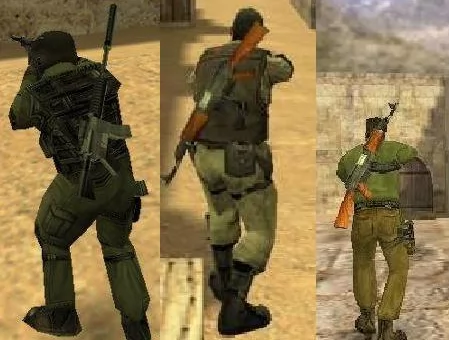
Pluginul adauga un plus de realism jocului, afisand celorlalti jucatori arma principala in spate cand nu o folosesti, exact la fel ca in cazul bombei (C4).
Fisierul backweapons.amxx il punem in folderul addons/amxmodx/plugins
Fisierul backweapons.sma il punem in addons/amxmodx/scripting
Apoi luam backweapons.mdl si il punem in folderul cstrike/models
- Free
- 75 Downloads
Updated -
This plugin just add player's country at the front of the player's name when player use "say" or "say_team". Not Cvar! Test it and work very well !!
Includes:
#include <amxmodx> #include <amxmisc> #include <cstrike> #include <geoip>
- Free
- 30 Downloads
Submitted -
C4 TAKER v1.09
(For lack of a better name)
Description:
Enables you to take the C4 from a teammate by aiming at him/her and pressing the USE key. (default 'E')
This is especially useful when playing with bots either for gameplay or debug purposes...
Requires:
amxmodx | fakemeta_util | hamsandwich
CVARs: c4t_admin_only [default 1] - limits the plugin for admin use only. Set to '0' so that everyone can take the C4. Set to '2' and admin gets the C4 automatically every start of a round. c4t_take_from_humans [default 0 ]- set to '1' to enable to take C4 from human players c4t_max_distance [default 120] - max distance for the take c4t_hud [default 5] - number of instances the HUD Message appears. Set to '0' to disable. Can be set to '9999...'.
Notes: Only Admins can take C4 by default Max distance of the HUD message are the same which means it may serve as an indicator of sorts. HUD message appears for certain amount of instances (set by a cvar) for each human player. After that it is disabled. Based off joaquimandrade's and ConnorMcLeod's "EasyWeaponsTrade" plugin.
- Free
- 4 Downloads
Updated -
🔹 Nume: Report Players (Sistem de tickete)
🔹 Versiune: 1.6 - Open Source
🔹 Autor: Yvezzaint + Edit: @LeX
🔹 Module necesare
easy_http nvault regex json
🔹📜 Introducere
Acest plugin a fost creat initial de Yvezzaint si editat de mine pentru a elimina dependenta de API-ul sau.
Puteti descarca pluginul original mai jos:
🔹❓ Ce face acest plugin?
Acest plugin adauga un sistem de raportare a jucatorilor, oferind o metoda rapida si eficienta pentru jucatori de a raporta comportamente suspecte, incalcari ale regulilor sau alte probleme direct administratorilor.
✅ Jucatorii pot raporta alti jucatori folosind comanda say /report ✅ Administratorii primesc notificari despre rapoarte in joc si pe Discord. ✅ Rapoartele sunt trimise catre un webhook Discord, permitand monitorizarea externa a plangerilor. ✅ Sistem de cooldown pentru a preveni abuzurile de raportare. ✅ Interfata meniului interactiva, permitand jucatorilor sa selecteze jucatorul si sa completeze motivul raportului.
🔹🛠️ Caracteristici principale
✔️ Meniu interactic de raportare – Jucatorii pot selecta un jucator din lista, specifica motivul raportului si marca raportul ca fiind urgent, daca este necesar. ✔️ Trimiterea automata a rapoartelor catre Discord – Rapoartele sunt trimise catre un webhook Discord, incluzand mai multe informatii de baza. ✔️ Sistem de notificare pentru administratori – Administratorii online primesc notificari instantanee despre rapoartele trimise, permitand interventia rapida. ✔️ Sistem de cooldown pentru rapoarte – Un jucator nu poate trimite rapoarte repetate intr-un interval scurt de timp, prevenind abuzurile. ✔️ Filtrare si gestionare de rapoarte pentru administratori – Pluginul identifica administratorii online si ii afiseaza jucatorilor inainte de a trimite un raport, incurajand trimiterea de mesaje directe in loc de raportare.
🔹🔧 CVAR-uri importante si configurare
report_webhook - URL-ul webhook-ului Discord unde sunt trimise rapoartele. Trebuie sa fie un URL valid pentru webhook-ul Discord. report_image - URL-ul imaginii afisate in embed-ul Discord al raportului. Trebuie sa fie un URL valid pentru imagine. report_advanced_cvar_check - Activeaza/dezactiveaza verificarea avansata. Valoarea pozitiva ( 1 - Implicit) permite verificarea avansata, Valoarenegativa sau 0 permite doar verificare standard. report_admin_flags - Specifica flag-urile pe care un administrator trebuie sa le aiba pentru a primi notificari despre rapoarte. De exemplu, "d" pentru administratorii cu flag-ul "d". report_min_flags - Numarul minim de flag-uri necesare pentru ca un jucator sa fie considerat administrator. De exemplu, "6" inseamna ca un jucator trebuie sa aiba cel putin 6 flag-uri pentru a fi considerat administrator. report_admin_display - Numarul maxim de administratori afisati atunci cand un jucator incearca sa trimita un raport. De exemplu, "4" inseamna ca vor fi afisati pana la 4 administratori online. report_cooldown - Perioada (in minute) dupa care un jucator poate trimite un alt raport. De exemplu, "30" inseamna ca un jucator trebuie sa astepte 30 de minute inainte de a trimite un nou raport. report_admin_notify - Activeaza/dezactiveaza notificarea pentru administratori atunci cand un raport este trimis (1 = activat, 0 = dezactivat). De exemplu, "1" inseamna ca administratorii vor primi notificari. report_display_image - Activeaza/dezactiveaza afisarea unei imagini in embed-ul Discord al raportului (1 = activat, 0 = dezactivat). De exemplu, "1" inseamna ca va fi afisata o imagine in embed-ul Discord. report_display_footer - Activeaza/dezactiveaza afisarea unui footer in mesajul Discord (1 = activat, 0 = dezactivat). De exemplu, "1" inseamna ca va fi afisat un footer in mesajul Discord. report_footer_type - Reprezinta tipul de footer in embend-ul reportului, 0 (implicit) va prelua dns-ul server-ului din numele server-ului / 1 se va folosi textul setat la cvar-ul 'report_footer_text' report_footer_text - Seteaza textul footer din embedul report-ului report_advanced_cvar_check - Activeaza/Dezactiveaza verificarea avansata 0 (implicit) verificare standard, 1 Verificare avansata (Get Request)
🔹⚠️ Configurare incorecta
Daca pluginul nu este configurat corect, jucatorii vor primi un mesaj de eroare in joc, informandu-i ca pluginul nu este configurat corect si sa contacteze administratorul serverului.
De exemplu, daca URL-ul webhook-ului Discord nu este valid, pluginul va afisa un mesaj de eroare si nu va trimite raportul.
De asemenea se for afisa in consola serverului si mesaje informative despre acest lucru si ce nu a fost configurat corect
🔹Alte Caracteristici
Sistemul este capabil sa faca si o verificare avansata a valorilor cvar pentru 'report_webhook' cat si 'report_image'.
Aceasta verificare consta in anumiti factori ce pot influenta in anumite cazuri performanta dar este mai sigur.
Aceasta verificare consta in general prin trimiterea de GET Request catre link-urile setate in cvar.
🔹 Verificare webhook Discord: ✔️ Daca Webhook ID este valid ✔️ Daca Token-ul este valid ✔️ La final poate determina daca ambele criterii sunt valide, daca acestea sunt valide, link-ul este valid 🔹 Verificare URL imagine ( indisponibil momentan ) : ✔️ Daca se poate face o conexiune catre acel link ✔️ Daca returneaza fisier si daca acesta este o imagine ✔️La final va determina daca link-ul este intradevar o imagine, si daca returneaza content de tip imagine (orice format de imagine)
Verificarea standard consta doar in verificarea string-ului link-urilor cat si verificarea prin regex daca link-ul de discord webhook respecta formatarea standard a acestuia
( Ex: https://discord.com/api/webhooks/ID_webhook/Token_webhook )
🔹🖼️Imagini
🔹 Concluzie
Acest plugin ofera o solutie eficienta pentru gestionarea plangerilor.
Ofera o interfata usor de utilizat, notificari automate pentru administratori si o metoda rapida de raportare a problemelor.
Integratia cu Discord permite gestionarea usoara a plangerilor si luarea masurilor necesare in timp real.
🔹 Usor de folosit 🔹 Personalizabil prin CVAR-uri 🔹 Eficient pentru administratori
🔄 Change Log - Istoricul versiunilor
.inlineCode { background: rgb(var(--theme-area_background_light)); padding: 2px 5px; font-family: monospace; border: 1px solid rgba(var(--theme-area_background_dark), 0.15); border-radius: var(--radius-1); display: inline-block; }- Free
- 26 Downloads
Submitted -
Description:
This plugins brings back the old feature from CS1.5 times. You were able to shoot a bullet with awp or scout, switch to knife or any other weapon really fast, and then switch back again. In result you get that you can fire your next bullet faster than if you would have waited for original bullet 'reload'.
Requires:
FakeMeta
HamSandWich
- Free
- 15 Downloads
Submitted -
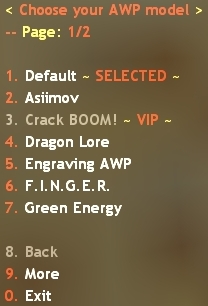
AWP Models
☄ Description
A simple plugin that adds a menu from which you can choose your AWP skin. The menu can be accessed by typing /awp in the chat.
☄ Cvars
am_open_at_spawn "0" -- whether the menu will be automatically opened on first spawn am_save_choice "0" -- whether the selected skin will be saved via SteamID after leaving the server
☄ Adding skins
The skins can be added in configs/AWPModels.ini by following the example:
[Skin Name] V_MODEL = path to v_ model P_MODEL = path to p_ model
If the skin doesn't have a p_ model, you can choose not to add the P_MODEL field. You can also add a sound when selected, assign a admin flag or a level from the rank system:
[Skin Name] V_MODEL = path to v_ model P_MODEL = path to p_ model FLAG = if you want the skin to be for VIP users/admins, enter the flag here LEVEL = required level (requires OciXCrom's Rank System) SHOW_RANK = if set to 1, the rank name will be displayed instead of the level number (requires OciXCrom's Rank System) XP = required XP (requires OciXCrom's Rank System) SELECT_SOUND = sound when selecting the skin from the menu
Example:
[My Cool AWP] V_MODEL = models/v_coolawp.mdl P_MODEL = models/p_coolawp.mdl FLAG = b LEVEL = 15 SHOW_RANK = 1 XP = 5000 SELECT_SOUND = coolawp/select.wav
- Free
- 18 Downloads
Submitted -
- Description
This plugin allow players to see if someone has quick/no scoped someone.
- Cvars
qsd_enabled 1/0 - Turn on/off the plugin
qsd_messagetype hud/chat/log - Change the message type
qsd_chatprefix [Quick&NoScopeDetector] - The prefix that will appear on chat messages
- Free
- 30 Downloads
Submitted -
(¯`·. Preturi Ranguri .·´¯)
Descriere: Daca aveti un server si doriti sa aveti cat mai multi ADMINI, acest plugin vă va ajuta. Cum?! Simplu! Jucatorii interesati de RANG pot tasta in chat (pe server): /preturi si se va deschide pe ecranul lor o imagine MOTD (Message of the Day). Totodata un mesaj va aparea pe chat la un interval de 2 minute si cateva secunde. 🙂
Instalare:
- Fisierul preturi_ranguri_motd.sma il puneti in addons/amxmodx/scripting.
- Fisierul preturi_ranguri_motd.amxx il puneti in addons/amxmodx/plugins.
- Fisierul preturi_ranguri_motd.html il puneti in addons/amxmodx/configs.
- Intrati in addons/amxmodx/configs/plugins.ini si treceti linia de mai jos:
Comenzi publice (se tasteaza in chat prin apasarea tastei Y):
/preturi - afiseaza preturile rangurilor/gradelor.
Informatii:
- Pentru a modifica rangurile si preturile intrati in preturi_ranguri_motd.html si modificati dupa preferintele voastre.
- Pentru a modifica intervalul in care apare mesajul in chat intrati in preturi_ranguri_motd.sma si modificati 149.0 de la #define ADVERTISING_TIME 149.0. Daca vreti ca intervalul sa fie de 60 de secunde puneti 60.0. Compilati fisierul .sma dupa ce l-ati modificat si l-ati salvat
- Free
- 52 Downloads
Submitted -
SuperAdmin 1.1 = Any admin with the Flag ADMIN_RCON >> "L" can kick, ban, slap and slayear any user and/or admin with immunity.
SuperAdmin 2.2 = Any player who has the SteamID saved in SuperAdmin.ini(File location: $moddir/addons/amxmodx/configs/SuperAdmin.ini) can kick, ban, slap and slayear any user and/or admin with immunity.
SuperAdmin 3.1 = Add Menus ^-^
SuperAdmin 4.1 = New command and auto-creation of the .ini file
Command:
- Free
- 7 Downloads
Submitted -
Plugin de tinte / crosshair din csgo pentru serverele de Counter-Strike 1.6
Instalare:
Folderele din arhiva se pun in cstrike!
Comenzi ( chat prin apasarea taste "Y" sau in consola prin comanda "say " ) :
say /tinta
say !tinta
say /ch
say !ch
say /cross
say !cross
say .cross
say /crosshair
say !crosshair
say .crosshair
say_team /cross
say_team !cross
say_team .cross
say_team /crosshair
say_team !crosshair
say_team .crosshair
- Free
- 77 Downloads
- 1 Comments
Submitted -
SENTRY GUNS
===========
Sentries in TFC were cool. Sentries in CS are cool.
Sentry guns are stationary engineering wonders that fire bullets at and kill your enemies.
Sentry guns can be upgraded twice, with the help of a team member, to be bigger and meaner.
You can remotely choose to detonate a specific sentry, or all of them.
You can also remotely look through the spycam mounted on your sentry.
INSTALLATION
============
1. Make sure the folling modules are running on your server: CSTRIKE, FUN, ENGINE, FAKEMETA (check configs/modules.ini)
2. Copy all models and sounds in place.
3. Compile and install plugin. (configs/plugins.ini)
- Done.
USAGE
=====
client command: sentry_menu
- Build/detonate/upgrade sentry guns with this one-for-all menu. You can also spy through your sentries using this menu.
client command: sentry_build
- Quickie to build a sentry without going through menu. Since version 0.2 you can now also point at a sentry and upgrade it with this command, if the sentry is close enough.
Note that you can also run into an upgradeable sentry gun to upgrade it.
client command: "/sentryhelp", or just "sentryhelp" in chat
- Displays info on how to bind buttons, what they do, etc.
- Free
- 14 Downloads
Submitted -
Change Score Version: v1 Author: Freecode + COSMIN
Change players/@TEAMS Kills(frags) and Deaths.
Admin Commands:
amx_chscore <nick/@CT/@TERRORIST> <frags #> <deaths #>- Free
- 9 Downloads
Submitted -
CS AFK Manager
There is many AFK manager on here, most of them are outdated, buggy or not complete.
This plugin aim to fix that problem.
The check method is based on the usage of buttons and can be complemented by a method based on aim.
This plugin features:
A Management for alive AFK client and AFK client in appearance select menu based on switch to spectators (or based on kick if this feature is disabled) ; A Kick management for AFK spectators (or for all players if spectator switch management is disabled) ; The ability to kick clients in spectators only if the server is full ; A bomb management based on bomb transfer to the nearest non-AFK terrorist or a forced drop of the bomb ; Optional admin immunities for all the previous features ; A global HUD message sent to alive players of a team if all the opposing team is AFK. Cvars
- Free
- 18 Downloads
Submitted -
Nume: amx_who
Versiune: v.2.0
Autor: COSMIN
Descriere: This plugin shows Online admins using the amx_who command in the console.
Running: (Care este versiunea de amxmodx): 1.9.0 1.10.0
ScreenShot:
* Instalare:
1. Fisierul amx_who.amxx il puneti in addons/amxmodx/plugins
2. Fisierul amx_who.sma il puneti in addons/amxmodx/scripting
3. Fisierul users.ini il puneti in addons/amxmodx/configs
4. Intrati in fisierul addons/amxmodx/configs/plugins.ini si adaugati la urma:
* Comenzi publice (Comenzi in Consola):
amx_who
* Module necesare (se sterge ; din fata modulului de mai jos; acestea le gasiti in fisierul amxmodx\configs\modules.ini):
amxmodx amxmisc
- Free
- 121 Downloads
Submitted -
Description:
Using the method I've used you will no longer have the reload glitch like the rest of the unlimited ammo plugins. This is a lot smoother. It will also give you unlimited nades as well depending on a cvar's flags. The only downside would be that it requires three modules in order for it to run and it's limited to only Counter-Strike.
Commands:
amx_ammo <nick,#userid> <0|1>
Cvars:
ammo_nade_flags "ac" a: Give HE grenades b: Give smoke grenades c : Give flashbangs
Required Modules:
Engine Cstrike Fun
This plugin requires the latest version of AMX Mod X in order to run!
- Free
- 5 Downloads
Updated -
Descriere: Toata lumea cred ca stie ce-i ala un level mod. Ei, daca nu stiai pana acum, level mod inseamna un plugin bazat pe nivele, avansezi in level facand experienta. Odata ce ai ajuns la x/x experienta, avansezi la nivelul urmator. Pluginul are in total 15 levele, beneficii. Toate astea mai jos
Descarcare: Link!
SMA (EDITAT) |
Nume: [Surf] Level Mod
Versiune: 1.7
Instalare:
1. Fisierul surf_level_mod_1.7.sma il puneti in addons/amxmodx/scripting
2. Fisierul surf_level_mod_1.7.amxx il puneti in addons/amxmodx/plugins
3. Fisierul fvault.inc il puneti in addons/amxmodx/scripting/include
4. Fisierul levelup.wav il puneti in sound
5. Intrati in fisierul addons/amxmodx/configs/plugins.ini si adaugati la urma:
surf_level_mod_1.7.amxx
6. Alti pasi necesari....
Cvar-uri (se adauga in fisierul amxmodx\configs\amxx.cfg):
surf_kill_xp "15" - xp-ul pe kill; daca vrei sa nu mai primesti xp pe kill, setezi 0
surf_hs_xp - xp-ul pe headshot; daca vrei sa nu mai primesti xp pe hs, setezi 0
surf_levelup_protect "1" - 1 sau 0: te protejeaza cand faci level nou
surf_levelup_effects "1" - 1 sau 0: iti coloreaza ecranul la level nou (1 - on | 0 - off)
Comenzi administrative (se tasteaza in consola si trebuie sa fiti administrator):
-
Comenzi publice (se tasteaza in joc prin apasarea tastei Y):
/xp - iti arata in chat un mesaj cu xp-ul si level-ul tau
/level - poti seta dintr-un meniu jucatorilor un level
Module necesare (se sterge ; din fata modulului de mai jos; acestea le gasiti in fisierul amxmodx\configs\modules.ini):
- CStrike
- Fun
- Fakemeta
- Hamsandwich
- Free
- 11 Downloads
Submitted -
✔️ Descriere
Vă crește viteza când țineți un cuțit.
✔️ Lista de quarci
fastknife_speed „50.0” -- specifică viteza suplimentară.
✔️Fotografi: Nu are ! Dar am testat plugin ruleaza.
- Free
- 17 Downloads
Submitted -
✔️ Descriere
Versiune reproiectată și îmbunătățită a originaluluiDeveniți un VIPconecteaza. Cu acest plugin, jucătorii pot obține steaguri VIP gratuite atunci când ajung la un anumit număr de ucideri.
✔️ Note
Rețineți că pluginul oferă doar steaguri și nu adaugă niciun extra. Trebuie să utilizați un plugin separat pentru extra, deoarece este complet inutil ca acesta să le conțină. Puteți genera propriul plugin suplimentar!
✔️ Comenzi
/becomevip, /kills -- arată câte ucideri ai
becomevip_give_kills <nick|#userid> <kills> -- oferă kills jucătorului
becomevip_reset_kills <nick|#userid> -- resetează uciderile jucătorului
✔️Cvar: (amx.cfg)
amx_vip_kills 1500 // Required kills for every player to become V.I.P.
amx_vip_flags "abc" // Admin flags granted when someone becomes V.I.P.
✔️ Setări
Setările se află în fișierul configs/BecomeVIP.ini .
PLUGIN_PREFIX -- prefix pentru mesajele de chat
SAVE_TYPE -- metoda de salvare a uciderii (0 = pseudonim; 1 = IP; 2 = SteamID)
KILLS_NEEDED -- numărul de ucideri necesare pentru a obține steaguri VIP
VIP_FLAGS -- Steagurile VIP pe care le primesc jucătorii când ating numărul necesar de ucideri
CHECK_KILLS_COMMANDS -- comenzi pentru a vedea câte ucideri ai
VAULT_FILE -- fișierul în care sunt salvate uciderile - schimbați numele pentru a reporni totul
VIP_SUCCESS_MESSAGE -- cine va vedea mesajul de chat atunci când un jucător primește steagurile VIP (0 = nimeni; 1 = doar jucătorul; 2 = toată lumea)
HUD_MESSAGE_ENABLED -- dacă mesajul HUD la reapariție este activat
HUD_MESSAGE_COLOR -- culoarea mesajului HUD
HUD_MESSAGE_POSITION -- Poziția mesajului HUD
HUD_MESSAGE_DURATION -- durata mesajului HUD
HUD_MESSAGE_EFFECTS -- Efectele mesajelor HUD
✔️ Fotografii:
- Free
- 20 Downloads
Submitted -
Descriere:
Prin acest plugin, jucătorii pot ascunde chat-ul și pot opri microfonul anumitor jucători. În mod implicit, jucătorii cu steagul „a” sunt imuni și nu pot fi tăiați la tăcere.
✔️ Lista de comenzi
amx_mute <nick|#userid>
amx_chatmute <nick|#userid>
amx_mutemenu
amx_chatmutemenu
spune /mute
spune /mutemenu
spune /chatmute
spune /chatmutemenu
✔️ Lista cvar-urilor
advmute_adminflag < default : "a"> -- Jucătorii cu acest steag vor fi imuni și nu pot fi dezactivați.
advmute_mutechat < default : "1"> -- Dacă pluginul ar trebui să dezactiveze chat-ul.
advmute_mutemic < default : "1"> -- Dacă pluginul ar trebui să dezactiveze microfonul.
advmute_reopen < default : "1"> -- Dacă se redeschide meniul atunci când îl utilizați.
advmute_sounds < default : "1"> -- Activează/dezactivează sunetele pluginului.
✔️ Informații suplimentare
Rețineți că pluginul ar trebui să fie în partea de sus a listei de pluginuri (plugins.ini) în cazul în care utilizați alte pluginuri, cum ar fi prefixul de administrator, chatul color etc.
Poze:
- Free
- 4 Downloads
Submitted -
✔️Descriere :
Acum poți auzi gloanțe zburând dacă un inamic trage în tine. Acest lucru adaugă serios suspans la cs.
Oricum, am vrut doar să testez noua funcție de stoc creată de KoST pentru mine.
✔️Cvars :
amx_bulletwhizz (D: 1) - on/off plugin
amx_bulletwhizz_dis (D: 35) - max distance to hear the whizz sound
✔️Plugin,ini>
- Free
- 4 Downloads
Submitted