


COSMIN
Administrators
-
Joined
-
Last visited
Everything posted by COSMIN
-
Left4Dead 2 Son Of The Forest Zombie Army 4: Dead War
-
True Damage’s original lineup could be getting back together in League of Legends. A new post from LeagueOfLeaks shares a reported first look at the group’s 2026 skins, naming Akali, Ekko, Qiyana, Senna, and Yasuo for an October 21 release. The preview follows earlier reports of a True Damage comeback during Season 3 Act 2, giving fans a clearer idea of which champions could join the release. In brief: LeagueOfLeaks has shared a reported first look at new True Damage 2026 skins. The listed champions are Akali, Ekko, Qiyana, Senna, and Yasuo. The post gives October 21, 2026, as the release date, pending official confirmation. Skin prices, tiers, and individual gameplay previews remain unverified. Which Champions Are Getting True Damage 2026 Skins? According to the reveal image, the upcoming collection features all five members of True Damage: Akali Ekko Qiyana Senna Yasuo So, this would reunite the lineup Riot introduced alongside GIANTS at Worlds 2019. GameRiv’s earlier coverage reported that new True Damage skins were planned, although the champion selection and release date were still unknown at the time. The latest report points toward fresh looks for the established group. Fans of the original members now have a specific lineup to watch for when Riot shares further details. The reveal artwork shows the five characters posing together above a city skyline, with a vivid orange and red backdrop. Oversized jackets, headphones, bright accessories, and contrasting hairstyles give the group a coordinated streetwear aesthetic. True Damage 2026 Skins Reported Release Date Based on what we know so far, the new True Damage 2026 will release on October 21, 2026. However, as with any other insider information, that date should be treated as reported information, not as an official Riot announcement. The post LoL True Damage 2026 Skins: First Look, Champions, and Reported Release Date appeared first on GameRiv. View the full article
-
League of Legends patch 26.20 is shaping up to give Lucian and Vayne bot some help while trimming several familiar pro-play picks. Riot is also targeting Experimental Hexplate and Runaan’s Hurricane, with a separate adjustment planned for Hextech Rocketbelt. Riot Phroxzon, Lead Gameplay Designer of League of Legends, describes 26.20 as the final Worlds patch. Riot is largely happy with the playoff meta and wants to make a few remaining improvements while protecting the Solo Queue experience. In brief: Eleven champions are listed for buffs, including Lucian, Vayne bot, and Smolder. Ambessa, Cassiopeia, K’Sante, Yunara, and Varus are set for nerfs. Sylas adjustments aim to help mid without strengthening jungle overall. Hexplate and Hurricane face nerfs, while Rocketbelt’s role is being refined. League of Legends Patch 26.20 Preview CategoryChampion or ItemRole / DetailsChampion BuffDianaChampion BuffFiddlesticksChampion BuffKennenChampion BuffKindredChampion BuffLucianChampion BuffMordekaiserChampion BuffNeekoChampion BuffSmolderChampion BuffSwainMidChampion BuffTahm KenchSupportChampion BuffVayneBotChampion NerfAmbessaChampion NerfCassiopeiaChampion NerfK’SanteChampion NerfYunaraChampion NerfVarusChampion AdjustmentSylasSystem NerfExperimental HexplateRangedSystem NerfRunaan’s HurricaneSystem AdjustmentHextech RocketbeltRanged nerf LoL Patch 26.20 Champion Buffs The following champions are listed for buffs in the preview. Diana Fiddlesticks Kennen Kindred Lucian Mordekaiser Neeko Smolder Swain (Mid) Tahm Kench (Support) Vayne (Bot) Lucian Gets Help After Patch 26.19 According to Phroxzon, the previous patch weakened Lucian’s strongest pairings, including enchanters such as Milio. Combined with the support laning changes, this significantly reduced his early kill threat. Riot now sees room to restore some general power to Lucian. The preview does not yet specify which abilities or stats will change. Vayne Bot Buffs Come With Hexplate Nerfs Vayne’s recent nerf addressed her strength in top lane across professional play and high-level Solo Queue. Riot wants to improve her bot-lane performance without bringing that top-lane problem back. The plan pairs a general Vayne buff with a Hexplate nerf. Riot expects this combination to leave top Vayne roughly neutral, or push her toward squishier builds, while giving bot Vayne a boost. LoL Patch 26.20 Champion Nerfs Five champions appear on the nerf list. Ambessa Cassiopeia K’Sante Yunara Varus Phroxzon singles out Ambessa, Cassiopeia, and K’Sante as picks that have grown stale in professional play. Cassiopeia’s recent changes fell short of Riot’s intended pro-play nerf, although they successfully shifted more of her regular-play strength toward higher-AP builds. Yunara is also receiving a direct nerf alongside the Hurricane reduction. Riot says it is being careful with their combined impact. Sylas Adjustments Target Mid Lane Sylas is the only champion listed under adjustments. Riot wants to give his mid-lane performance a slight lift while keeping jungle Sylas steady overall. The changes should strengthen matchups he already handles well, with little change to his weaker matchups. LoL Patch 26.20 Item Changes Experimental Hexplate Experimental Hexplate is receiving a ranged-specific nerf. Reducing its power should give Riot more room to buff champions whose balance has been constrained by the item, including Vayne. Runaan’s Hurricane Riot believes Hurricane’s previous buff went slightly too far. A small reduction is planned, with Phroxzon stressing that the rollback should be modest. Hextech Rocketbelt Rocketbelt is being adjusted to better reward committing to a fight. Phroxzon says the item currently gives pro-play mages too much durability and flexibility, leaving them with too few weaknesses at the highest level. Riot expects engage-focused ranged users such as Annie and Neeko to remain roughly power-neutral with the item. However, they should face a greater tradeoff in repeatable damage. Are the Full Patch 26.20 Numbers Available? This initial preview names the planned changes and explains several of Riot’s goals, but it does not include exact stat or ability values. Phroxzon says more champion details will follow in the next update. These changes remain provisional until the final patch notes. We’ll update this article with more details as soon as full preview for this patch is revealed. The post LoL Patch 26.20 Preview: All Buffs, Nerfs, and More appeared first on GameRiv. View the full article
-
\[ MISC ] Fixed pixel-gaps in various Rush rooms. Clipping adjustments in T/CT Castle rooms. View the full article
-
View Article Media Media gallery × ❮ ❯ 1 / 1 If you have played GTA V for more then atleast 50-100 hours, you 100% know that quite often you'll hear the sound of a speeding car in the distance, and I decided to add it into l4d because I think it fits the creepy atmosphere of l4d honestly, that's my opinion, what you most likely didn't know is the sound in GTA actually changes depending on where you are on the map, so if your in the city it'll sound loud and kinda muffled fsr, and out north towards paleto bay it sounds quite quieter and more clear, and I made the loud and muffled one play in maps that are more of a big city that are more likely to be closer to where a speeding car would be, and maps that are more of a smalltown play the quiet and clear one, lemme be more specific: Loud & Muffled: The Passing C1-C2 Hard Rain No Mercy Crash Course Dead Air Quiet & Clear: Dead Center The Passing C3 Dark Carnival Swamp Fever The Parish Cold Stream Death Toll Blood Harvest The Sacrifice The Last Stand You also may notice that on Hard Rain the sound is a bit louder then usual, Especially if you muted the sound of the storm, but I adjusted the volumes to fit the ambience so it's not too quiet, And if you think I should change something lemme know in a comment and I'll let you know Note: You'll still here the audio play even if you get my add-on that mutes ambience, I recommend leaving ambience unmuted View the full article
-
View Article Media Media gallery × ❮ ❯ 1 / 3 My English is not good, so I have to use a translation software. Please forgive me. -------------------------------------------- Plot Introduction ------------------------------------------------- When the zombie epidemic swept the world, the ancient city of Lingshan in southern China was also not spared. Under the overwhelming attack of the zombie tide, various areas in the suburbs successively fell. In such a critical moment, to have a chance of survival, one must venture to the evacuation point - Liufeng Mountain. The road to the evacuation point is fraught with dangers. Survivors must take up weapons and use their unwavering will to break through the siege! --------------------------------------------- Author's Note ------------------------------------------------ Thank you for subscribing! This is my first official campaign map. It took nearly two years from conception to completion. In the early development stage, a test version map was released, but the response was not satisfactory. The map design problems were very serious. After the test version, the entire test version process was reset for a year, and I refreshed the entire test version process and supplemented the subsequent levels. The new version of the map is more exquisite than the test version, with more mechanisms and a longer process. If you encounter any problems during gameplay, you can come to me for feedback. I will do my best to solve them. --------------------------------------------- Map Features ------------------------------------------------ * A large number of Chinese-style elements made by self-made textures * A large number of self-built solid-built models * Maps with a lot of effort spent on shaping * Some items can be picked up * Except for a few routes that use original scenes, the rest are all taken from real-life Guangxi Zhuang Autonomous Region's Lingshan City's Lingcheng * 8 chapters with all self-made levels --------------------------------------------- Map Construction Code ------------------------------------------------ M1_LS_FSL_LFSWJ M2_LS_FJL_LFSWJ M3_LS_ZSXML_LFSWJ M4_LS_XML_LFSWJ M6_LS_RMGC_LFSWJ M7_LS_HXQ_LFSWJ M8_LS_LFSJQ_LFSWJ M9_LS_LFSJQ_CXF_LFSWJ View the full article
-
View Article Media Media gallery × ❮ ❯ 1 / 2 ESTE MOD CONTIENE TODOS LOS SONIDOS DEL TANK DE L4D1 SIN Q SUENEN LOS DEL TANK DE L4D2 COMO PASA CON EL DE MOD DE EEEN View the full article
-
John Wick 4 Skin v1 🔫 John Wick 4 Skin v1 📌 DescriptionWant to add a little John Wick style to your Counter-Strike 1.6 server? This player skin is inspired by John Wick 4 and replaces the default Urban player model with a custom John Wick-inspired model. 🎮 Features🔫 Inspired by John Wick 4 👤 Replaces the Urban player model 🎮 Made for Counter-Strike 1.6 📦 Easy to install ✨ Custom player model 🖥️ Suitable for servers using custom player skins 📂 Files IncludedJohn Wick 4 skin v1 └── cstrike └── models └── player └── urban ├── urban.mdl └── urbanT.mdl📁 Included ModelsFile Location urban.mdl cstrike/models/player/urban/ urbanT.mdl cstrike/models/player/urban/ 🛠️ Installation Download the archive below. Open it using WinRAR or 7-Zip. Extract the cstrike folder into your Counter-Strike 1.6 directory. Choose Replace if Windows asks. Start the game and join your server. The final paths should be: cstrike/models/player/urban/urban.mdl cstrike/models/player/urban/urbanT.mdl📥 Download📦 File: john_wick_4_skin_cs_16_78b60.rar ⬇️ Download the file from the Files section below. 🖼️ PreviewCheck out the screenshots above to see the John Wick 4 model in-game. ℹ️ Information🎮 Game: Counter-Strike 1.6 📁 Category: Player Models 👤 Model: Urban 🔢 Version: v1 📦 Format: .rar 🧩 Type: Player Skin / Model GameLife România 🇷🇴 Gaming • Counter-Strike 1.6 • Community • Downloads File Information Submitter COSMIN Submitted 09/27/2026 Category Others View File
-
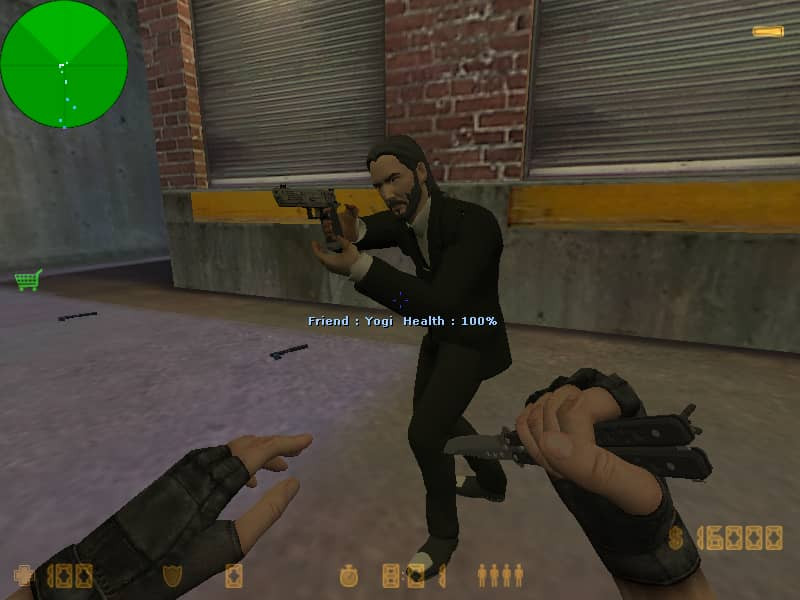 🔫 John Wick 4 Skin v1 📌 DescriptionWant to add a little John Wick style to your Counter-Strike 1.6 server? This player skin is inspired by John Wick 4 and replaces the default Urban player model with a custom John Wick-inspired model. 🎮 Features🔫 Inspired by John Wick 4 👤 Replaces the Urban player model 🎮 Made for Counter-Strike 1.6 📦 Easy to install ✨ Custom player model 🖥️ Suitable for servers using custom player skins 📂 Files IncludedJohn Wick 4 skin v1 └── cstrike └── models └── player └── urban ├── urban.mdl └── urbanT.mdl📁 Included ModelsFile Location urban.mdl cstrike/models/player/urban/ urbanT.mdl cstrike/models/player/urban/ 🛠️ Installation Download the archive below. Open it using WinRAR or 7-Zip. Extract the cstrike folder into your Counter-Strike 1.6 directory. Choose Replace if Windows asks. Start the game and join your server. The final paths should be: cstrike/models/player/urban/urban.mdl cstrike/models/player/urban/urbanT.mdl📥 Download📦 File: john_wick_4_skin_cs_16_78b60.rar ⬇️ Download the file from the Files section below. 🖼️ PreviewCheck out the screenshots above to see the John Wick 4 model in-game. ℹ️ Information🎮 Game: Counter-Strike 1.6 📁 Category: Player Models 👤 Model: Urban 🔢 Version: v1 📦 Format: .rar 🧩 Type: Player Skin / Model GameLife România 🇷🇴 Gaming • Counter-Strike 1.6 • Community • DownloadsFree
 -
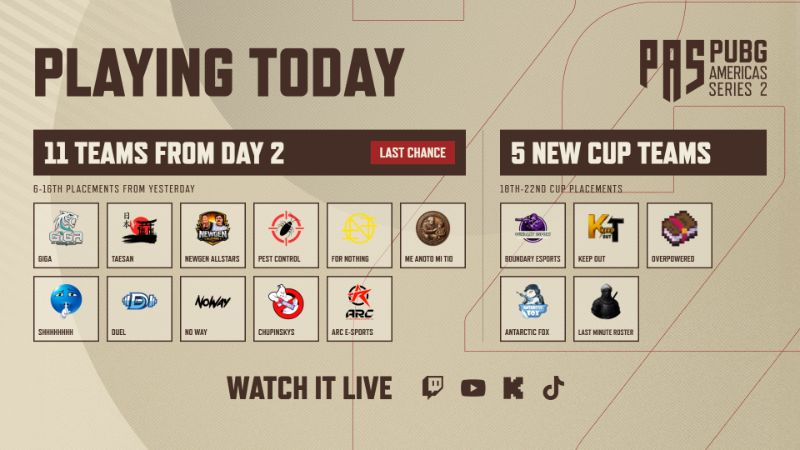
The PUBG Americas Series 2 Playoffs begin tonight at 4pm EDT / 7pm EST! Over the course of three match days this weekend, we will whittle down 29 teams into 16 finalists! Who will make the cut? The PAS2 Playoffs have a unique qualification format. After each day of Playoffs, the leaderboard resets and the amount of qualification slots is lower on each consecutive day. Check out the full breakdown below! View the full article
 View Article Media Media gallery × ❮ ❯ 1 / 8 Daewoo K5 Pistol v4 (Dual pistols) [Sound fix Ver] Game Point blank (2008) SNT Motiv K5 [9×19 mm Parabellum] for Pistols Skin Skin replacement for Left 4 Dead 2 Dual pistols SIG-Sauer P220 SAO, Glock 26 scripts More Damage increase - Ardiansyah_Indie - Daewoo Precision Industries K5 Script for Dual Pistol 14 + 14 = 25 bullets sound edit - Certified Arsonist™ - Daewoo K5 Pistol Firing Sound v2 skin,hud icon - Certified Arsonist™ - Daewoo K5 Pistol v4 Port and Compile - l4dkk View the full articleView Article Media Media gallery × ❮ ❯ 1 / 4 "This is Remake or Recreation of Pax 2009 Nick. To Remove the Rings and Handgun holster, This is based on the L4D2 in Pax 2009 Video, anyways Have Fun!" -SplatterW2007 STEAM WORKSHOP https://steamcommunity.com/sharedfiles/filedetails/?id=2835201094 View the full article\[ RUSH ] Various gap fixes and clipping adjustments. \[ GAMEPLAY ] Fixed some cases where loud reloads would persist while trying to stealth reload. \[ MISC ] Added sv_clantags_enabled option so custom servers can disable clan tags. The eggs of background players in main menu lobbies now rest in nests. View the full articleView Article Media Media gallery × ❮ ❯ 1 / 8 CODMW2026 M4 - m16a2 [Sound fix Ver] Call of Duty: Modern Warfare 4 (2026) M4 [USASOC/NSW M4A1 URG-I. 11.5" barrel - 5.56x45mm NATO] Assault Rifle skin. Left 4 Dead 2 M16A2 Assault Rifle replacement skin. scripts More hud icon Damage increase 30 bullets Add sound skin - BaiF*ckmouse (COD:MW2026 M4) Port and Compile - l4dkk View the full articleView Article Media Media gallery × ❮ ❯ 1 / 8 COD23:MW4 KRAIT P68 (pistols) [Sound fix Ver] Call of Duty: Modern Warfare 4 (2026) KRAIT P68 [Heckler & Koch USP45 - .45 ACP] pistol skin Skin replacement for Left 4 Dead 2 Dual pistols SIG-Sauer P220 SAO, Glock 26 scripts More add hud icon Damage increase 11 + 11 = 22 bullets sound Fix skin - sine - COD23MW4 KRAIT P68 v4 Port and Compile - l4dkk View the full articleView Article Media Media gallery × ❮ ❯ 1 / 8 MW19 FN Scar 17 SD Black1 (AKM) CALL OF DUTY MODERN WARFARE (2019) Two-Tone FN SCAR-H STD (Gen 3) Suppressed - 7.62x51mm NATO Assault Rifle Skin. Left 4 Dead 2 AKM,AK47 replacement skin. scripts More add hud icon Damage increase 20 bullets sound FIX skin - AdrianMagdanøv, Animal33/t087 [MW19 FN Scar 17 SD (AK) - https://steamcommunity.com/sharedfiles/filedetails/?id=3641294677] Port and Compile - l4dkk View the full article🔥 The Division 2 este GRATIS în acest weekend!Ubisoft oferă acces gratuit la versiunea completă a Tom Clancy’s The Division 2 pentru o perioadă limitată. 📅 Perioada: 24 septembrie – 28 septembrie 2026 🎮 Platformă PC: Ubisoft Connect 🎮 Xbox: Xbox One 🎮 PlayStation: PS4 🕐 Când poți juca?Începând cu 24 septembrie, ora 17:00 până pe 28 septembrie, ora 14:00, conform orei locale. Poți începe chiar de acum descărcarea jocului, astfel încât să fii gata când se deschid serverele. 🏙️ Despre jocWashington D.C. a fost devastat după o pandemie, iar societatea se află în pragul colapsului. În Tom Clancy’s The Division 2, faci parte dintr-o echipă de agenți de elită și trebuie să contribui la restabilirea ordinii în capitala Statelor Unite. 🔫 Acțiune third-person 👥 Co-op și multiplayer 🏙️ Lume deschisă 🎯 Misiuni și activități diverse ⚔️ Loot & RPG 🌐 Multiplayer online 🎁 Ce se întâmplă după weekend?Un avantaj foarte bun este că progresul tău este păstrat. Dacă decizi să cumperi jocul după terminarea weekendului gratuit, îți vei putea continua progresul de unde ai rămas. 💻 Cum îl joci pe PC?Pentru PC ai nevoie de Ubisoft Connect. 👉 Intră pe pagina oficială a evenimentului și alege Ubisoft Connect PC pentru a începe descărcarea. Ubisoft – The Division 2 Free Weekend 📌 Perioada gratuită Nu rata weekendul gratuit și încearcă The Division 2 fără să cumperi jocul! 🎮🔥Ready to hit the road? Today, we're taking a closer look at one of the new systems created for our upcoming Coaches DLC for Euro Truck Simulator 2 and Road Trip for American Truck Simulator; Mode Switch. This feature helps bring different types of gameplay together, allowing you to move between your trucking career and new adventures behind the wheel of a car or coach! ETS2 & ATS are expanding beyond trucking, and with that comes the need to clearly separate the different careers and gameplay experiences available to players. This is why we have divided the game into different modes, Truck Mode, Car Mode and Coach Mode. Each mode has its own gameplay, progression, and career systems. Truck Mode remains centred around transporting cargo and building your trucking business, while Car Mode, introduced with Road Trip, places a greater emphasis on exploration and building your reputation with customers. Coach Mode will focus on operating routes, providing passengers with a smooth journey, and keeping them satisfied along the way. Progression is separate between these careers, with Car Mode using reputation rather than traditional experience points. However, some important parts of your profile remain shared. Your money and map exploration carry across all modes, meaning roads discovered while travelling by car will remain explored when you return to your truck, and vice versa. Separating the experience into different modes also allows us to keep everything relevant to your current career together in one place, including your vehicles, progression, statistics, and other mode-specific information. Switching between modes is straightforward. You can enter another mode while you're not driving to manage that career, although you cannot have more than one active job across all modes at the same time. The full switch between modes happens once you press the Drive button. As of right now, the navigation system remains tied to the mode you last drove in, so you won’t be able to set or adjust a route for the newly selected mode. As soon as you hit the road, the correct navigation and gameplay systems for that mode will kick in. Looking ahead, we’re already looking at ways to make navigation between modes feel even smoother in future updates. Wonder where you last left off in your vehicle? The map will also show the positions of your other vehicle, as well as your current position when undertaking a Quick Job. When you mode switch, you'll continue from the location where you left your truck, coach, or car. The introduction of multiple modes also played a part in our recent changes to the fatigue system. Fatigue Simulation is now separated into Rest State and Mandatory Breaks. Your Rest State represents how tired your character is and is shared across modes, while Mandatory Breaks represent legally required rest periods. Trucks and coaches are subject to Mandatory Breaks, while cars are not. The introduction of different modes is an important part of expanding Euro Truck Simulator 2 and American Truck Simulator while keeping their various gameplay experiences connected. Each mode offers its own career and progression, while shared systems such as money and exploration help ensure everything still feels like part of the same world and profile. We hope this gives you a better understanding of how Mode Switch works and some of the thought process behind the creation of the system. We're looking forward to getting you behind the wheel of some new vehicle types in Euro Truck Simulator 2 and American Truck Simulator! Until next time, keep an eye on our blog and social media for all the latest news, and we’ll see you on the road! https://store.steampowered.com/app/3809270/Euro_Truck_Simulator_2__Coaches/ View the full article
 \[ RUSH ] Added a better description of the rules to the loading screen. Adjusted rules for determining when to kick players due to team damage. Various clipping adjustments. \[ GAMEPLAY ] Fixed a case where it was possible to get a slightly faster silent reload by tapping the reload button before holding it. Fixed a case where it was possible to use silent reload to fire shotguns faster than normal. \[ MISC ] Fixed a case where the AK-47 inspect animation sometimes popped. View the full articleView Article Media Media gallery × ❮ ❯ 1 / 5 Glubtastic 5 has been out for two years now, but it was only exclusive to Steam. Well, here it is for Gamemaps, this version only includes minor patches and bug fixes (just the .nav and .lmp files) some unnecessary materials and models were removed for better optimization. As already hinted, this is the final chapter of the Glubtastic saga. --READ BEFORE YOU COMMENT-- This campaign uses ALOT of custom scripted content, so scripted mods may mess with it. (Random crashes are almost always caused by mods you are running). Using dedicated servers will likely cause issues, we strongly recommend running on a local host. View the full articleView Article Media Media gallery × ❮ ❯ 1 / 1 Advanced Bot AI incompatible with Left 4 Bots, Left 4 Lib, Merciless Survivor Bots (any version), among other modifications that alter the behavior of bots or infected -Bot gives away (medical kit, pills, adrenaline, molotov, pipebomb, vomitjar) -Bot uses throwable objects (molotov, pipebomb, vomitjar) -Bot carries gasoline canister, gas bottle, oxygen tank, soft drinks and a gnome on his back -Bot uses melee weapons -Bot uses tertiary weapons (chainsaw, custom weapons, m60, 50cal, minigun) -Bot uses defibrillator -Bot continues to the shelter if you die -Bot can rescue you if you die -Bot helps itself if it falls off a ledge or is incapacitated -Special infected with balanced health (smoker, hunter, jockey, spitter: 1000hp)(boomer: 1500hp)(charger, witch: 2500hp)(tank: 8000hp) Note: This mod includes custom HUD, optimization, and Realistic FX Pack View the full articleHEARTSTEEL is back with a fresh wardrobe, and the Live My Life splash arts give League of Legends players a closer look at the band’s next skin collection. Aphelios, Ezreal, Kayn, K’Sante, Sett, and Yone are all part of the lineup, with Sett getting the Prestige treatment. The collection leans into colorful streetwear, music gear, and casual hangout scenes. Riot has confirmed that HEARTSTEEL Live My Life arrives with Patch 26.20. In brief: All six HEARTSTEEL members feature in the Live My Life collection. Aphelios, Ezreal, Kayn, K’Sante, and Yone are listed as Epic skins costing 1,350 RP each. Prestige HEARTSTEEL Live My Life Sett is tied to the paid Season 3 Act 2 Battle Pass. The collection arrives with Patch 26.20, scheduled for October 7, 2026. HEARTSTEEL Live My Life Splash Arts The new artwork gives each member room to show off their personality. Bright colors and graffiti-style accents connect the collection, while the individual scenes range from playing guitar to hanging out near a basketball court. HEARTSTEEL Live My Life Aphelios Aphelios sits with a guitar across his lap and gold headphones around his neck. His blue jacket and dark hair with lighter streaks give him a more understated look, while colorful brush strokes keep the scene connected to the rest of the band. HEARTSTEEL Live My Life Ezreal Ezreal sports short pink hair, a cropped green top, and loose purple trousers. A skateboard and portable music player complete the relaxed streetwear look, making this one of the collection’s more noticeable makeovers. HEARTSTEEL Live My Life Kayn Kayn’s splash uses a recording overlay to frame him reaching toward the camera. Magenta hair, a torn black sleeveless top, and headphones suit his mischievous expression, with his scythe still visible behind him. HEARTSTEEL Live My Life K’Sante K’Sante brings the party with oversized yellow audio equipment and a blue jacket over an open yellow shirt. His broad smile and bright outfit make the splash feel especially upbeat. Prestige HEARTSTEEL Live My Life Sett Sett’s splash pairs a cropped white top with blue sleeves, gold jewelry, and ripped jeans. The basketball court backdrop keeps the casual theme intact, while gold accents give his Prestige design extra shine. HEARTSTEEL Live My Life Yone Yone completes the six-member lineup with an Epic skin priced at 1,350 RP. New HEARTSTEEL Live My Life Skins – PBE Preview ‼️ • Aphelios • Ezreal • Kayn • K'Sante • Sett (Season 3 Act 2 Battle Pass Prestige) • Yone pic.twitter.com/kDVoMs3xQR — League of Legends Leaks & News (@LeagueOfLeaks) September 23, 2026 HEARTSTEEL Live My Life Skin Prices The five Epic skins are listed at 1,350 RP each. Sett is the exception: his Prestige skin is reported as a reward in the paid Season 3 Act 2 Battle Pass, rather than a standard RP purchase. HEARTSTEEL Live My Life Release Date HEARTSTEEL Live My Life launches during Patch 26.20, scheduled for October 7, 2026. Riot’s announcement confirms the patch, while current reporting supplies the October 7 date. The exact store unlock time should be checked against the final patch notes, since the patch rollout and cosmetic availability may happen at different times. The post LoL HEARTSTEEL Live My Life Skins: Splash Arts, Release Date, and Prices appeared first on GameRiv. View the full article

Important Information
Account
Navigation
Search
Configure browser push notifications
Chrome (Android)
- Tap the lock icon next to the address bar.
- Tap Permissions → Notifications.
- Adjust your preference.
Chrome (Desktop)
- Click the padlock icon in the address bar.
- Select Site settings.
- Find Notifications and adjust your preference.
Safari (iOS 16.4+)
- Ensure the site is installed via Add to Home Screen.
- Open Settings App → Notifications.
- Find your app name and adjust your preference.
Safari (macOS)
- Go to Safari → Preferences.
- Click the Websites tab.
- Select Notifications in the sidebar.
- Find this website and adjust your preference.
Edge (Android)
- Tap the lock icon next to the address bar.
- Tap Permissions.
- Find Notifications and adjust your preference.
Edge (Desktop)
- Click the padlock icon in the address bar.
- Click Permissions for this site.
- Find Notifications and adjust your preference.
Firefox (Android)
- Go to Settings → Site permissions.
- Tap Notifications.
- Find this site in the list and adjust your preference.
Firefox (Desktop)
- Open Firefox Settings.
- Search for Notifications.
- Find this site in the list and adjust your preference.