




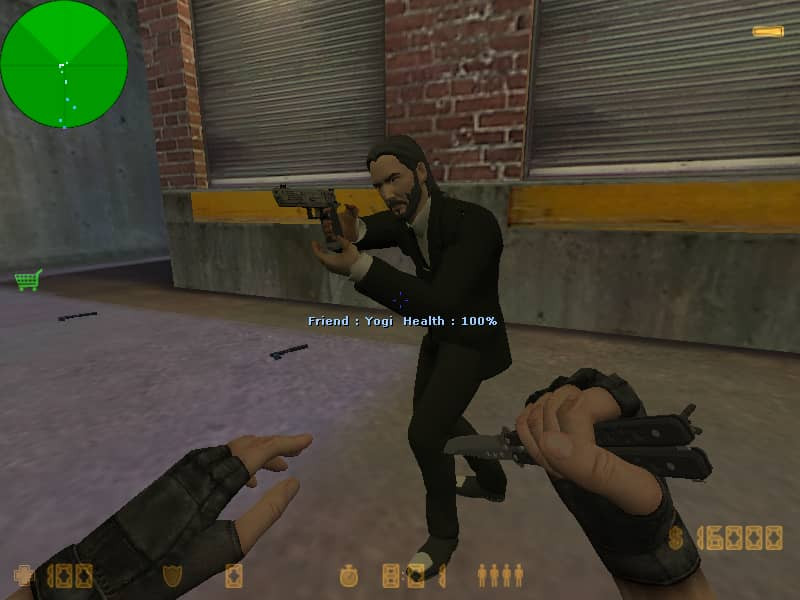
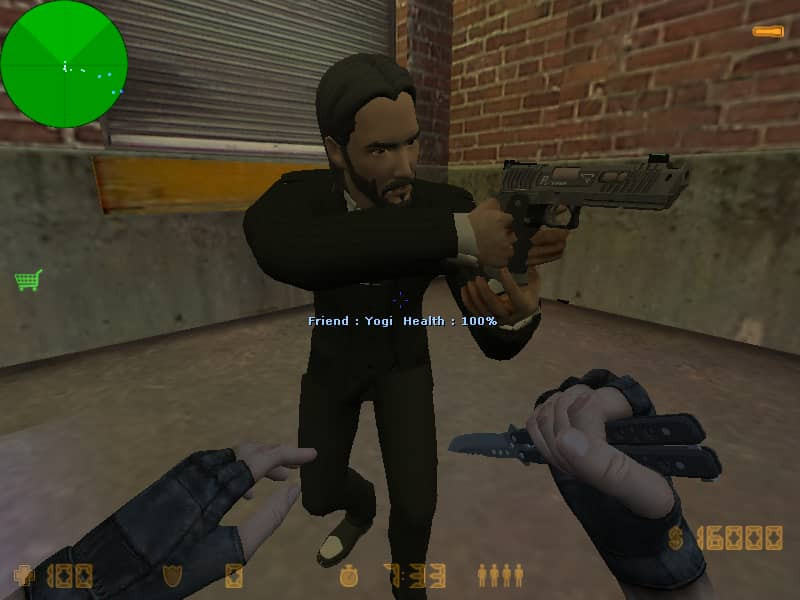
🔫 John Wick 4 Skin v1
Bring the legendary John Wick style to Counter-Strike 1.6! 🕴️🔫
📌 Description
Want to add a little John Wick style to your Counter-Strike 1.6 server?
This player skin is inspired by John Wick 4 and replaces the default Urban player model with a custom John Wick-inspired model.
🎮 Features
🔫 Inspired by John Wick 4
👤 Replaces the Urban player model
🎮 Made for Counter-Strike 1.6
📦 Easy to install
✨ Custom player model
🖥️ Suitable for servers using custom player skins
📂 Files Included
John Wick 4 skin v1
└── cstrike
    └── models
        └── player
            └── urban
                ├── urban.mdl
                └── urbanT.mdl
📁 Included Models
File | Location |
|---|---|
|
|
|
|
🛠️ Installation
Download the archive below.
Open it using WinRAR or 7-Zip.
Extract the
cstrikefolder into your Counter-Strike 1.6 directory.Choose Replace if Windows asks.
Start the game and join your server.
The final paths should be:
cstrike/models/player/urban/urban.mdl
cstrike/models/player/urban/urbanT.mdl
📥 Download
📦 File: john_wick_4_skin_cs_16_78b60.rar
⬇️ Download the file from the Files section below.
🖼️ Preview
Check out the screenshots above to see the John Wick 4 model in-game.
ℹ️ Information
🎮 Game: Counter-Strike 1.6
📁 Category: Player Models
👤 Model: Urban
🔢 Version: v1
📦 Format: .rar
🧩 Type: Player Skin / Model
💬 Enjoy the skin? Leave a Like and let us know which Counter-Strike 1.6 skins you'd like to see next! 🔥
GameLife România 🇷🇴
Gaming • Counter-Strike 1.6 • Community • Downloads
You may only provide a review once you have downloaded the file.
There are no reviews to display.