




Echo
Administrators
-
Joined
-
Last visited
Everything posted by Echo
-
Commanders! Update 2.4 brings a whole bunch of new features, including the introduction of light tank roles and changes to the game's matchmaker system. These will make battles more engaging and fair. Light Tank Roles A Clear Role for Every Light TankLight tanks have always been capable of scouting, supporting allies, and dealing damage—but not every vehicle excels at each task equally. Update 2.4 introduces three distinct roles to better reflect how different vehicles naturally perform on the battlefield while helping players understand their strengths at a glance. Scout: These light tanks specialize in reconnaissance and enemy detection. Their small size, excellent concealment, and outstanding mobility make them ideal for spotting enemy movements and gathering vital intelligence for the team. Although their firepower is generally more limited, skilled Scout players can have an enormous impact through vision control alone. Universal: These light tanks combine solid reconnaissance with dependable firepower, making them adaptable in almost any situation. While they won't outperform dedicated Scouts in spotting or Support vehicles in damage output, they can comfortably switch between both roles as the battle develops. They're an excellent choice for players who enjoy flexibility and adapting to changing situations. Support: These light tanks trade some concealment for greater offensive potential. Their larger size makes them less effective at competing for vision control, but they make up for it with powerful weapons, strong mobility, and the ability to quickly reposition to exploit enemy weaknesses. They're ideal for players who prefer dealing damage while still supporting their team through opportunistic reconnaissance. Fine-Tuning Every RoleTo support the new role system, many light tanks have received targeted balance adjustments. These updates strengthen the identity of each role by refining characteristics such as mobility, view range, survivability, and firepower, while preserving each vehicle's familiar playstyle. FULL DETAILS EU NA ASIA Matchmaker ChangesAs usual, changes to the matchmaker come in two batches: those to be deployed with Update 2.4 and those to be tested on select servers. Ready to DeployRole-Based LT Matching With the introduction of light tank roles, the matchmaker will consider each vehicle's role when building teams. The infographic below is an example of the effect of the changes. It shows (in green) the chance of the Manticore being matched against another Manticore before Update 2.4 (about 50%) versus the chance of the Manticore being matched against a light tank of the same tier and role after Update 2.4 (well over 90%)—for all maps and also separately for Malinovka and Prokhorovka (typical open maps where LT performance influences the battle outcome greatly). ALL MAPS MALINOVKA PROKHOROVKA Wheeled vehicles will continue to be matched only against other wheeled vehicles. No More Than Two Light Tanks per Team Alongside the introduction of light tank roles, we are also introducing a limit of two light tanks per team. Together with role differentiation, this change is designed to make light tank gameplay more consistent and enjoyable—for light tank players and their teams. From Update 2.4, the share of battles with four or fewer LTs and SPGs (combined) will increase from around about 80% to about 87%. Improvements to the Matchmaker Core The updated system can apply complex conditions regarding the number of vehicles of different types in battle. It also reduces the likelihood of players being temporarily denied queue placement during periods of high matchmaker load. The improved matchmaker core provides more consistent teams and a more rewarding overall matchmaking experience. It also allows us to introduce new features that were previously difficult or impossible to implement. Next Round of Testing in Update 2.4Less Map Repetition One of the first new features made possible by the matchmaker tech core upgrade is an improved map selection system designed to reduce map repetition. Its testing will begin with Update 2.4 on EU1 (starting with the update release), followed by EU4 and NA3 (starting approximately two weeks after the update release). The infographic below shows the likelihood of not encountering the same map in playing sessions of various length (measured in battles and based on our modeling projections)—before Update 2.4 (left) and after (right). For example, for sessions of 21 to 25 battles the likelihood of not getting a duplicate map jumps from 1% up to 69%, and for more common sessions of 11 to 15 battles it increases from 40% to 97%. LEARN MORE EU NA ASIA Roll out! View the full article

-
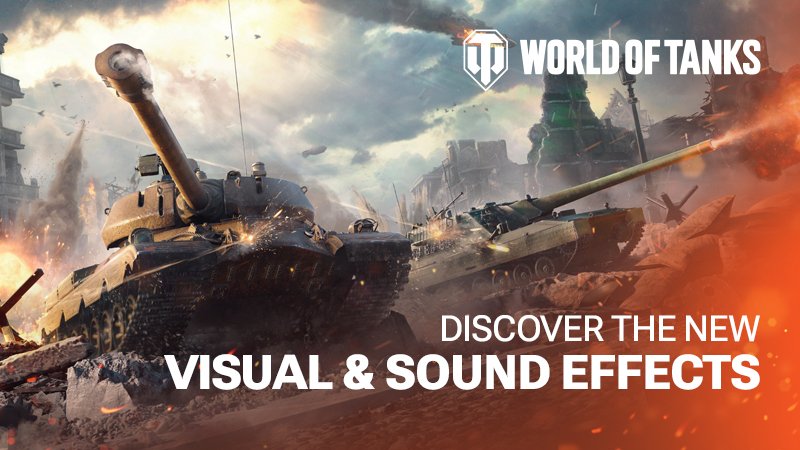
https://www.youtube.com/watch?v=MOcTtdOktZU&list=RDMM&start_radio=1&rv=JJsbG8n0xqMCommanders! Along with new Tier XI vehicles, an entirely new German heavy line, and improved matchmaking, Update 2.4: Overdrive delivers major audio and visual improvements, bringing battle immersion to a new level! Here are some highlights of the FX update: Combat Effects Overhaul: Visual and sound effects have received their biggest refresh since 2018. Redesigned muzzle flashes, impacts, ricochets, smoke, sparks, and armor deformation provide clearer combat feedback and help you stay focused in the fiercest clashes. Effect and 3D Attachment Visibility: This brand-new setting reduces visual effects in aiming mode, helping you keep your target in view without losing the spectacle across the battlefield. Dynamic Sound: Gunfire, echoes, and reflections now adapt to the surrounding environment, creating distinct audio experiences across open terrain and in enclosed spaces.Explore a set of comprehensive interactive demos and experience the reworked effects on our portal: EU NA ASIA View the full article
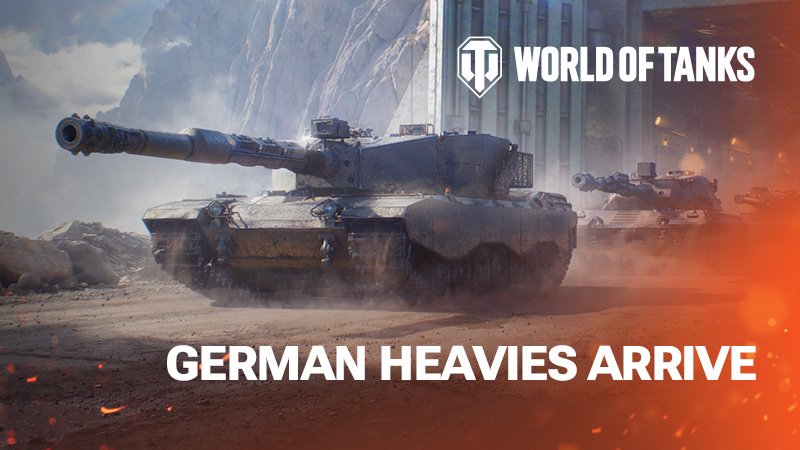
 Commanders! Four brand-new German heavies from an entirely new line are joining the battlefield in Update 2.4, led by the Tier XI Pz.Kpfw. Neu. Every vehicle in the branch features the unique Shell Calibration System. It allows you to quickly adapt your shell to each selected target in battle and deal with enemy armor more effectively. Shell Calibration System: Fine-Tune Your AmmoThe Shell Calibration System lets you fine-tune your shell for each opponent and recalibrate it on the fly. Break through tough armor and difficult defenses—all without changing shell types. React quickly to each specific combat situation and destroy your enemies more effectively! Pz.Kpfw. Neu: Top of the Branch This Tier XI beast combines excellent armor, great firepower, and an impressive 11° of gun depression. With Shell Calibration at its disposal, the Pz.Kpfw. Neu can adjust its ammo performance on the fly, giving you more combat options in every engagement. Kampfpanzer 67 This Tier X brawler features reinforced turret armor, great gun depression, and outstanding penetration. A dangerous frontline fighter, the Kampfpanzer 67 can break through enemy defenses and lead the charge. Versuchspanzer 57Thanks to its good 9° of gun depression, effective armor layout, and reliable firepower, this Tier IX vehicle can confidently use hills and ridges to win in positional duels. Pz.Kpfw. 55 With strong armor, a large HP pool, and forgiving handling, the Tier VIII Pz.Kpfw. 55 is the perfect introduction to the new German line's playstyle and the vehicles' signature Shell Calibration mechanic. Prepare to master the new German heavies, Commanders! LEARN MORE EU NA ASIA View the full article
 GL-Moderator, vei fi pe ce sectiune doresti!
Important Information
Account
Navigation
Search
Configure browser push notifications
Chrome (Android)
- Tap the lock icon next to the address bar.
- Tap Permissions → Notifications.
- Adjust your preference.
Chrome (Desktop)
- Click the padlock icon in the address bar.
- Select Site settings.
- Find Notifications and adjust your preference.
Safari (iOS 16.4+)
- Ensure the site is installed via Add to Home Screen.
- Open Settings App → Notifications.
- Find your app name and adjust your preference.
Safari (macOS)
- Go to Safari → Preferences.
- Click the Websites tab.
- Select Notifications in the sidebar.
- Find this website and adjust your preference.
Edge (Android)
- Tap the lock icon next to the address bar.
- Tap Permissions.
- Find Notifications and adjust your preference.
Edge (Desktop)
- Click the padlock icon in the address bar.
- Click Permissions for this site.
- Find Notifications and adjust your preference.
Firefox (Android)
- Go to Settings → Site permissions.
- Tap Notifications.
- Find this site in the list and adjust your preference.
Firefox (Desktop)
- Open Firefox Settings.
- Search for Notifications.
- Find this site in the list and adjust your preference.
