
Search the Community
Showing results for tags 'css_dust3_go'.
Found 2 results
-
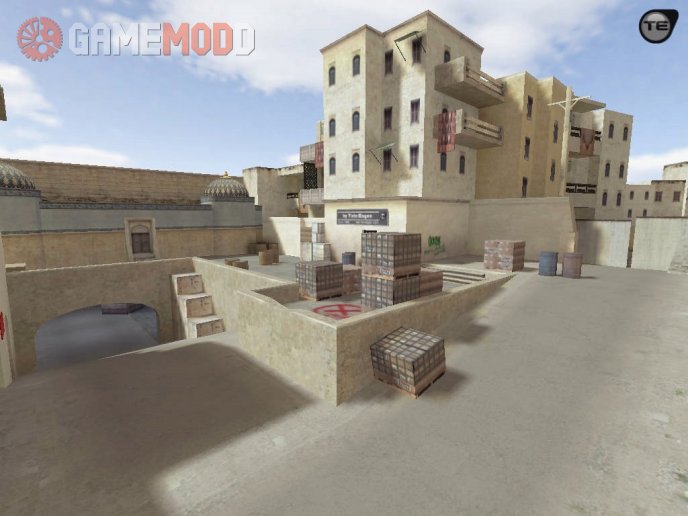
3 downloads
Author: Tatu Eugen, David Johnston Date: 17-06-2017 Maps Installation Guide for CS 1.6 We are glad to welcome you on our Internet portal. Right now we would like to touch on such an important topic - How to install maps for CS 1.6. Sooner or later you play on the same cards and, as a consequence, you start looking for new maps for CS 1.6. But some people have the same question - How to install maps for CS 1.6? And now we will tell you that yes how, and, in fact, there is nothing difficult. Once you read it, and then you will be able to install maps for CS 1.6 yourself without any help. So, let's get started. First we need a map. Download maps for CS 1.6. You can download the link on the right or find the same on the Internet. Before we begin the installation, we would like to tell you about what can be the folders in the archive with the penalty and their purpose. The "maps" folder is the card itself. The folder "gfx" is the graphic elements of the map. The "sound" folder is the sounds of the map. The "models" folder is the new map models. Folder "sprites" - sprites of the map. Below you can see the list of files with different extensions and the place where they need to be placed. The .txt file - "Your server / cstrike / maps" The .bsp file - "Your server / cstrike / maps" The .tga file - "Your server / cstrike / gfx / env" The .wav file is "Your server / cstrike / sound" The .spr file is "Your server / cstrike / sprites" The .mdl file is "Your server / cstrike / models" The .nav file - "Your server / cstrike / maps" The .res file - "Your server / cstrike / maps" File .wad - "Your server / cstrike" Besides all this I want to say one important thing. If there are folders in the archive with the downloaded map: maps, gfx, sound, sprites, models and files with the .wad extension, then all these folders and files can be downloaded to "Your server / cstrike" and confirm the merge of the folders. This is the most simple and convenient way to install maps for CS 1.6, but you want to notice that this method is only valid when there are these folders. (It does not have to be all the folders) After when you unzip all the files in the necessary folders, open the file "Your server / cstrike / addons / amxmodx / configs / maps.ini" and assign a new name to the card without an extension! Example: awp_india. Next, open one more file "Your server / cstrike / mapcycle.txt" and again, prescribe the name of the installed card without an extension. Installation completed. We wish you a pleasant game. If you suddenly have any questions about installing the card on the server CS 1.6, then ask them in the comments.Free -
View File css_dust3_go Author: Tatu Eugen, David Johnston Date: 17-06-2017 Maps Installation Guide for CS 1.6 We are glad to welcome you on our Internet portal. Right now we would like to touch on such an important topic - How to install maps for CS 1.6. Sooner or later you play on the same cards and, as a consequence, you start looking for new maps for CS 1.6. But some people have the same question - How to install maps for CS 1.6? And now we will tell you that yes how, and, in fact, there is nothing difficult. Once you read it, and then you will be able to install maps for CS 1.6 yourself without any help. So, let's get started. First we need a map. Download maps for CS 1.6. You can download the link on the right or find the same on the Internet. Before we begin the installation, we would like to tell you about what can be the folders in the archive with the penalty and their purpose. The "maps" folder is the card itself. The folder "gfx" is the graphic elements of the map. The "sound" folder is the sounds of the map. The "models" folder is the new map models. Folder "sprites" - sprites of the map. Below you can see the list of files with different extensions and the place where they need to be placed. The .txt file - "Your server / cstrike / maps" The .bsp file - "Your server / cstrike / maps" The .tga file - "Your server / cstrike / gfx / env" The .wav file is "Your server / cstrike / sound" The .spr file is "Your server / cstrike / sprites" The .mdl file is "Your server / cstrike / models" The .nav file - "Your server / cstrike / maps" The .res file - "Your server / cstrike / maps" File .wad - "Your server / cstrike" Besides all this I want to say one important thing. If there are folders in the archive with the downloaded map: maps, gfx, sound, sprites, models and files with the .wad extension, then all these folders and files can be downloaded to "Your server / cstrike" and confirm the merge of the folders. This is the most simple and convenient way to install maps for CS 1.6, but you want to notice that this method is only valid when there are these folders. (It does not have to be all the folders) After when you unzip all the files in the necessary folders, open the file "Your server / cstrike / addons / amxmodx / configs / maps.ini" and assign a new name to the card without an extension! Example: awp_india. Next, open one more file "Your server / cstrike / mapcycle.txt" and again, prescribe the name of the installed card without an extension. Installation completed. We wish you a pleasant game. If you suddenly have any questions about installing the card on the server CS 1.6, then ask them in the comments. Submitter COSMIN Submitted 07/24/2024 Category Maps