
Skip to content
View in the app

A better way to browse. Learn more.

GAMELIFE România

A full-screen app on your home screen with push notifications, badges and more.

To install this app on iOS and iPadOS
  1. Tap the Share icon in Safari
  2. Scroll the menu and tap Add to Home Screen.
  3. Tap Add in the top-right corner.
To install this app on Android
  1. Tap the 3-dot menu (⋮) in the top-right corner of the browser.
  2. Tap Add to Home screen or Install app.
  3. Confirm by tapping Install.

Unbann ?

Featured Replies

  • Administrators

...

@COSMIN told you how to make this unban request here: https://gamelife.ro/forum/index.php?/topic/6876-model-cerere-unban-unban-request/
you must follow the required model.


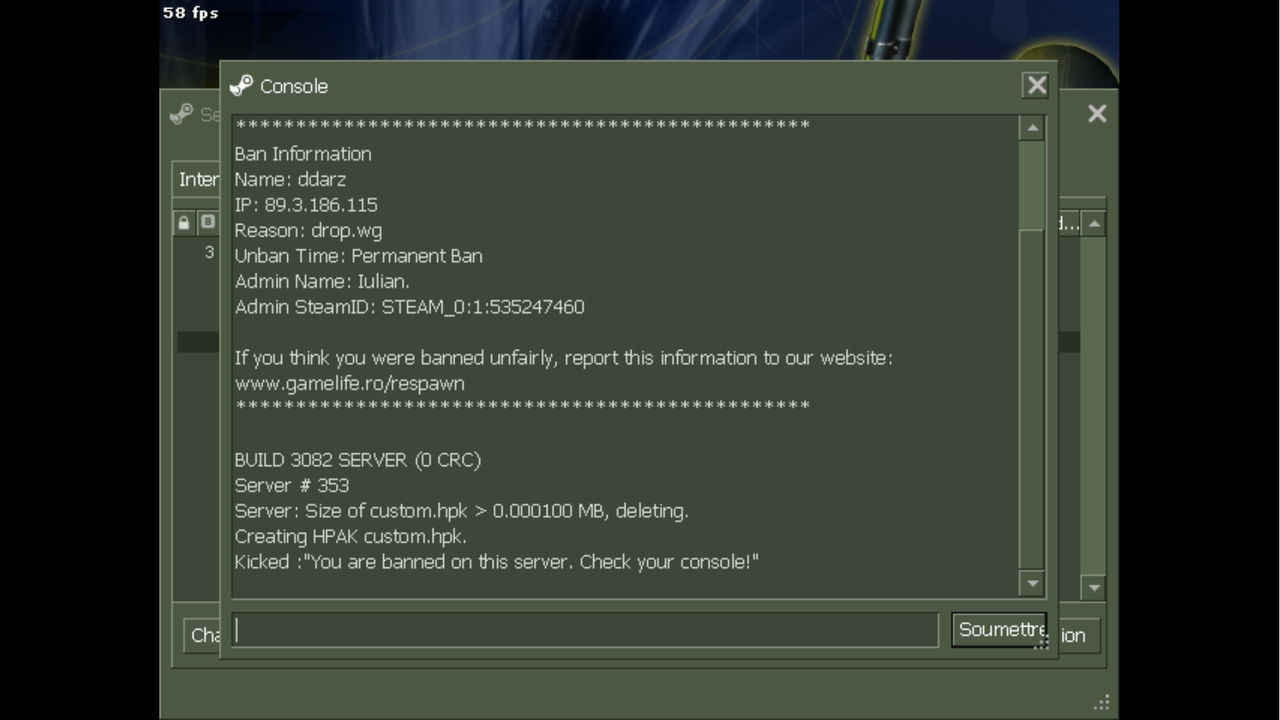
and... a copy > paste from the console would have been enough, has all the necessary information.


we need to copy certain data (text) because we can't write what we see in an image

requires effort for an effortless unban request

we use the information to search in the logs to see what happened and to be able to unban you


normally i should be against this request

because you did not comply with the requested model

but... let's discuss the situation a little
 

i agree with @darzA regarding banning for no.wg or drop.wg
this is my honest opinion, further... it's not up to me


however, the decision remains at the discretion of @COSMIN or @Iulian. (  because he banned you )


Best Regards, Alex ( ak @LeX ) - Staff RESPAWN


277198.png?1730931816

  • Author
  • Members
 

name : d a r z A D E S Q U E ^ 

steamID : STEAM_0:1:535247460 

reason : drop wg

unban time : permanent ban

admin name : Iulan.

Guest
This topic is now closed to further replies.

Recently Browsing 0

  • No registered users viewing this page.

Account

Navigation

Search

Search

Configure browser push notifications

Chrome (Android)
  1. Tap the lock icon next to the address bar.
  2. Tap Permissions → Notifications.
  3. Adjust your preference.
Chrome (Desktop)
  1. Click the padlock icon in the address bar.
  2. Select Site settings.
  3. Find Notifications and adjust your preference.