

th3#afk
Hall Of Fame
-
Joined
-
Last visited
Everything posted by th3#afk
-
[data-focus-scheme="dark"] { color-scheme: none; } IntroductionIn Darktide we wanted all sounds to feel coherent and real, even though the Warhammer 40,000 universe is full of concepts based on fiction. It’s very easy as a sound designer to fall into cliches when making futuristic or fictive designs. You know, a sci-fi gun doesn’t have to go “pew-pew” when you shoot it. Me and the team actively avoided these cliches, because first of all it’s boring, and second of all, the Warhammer 40,000 universe has its own unique sounds. My name is Johan W., one of the sound designers here at Fatshark. And in this dev blog I’m gonna go into some details in the process of creating the sound direction for Darktide. How It StartedA good place to start is to bring up Anders D. G., our Game Director. He was the one sitting on the vision for Darktide. We had a lot of chats about sound and music in general and shared references about how the world of Darktide should feel. To me personally though, everything kind of started with a very particular sound. It’s a synth preset I did. I named it the Darktide Distortion Bend. There was nothing special about it really, but each time I played it, I got into a headspace I liked. It sounded dark and gritty, it had an analogue synth feel and it felt powerful and dangerous. This is a bit fuzzy I know, but I thought that described my idea of Darktide pretty well. From there, I started comparing everything I did to see if they’d fit together. You can actually hear it in the very first teaser trailer we did (that wobbly distorted revving sound around 01:05 in the video). Warhammer 40,000: Darktide - Official Teaser Trailer And in the second trailer… Warhammer 40,000: Darktide - Official Gameplay Trailer And in the sound of you dying… https://drive.google.com/file/d/1DIQNC3yeNAABI7q42VaQvzp9nFI8cOmp/view?usp=drive_link The distortion bend-sound was actually my starting point even for the Lasgun, which we knew was gonna be one of the most important weapons to get right from the start. And we knew for certain that it wasn’t gonna sound like a generic sci-fi laser weapon. For that reason it went through tons of iterations just to find the balance between grittiness, punchiness and finding out what the “las”-part of the weapon was gonna sound like for Darktide. We wanted to create a lasgun sound that remained faithful to the source material. It also had to be at least somewhat satisfying to use, if anyone was gonna use it. I ended up working with mostly analog noises from electrical gear, some frying pan noises and some real gun sounds as well, just to up the realism. I decided to focus on the heat from the photons, instead of the “crack” that has sometimes been described (although there are a lot of cracking sounds when you’re running out of ammo instead). (Shoutout to my previous lead/boss Danijel Djuric who did the first prototypes for the Lasgun. I continued everything where he left it when he left the company.) https://drive.google.com/file/d/1UKBHbp8CaDEPW6WsA68GJHn0TUJRiT3r/view?usp=sharing When I say analog noises, I mostly talk about this set of module synths that served me very well for Darktide. Not just for Lasguns but almost every psyker sound has something to do with this one. Once a few more areas of the game started to shape up. We started to more accurately grasp what the sound of Darktide should be about. Eventually I tried putting it into words. The idea was that every sound we put in the game should follow this set of guidelines. I’m just gonna copy paste what was written. It was only meant internally for the sound team. It’s very technical and perhaps super boring to most of you. But I feel like some of you might find it interesting. So here we go! The Sound Direction of DarktideThe soundscape of Darktide is made out of metal, dirt, analogue gear, broken electronics, old huge machines. Nothing is well oiled, so heavy squeak, creek, stress and spark sounds are a big part of the soundscape. “High-tech” doesn’t belong in this world. If something is digital it should feel like an old computer with broken harddrives and clunky buttons. It’s much closer to cyberpunk than sci-fi in that sense. High-pitched beeps and classic laser type of sounds are strictly forbidden, pure heresy. With Darktide we are not just creating a game-play experience, we are bringing a universe to life. That mindset should be reflected in how we design this game. It should feel like we are in a place too large to grasp, and the player is just a tiny piece in a large story taking place. We do this by emphasizing the scale of things. Oversized RealismEvery single worldized audio source in Darktide should sound real, even though we are making a surreal game. We also want most things in Darktide to sound huge, larger than most items that exist in real life. This is a challenge, because it sounds contradictory. How do we create realism if there’s no real-life reference to compare it to? Here’s the answer… If a sound has a natural frequency balance, dynamic range and width that corresponds to the distance it’s being heard from, it’s going to sound realistic. So if we are designing, say, a pistol sound, we should first imagine it being at least twice the size of a real-life pistol and then reflect on how that would sound if it was real. If we are able to create a huge pistol sound, but also stay within a realistic frequency balance, dynamics and width, it’s going to fit into the Darktide universe. Even Magical Sounds Should Be OrganicEvery concept that involves unrealistic materials or sources of power should still be based on something organic. For example Las-weapons are based on electric sounds and old electronic gear. That way we can make it sound organic because there are a lot of real life recordings to use and get inspiration from. Plasma-weapons are based on water and some analogue synthesis. The warp mainly consists of pulsating analog circuits and glitches. This way we can maintain the feeling of realism even with the most unrealistic concepts. You will also much easier get high quality textures in the sounds when using real recordings as assets. Dark and Gritty (But Not Harsh to Listen to)Darktide should sonic-ally be pleasant on the ears, but nothing in this universe should feel pleasant. A successful example of this is when a sound feels gritty but not harsh on the ears. It’s very important to separate the sound design from the mix-quality of the sound. Both aspects need to be fulfilled in order to fit in the game. Always reflect before committing on a design choice, “Could I make this sound feel even darker?” Usually the darker the better. If a sound feels cute, happy, funny it doesn’t belong in this world. The only occasion we can allow ourselves to be comical is a dark sense of humor. In Darktide you can never go too horrifying or brutal. Spatial AudioThe whole soundscape of Darktide is based on the principle that everything that can be spatialized, should be spatialized. Always 3D over 2D as long as it makes sense. Even stingers should strive towards always being 3D because we want to present it as an in-world sound. We wanna avoid non-diegetic sounds, even if that is the more traditional way of doing it. The only exception should be UI and player experience sounds. Prioritize Game-Play in the MixEven if the design goal for Darktide is immersion and realism, game-play needs to be the priority when necessary. The human perception is limited and can’t hear everything at all times, especially from just a pair of speakers. So priorities need to be made in order to keep the mix readable. We should always strive for danger sounds (things that can hurt the player) and game-play informative sounds (e.g. hits, abilities, stingers, to be prioritized. It’s incredibly complex and we don’t always get it right, but we try our best. The CombatOkay, so combat… The direction for the combat sounds went through some turns during production. We started off with the goal of making it feel as real as possible. Battlefield was a reference in several discussions about how the guns should feel (not sound). We thought that pure realism would fit the game direction perfectly, painting the perspective of the regular people, etc. If you’re just a disposable soldier, the gameplay should probably feel like a battlefield was our thinking. And the enemies should be loud and powerful to convey your insignificance even more. This was a total 180 turn from the Vermintide sound design, where you are this cinematic hero where your actions are loud, fun and powerful. I remember this shift in design approach when I first got my hands on the thunder hammer. I got the brief from Mats (combat designer) that it should sound like a lightning strike right in front of you and it should feel like you’re just melting everything. I knew I couldn’t do it realistically, it had to be cinematic and fat as hell. By that time, we had started to work with some “kill confirm” sounds. I wanted to make them big and satisfying too in a way that could work alongside big thunder hammer sounds. All of a sudden we started to enter a territory that was closer to Vermintide where we had big and punchy sounds during combat, and I think everyone agreed that this was just so much more fun to play with. I still wanted to restrain us and not just drop the realism part. I still believed it was possible to do both. Here’s where the “oversized realism” direction I talked about earlier started. I’m glad we ended up putting in so much effort in making the combat feel fun and rewarding, shout out to Sebastian G. who helped out so much on the gameplay code side. He was the one enabling me to add different hit sounds based on where you hit, how hard you hit, with what you hit and what you hit it with, if the enemy died from the hit and so on. It really helped us make the combat more immersive and satisfying. I really enjoyed the detail that you get different kill confirm sounds based on what enemy type you killed. All these small parts came together pretty good, it just makes you wanna smash things, am I right? The EnemiesThere is a lot to talk about the enemies. I won’t go into detail on how they were designed. That’s something we can talk about in another dev blog as it wasn’t me who did most of them. Anders N. did most of the work here, and of course our great VO designers David W., Ola and David F… My main focus was to make them work in the mix, and make sure the sounds fit the gameplay loop. This might have been the most challenging part of the whole sound mix actually. If you miss a sound cue during a mission you might die, but if the game is just full of sound cues all the time, they’d stop being cues and just turn into noise. You’d also lose most of the immersion if we went full-on arcade with stingers all over the place. We had to be very selective of what to present to the players, but never select the wrong things. Anyway, instead of putting the main focus on making the most sophisticated hierarchical mixing system, I wanted the main problem solving to take place in the actual sound design. For example, instead of making a trapper three times as loud as a mauler in order to hear, we wanted to make sure they didn’t even compete in the mix. Because sometimes you’d even wanna hear the mauler over the trapper. Basically the goal was that multiple enemy sound cues could play simultaneously and still be readable. To try and achieve this we had to make sure each enemy not only had unique sounds, they also had to be differentiated in terms of timbre, pitch, duration, loudness, etc. as much as possible. We had to use all kinds of mixing and psychoacoustics tricks to make them stand out from each other as much as possible. To fully understand why and how this works you need some basic understanding of sound theory and acoustics. This took us a long way, but more was needed to be done in a chaotic game such as Darktide. Another way we worked to make the special enemies stand out in the mix was to just have them behave differently game-play wise. Poxbursters are designed to be heard from a distance so you have time to shoot it. Trappers are supposed to be sneaky so they are heard mostly when they are close by. Mutant chargers are meant to be heard over time with more low frequency content. Snipers with a very specific “dodge or die” sound that only happens once. Chaos hounds have a distinct spawning sound, which is supposed to make you aware that dogs are coming, then you have to wait and see where they show up. Other enemies like the flamer are purposefully more reliant on the visuals to not bloat the mix too much. Same goes for bosses, you don’t really need super clear sound cues for them, because you can’t miss them. All these small parts, a lot of mixing, (which I won’t go into here), makes the enemies audible even in the most chaotic moments. That was our goal at least. The LevelsThe ambience of Darktide had a pretty clear direction from the beginning. It was also one of those things we could start to work on before a lot of the game mechanics were fully in place. We knew that it had to feel huge, industrial and obviously grimdark. But we wanted to do it realistically. Usually when creating big environments you try to utilize nature and animals to make the space feel alive. That wasn’t really possible in Darktide. You are almost never outdoors, everything is made out of metal and seemingly no wild life. To make the environments feel alive we had to use other tools. As I described earlier we wanted the players to feel small and vulnerable in this world. To further convey this we focused on adding sounds that felt huge and distant. Big metal stress sounds, huge fans and machinery going off in the distance. In some areas there is warfare going on, or speakers playing propaganda, but it’s all fairly distant sounding. I think that just adds to this feeling of size to the place. And also your insignificance as a player, the world is simply too big to care for you. Maybe my colleague Jonas Hellberg can tell you more about the level events and how he makes huge world sounds in another dev blog. The propaganda played out in the levels is actually a quite fun medium that we’ve used a lot to further tell a story about the different areas of Atoma. What’s being said from them is based on missions and if the Imperial cultists are occupying that area. On some missions it is cultists that play their own propaganda through the PA-systems. Another important aspect of the level sound design is that we kept a very high quality of the reverbs, which are all impulse responses of real spaces. Every ambience loop is in surround formats and we use sound portals to properly propagate the sounds through corridors, open doors, windows etc instead of them traveling directly through the walls. That is a big upgrade from the Vermintide games that I think made a huge difference in the end. The MusicThe music of Darktide is today a huge part, some say the biggest part of Darktide’s sound. And it’s all thanks to our composer Jesper Kyd, who exceeded our expectations to say the least. But this wasn’t the case throughout the whole production. Jesper came in fairly late in the production process. We released our first three trailers without a composer just because we hadn’t found the right one yet. Who the hell did the music for the first three then you might ask? Well that’s not important. Let’s just agree that it got so much better when we finally decided to ask Jesper. Anders De Geer presented our vision, we gave him some more sound mix pointers, and he was able to translate it into music so well. We wanted gritty organic analog sounds, and he had a bunch of old analog synths that he was itching to use. A match made in heaven? He got a lot of creative freedom, since we kind of had a very similar vision of the game we never really had to direct him much at all. His work kind of just molt together with our sound design, and there we had the sound of Darktide presented to us for the first time. Alright, well, that’s it for now! I hope you found this somewhat interesting, and hopefully It revealed some more insight into how I (along with the rest of the team) shaped the sound for Darktide that we all know and (hopefully) love. It took a lot of effort to ship this game, from a lot of talented people. I’m so proud of what we’ve done thus far. And a lot more is to come! If you have any questions about some of our design decisions, or any of the more tech-specific words I used, or if there is more you want to know on the topic, please comment below! Me or someone else in the team would happily talk more on any topic, preferably sound related. I’m sure StrawHat will pass them along to me and I’ll do my best to respond. Ok thanks bye! – JohanVezi articolul complet
-
[data-focus-scheme="dark"] { color-scheme: none; } Hello everyone, Mitch here, Design Director on Total War: Warhammer III, back with another dev blog - this time for patch 5.3! Having now seen your reaction to patch 5.2 I can say it’s been really wonderful; it was inspiring to see all of your reactions to the new content, reworks and fixes and in particular your excitement for the future of the game. Speaking of the future, we’re already well underway with patch 5.3 and so I’ll walk you through the changes and additions coming as part of our next patch, before that touching on the topic of game balance as well as taking the chance to acknowledge some of the feedback we’ve seen following 5.2 and our recent Dev Chat video where among other things we asked for more of your thoughts. 📜 Read full 5.3 Dev Blog here —The Total War Team For the latest news and announcements, don't forget to visit our official social channels. Steam Discussions X Facebook Instagram DiscordVezi articolul complet
-
(Image credit: gedu and fontar) It's time to ping your TF2 buddies and scroll through your Steam friends to muster the best 9 gamers to compete in the propugs.com Fall Highlander Cup 2024! While other leagues clock off for the year, this new cup can satiate your TF2 cravings whether you are an established team or a fresh face hungry to get started in competitive TF2! The top teams in European Highlander can battle it out for a 100+ key prizepool and other prizes! New players can also join the fun and be ensured of a healthy competition with a dedicated Newcomer Division. Not only can rookies make some new buddies and learn the ropes of 9v9 Highlander, but the legendary SDCK! Pyro, GardenFungus, has also provided a 45+ key prizepool specifically for the Newcomer Division! Sign-ups will run until November 27th, with tournament matches being played between November 29th and December 19th. The most highly anticipated of these will be broadcast live on KritzKast. All players (even Medics!) can submit their best plays from the tournament, with a chance to make it into the official fragmovie! In the meantime, players can sharpen their skills with pick-up games for 6v6 and Highlander. Join the propugs.com Discord to get involved and find all the information for the propugs.com Fall Highlander Cup 2024! View the full article
-
The Call of Duty Endowment (C.O.D.E.) Endeavour: Tracer Pack In Partnership with ThruDarkEndeavour through darkness for U.S. and U.K. military veterans by purchasing the Call of Duty Endowment (C.O.D.E.) Endeavour: Tracer Pack. This in-game content features the Endowment’s first ever U.K. operator skin. The pack’s design has been guided by ThruDark, a high-performance British outdoor apparel brand co-founded by former Special Forces operators, Anthony “Staz” Stazicker CGC and Louis Tinsley, on the principle that veterans are cut from a special cloth. With a combined 28 years of military experience the pair personally design, develop and test each piece of ThruDark apparel to the most rigorous of standards. The pack includes a ThruDark insignia Weapon Charm, Weapon Sticker, Spray and more. Visit http://www.callofduty.com/endeavour to purchase the pack on Friday at 10AM PT. Each purchase will unlock the following in-game items for Call of Duty®: Black Ops 6 and at Season 01 Launch for Call of Duty: Warzone™. Stay tuned for the world premiere of the official trailer of the Endeavour: Tracer Pack, launching Friday on the Endowment’s TikTok, Instagram, X (formerly Twitter), and Facebook. ThruDark Co-Founders, Staz and Louis, worked closely with the Call of Duty Endowment to develop a pack inspired by their experiences. When it came to outfit the operator, they catered the look to the 1990s SBS teams who specialized in Maritime Security Operations. The C.O.D.E. Endeavour: Tracer Pack includes: “SC1” Operator Skin: Love many, trust few and always paddle your own canoe with the SC1 Operator Skin. “Ghostly Guile” LR 7.62 Sniper Rifle Animated Blueprint with Tracers: Not to be trifled with, the Ghostly Guile Animated Blueprint with Tracers is both deadly and discreet. “Seaworthy Strength” AMES 85 Assault Rifle Animated Blueprint with Tracers: Harness lethality from the darkest depths with the Seaworthy Strength Animated Blueprint with Tracers. “Not Alone” Weapon Charm: Never stand alone against adversity when equipping this Weapon Charm. “Going Commando” Spray: Enemies will watch their backs and check their corners when seeing this Spray. “Dead of Night” Animated Emblem: Look sharp in the dead of night with this Animated Emblem. “Feeling Froggy” Weapon Sticker: Dive and survive in the deepest of depths with this Weapon Sticker. “Wolf of Metals” Animated Calling Card: Devour all that stands in your way with this Animated Calling Card. “Look Sharp” Finishing Move: Enemies will lose their breath when seeing this Finishing Move 1 Hour Double Weapon XP 1 Hour Double XPThis pack is available on Friday, October 25th at 10AM PT for Call of Duty: Black Ops 6 and at Season 01 Launch for Call of Duty: Warzone. Visit http://www.callofduty.com/Endeavour to purchase. Activision will contribute 100% of the net proceeds from every Endeavour: Tracer Pack purchased to the Call of Duty Endowment. The Endeavour Apparel Collection For the first time ever, the Call of Duty Endowment is launching an apparel line alongside the in-game pack. The exclusive ThruDark collection draws inspiration from the brand’s founders’ service in the U.K. Special Forces and Call of Duty: Black Ops 6, with a percentage of proceeds going towards the Endowment charity. The ThruDark X Endowment hoodies, t-shirts, and caps incorporate elements of the pack in their design and every purchase comes with a free code to Call of Duty Endowment (C.O.D.E.) Endeavour: Tracer Pack. ICYMI, check out the announcement at #CODEBOWLV in August. To view the full limited edition collection that just launched, please visit http://www.thrudark.com/CallofDutyEndowment while supplies last. About ThruDarkThruDark is a high-performance British clothing brand that launched in 2018 with a bespoke summit suit that broke world mountaineering records before launching a limited range of cold weather expedition gear. Since that time, ThruDark’s outerwear offering has expanded to include the latest in activewear innovation, hot weather clothing, combat sports attire and premium apparel alongside its continued development in the world of winter wear. All of ThruDark’s technical products are tested personally in real world conditions by its founders, using their combined 28 years of military experience. USAA GiveawayAs a special thank you for their service, the Endowment and USAA are offering free C.O.D.E. Endeavour: Tracer Packs to U.S. military and veterans when the pack launches in Call of Duty: Black Ops 6 this Friday, October 25 at 10am PT. To redeem, please visit http://www.callofdutyendowment.org/usaa for more information this Friday. While supplies last. Quantities limited. ID.me account required. See official rules here. About The Call of Duty EndowmentThe Endowment has placed more than 140,000 veterans in jobs since 2009. That’s equal to 23 vets placed per day over the last 14 years, creating more than $7 billion in economic value for U.S. and U.K. veterans and their families. Last year, the average cost to place a veteran in a job was $618, about 1/19th the cost per placement of U.S. government’s efforts. For more information about the Call of Duty Endowment, visit the website or explore more on TikTok, Instagram, X (formerly Twitter), and Facebook. © 2024 Activision Publishing, Inc. ACTIVISION, CALL OF DUTY, CALL OF DUTY WARZONE, and CALL OF DUTY BLACK OPS are trademarks of Activision Publishing, Inc. All other trademarks and trade names are the property of their respective owners. For more information, please visit http://www.callofduty.com/ and http://www.youtube.com/callofduty, and follow @Activision and @CallofDuty on X (formerly Twitter), Instagram, and Facebook. For Call of Duty Updates, follow @CODUpdates on X (formerly Twitter). View the full article

-
[data-focus-scheme="dark"] { color-scheme: none; } Heyo Everyone, Hotfix #51 (aka 1.5.4) is out now and you can find the patch notes for it below! It is out now on Steam and it will shortly follow on our other platforms. Render Settings ResetWith 1.5.0 and the introduction of FSR 3.1 Frame Generation we accidentally defaulted the Frame Gen setting to be on. This was unintentional and we apologize for the inconvenience. With this hotfix, the launcher will be doing a proper re-detection of your render settings and reset the frame generation setting to off. This applies even if you have explicitly turned on Frame Generation. You will have to turn it on again, and you might want to tweak other render settings to your liking after the first time you launch the game. Deprecating Fullscreen Exclusive (FSE) Display ModeWhat?With 1.5.4 we will be deprecating our Fullscreen Exclusive (currently named "Fullscreen") display mode and adding the ability to set custom resolution for the "Borderless Fullscreen" mode. You will not see any performance degradation from this change. Why? We have now added the ability to set custom resolution for the "Borderless Fullscreen" which was the last remaining blocker for making the "Borderless Fullscreen" fully usable. The Fullscreen Exclusive display mode no longer serves a purpose when it comes to improving the performance of Win10/DX12 exclusive titles after Microsoft's improvements to borderless window modes*. For quite some time we have seen a lot of issues connected to the Fullscreen Exclusive display mode. With the latest release we also added FSR3.1 FG which added even more crashes with a similar connection to the Fullscreen Exclusive display mode and it is clear that the focus on testing for Fullscreen Exclusive display modes from our partners is dropping. The borderless window approach to fullscreen shows significantly more stable and user friendly behavior for players that frequently alt-tab in and out of the game.How?Going forward we are renaming "Borderless Fullscreen" to only "Fullscreen" and will have only two display mode options "Window" or "Fullscreen". We are also decoupling the resolution from the window size, meaning that you will now be allowed to set any resolution for the game when using the new Fullscreen (previously "Borderless Fullscreen") mode. Previously you were always locked to using the desktop resolution if you used the "Borderless Fullscreen" mode. This caused players that had a 4k desktop resolution but hardware that wasn't able to push the game to sufficient frame rates at 4k, to be unable to use the "Borderless Fullscreen" mode. * https://devblogs.microsoft.com/directx/demystifying-full-screen-optimizations/ Bug Fixes and Tweaks Fixed an issue where some of the weapons with a Special activate action failed to correctly refresh their activation if the Special action was performed again while in the active duration of a previous Special activation. Fixed an issue where shots from the M35 Magnacore Mk II Plasma Gun failed to penetrate Bulwark shields. Fixed an issue where the Valkyrie briefings would sometimes not finish before loading into a mission. Fixed an issue where you would occasionally see a subtitle when getting close to a character in the Mourningstar. Fixed an issue where subtitle text from Morrow would sometimes remain displayed after the VO ended. Fixed some issues with Darinda Dukane’s animations. Updated the description of the Ceaseless Barrage blessing to correctly match the gameplay mechanics. Updated software that should address the issue of players being unable to see or type in chat. Fixed a crash related to enemy spawning that could occur during certain mission events. Fixed an issue that could cause a crash when navigating the Mastery menu using a gamepad without any Blessings present.Cosmetic Fixes Fixed an issue where some gaps would appear while wearing the Zealot “Pious Banneret's Garb” upper body cosmetic. Fixed an issue where the rivets on the Veteran “Lucius KM VIIIB Death’s Head” and “Lucius MK IIIA Death’s Head” headgear cosmetics wouldn’t always line up correctly, creating incorrect shadows. Made slight changes to the collar of the Veteran “Krieg Greatcoat MkI” upper body cosmetic to avoid clipping with the “Lucius KM VIIIB Death’s Head” and “Lucius MK IIIA Death’s Head” headgear cosmetics. Fixed an issue where the shoulder pad on the Psyker “Kobaloi Topcoat” upperbody cosmetic would appear to be offset from the arm. Fixed some clipping issues while wearing the Psyker “ "Timeworn" Psyker Jerkin (Taros Tan)” upper body cosmetic together with the “ “Timeworn” Psyker Regalia” lower body cosmetic. Fixed the insignia on the Zealot “MK IX Pot Helm and Rebreather” headgear cosmetic being depressed into the helmet. Fixed an issue where certain faces would lightly clip into the visor of the Zealot “Votarist’s Pot Helm with Rebreather” headgear cosmetic. Known IssuesFsr 3.1 Frame Generation Does Not Do Anything During Excessive Fullscreen Effects FSR 3.1 Frame Generation excludes the entire screen from generation when there are a lot of fullscreen effects playing that impact all pixels on screen. This will cause frame gen to just copy the previous rendered result which results in the framerate looking like framegen is disabled while frame counters saying that it is running correctly. CURRENT WORKAROUND: If players disable Lens Quality, it addresses this issue for the time being.Penances Shown As Not Completed While migrating to the new Itemization system, there is a chance for a visual bug to occur where players with a lot of progression on their weapons might not see their Penances displayed as complete. This is only a visual issue which might occur when opening the Penances menu for the first time. Closing and opening the UI again will update it properly. UPDATED: A fix for this will be shipped with the next hotfix.Incorrect Rounding of Weapon Stats On uncommon occasions when looking at a weapon card, the total value of the potential stats distribution shown might add up to 1% higher or lower than the maximum (380). UPDATED: A fix for this will be shipped with the next hotfix.Misaligned Weapon Skins in the Penance Preview Squares There are some weapon skin rewards in the penance previews that are misaligned or don’t fit in the square. Vezi articolul complet
-
[data-focus-scheme="dark"] { color-scheme: none; } Heya Everyone, We are putting out a hotfix this week which might require players to tweak their render settings again when first launching the game on PC. When Unlocked & Unloaded came out last month, we added FSR 3.1 Frame Generation. As many noticed, this was defaulted to “on” and it caused issues for some players. Honestly, this was unintentional, as it was not meant to be defaulted to on. For this next Hotfix #51, we will update the settings version which will force the launcher to re-detect players’ render settings, this will reset the FSR3.1 frame generation to off. This is partially to revert the defaulted frame generation setting and partially to clean up resolutions and render settings to prepare for another change coming with the hotfix. When launching the game for the first time, the launcher will show a pop up to notify the user that settings have been reset based on hardware detection. Some players might want to go and tweak settings based on their own preferences. This note will be included in the patch notes this week for Hotfix #51, but we wanted to make sure this isn’t missed by players and it is clearly communicated ahead of time! Thank you, The Darktide Team Vezi articolul complet
-
[data-focus-scheme="dark"] { color-scheme: none; } Lord Captains! As the Grim Darkness Challenge arrives in the Koronus Expanse, so too does the exclusive Twitch Drops campaign! To activate Drops and receive items, you will need to link your PC account to Twitch. Simply enter the game and locate the special chest inside the Lord Captain’s quarters. Click on it to interact and then follow the instructions on our website to link your account. Once your account is successfully linked, all you need to do is watch any of the Warhammer 40,000: Rogue Trader streams on Twitch with Drops enabled for at least an hour, and the rewards will be yours to enjoy! There are three unique in-game items up for grabs: a pack of mind-twitching grenades, a helmet of tactical superiority, and a special servo skull (rumour has it, the skull has a few words for those who decide to click on it). The items will be dropped right into your inventory - no need to do anything! Also, these items are not limited to one playthrough and will replenish if you choose to start a new game. The campaign starts with the Grim Darkness Challenge on October 22nd and will end on November 4th. Find more detailed information on our website: https://roguetrader.owlcat.games/drops May luck follow our Grim Darkness Challenge contestants, and may the Emperor protect them on their perilous adventures! Vezi articolul complet
-
[data-focus-scheme="dark"] { color-scheme: none; } Lord Captains! As the Grim Darkness Challenge arrives in the Koronus Expanse, so too does the exclusive Twitch Drops campaign! To activate Drops and receive items, you will need to link your PC account to Twitch. Simply enter the game and locate the special chest inside the Lord Captain’s quarters. Click on it to interact and then follow the instructions on our website to link your account. Once your account is successfully linked, all you need to do is watch any of the Warhammer 40,000: Rogue Trader streams on Twitch with Drops enabled for at least an hour, and the rewards will be yours to enjoy! There are three unique in-game items up for grabs: a pack of mind-twitching grenades, a helmet of tactical superiority, and a special servo skull (rumour has it, the skull has a few words for those who decide to click on it). The items will be dropped right into the special chest inside the Lord Captain’s quarters - no need to do anything! Also, these items are not limited to one playthrough and will replenish if you choose to start a new game. The campaign starts with the Grim Darkness Challenge on October 22nd and will end on November 4th. Find more detailed information on our website: https://roguetrader.owlcat.games/drops May luck follow our Grim Darkness Challenge contestants, and may the Emperor protect them on their perilous adventures! Vezi articolul complet
-
Earning Calling Cards Calling Cards and their corresponding Challenges are grouped into categories, and each category has multiple sets of Calling Cards to earn and complete. Complete a Challenge set by earning every individual Calling Card in the set to obtain the Animated Mastery Calling Card for that set. Prestige Challenges Career and Battle Hardened are not the only Calling Card Challenge categories in each mode available at launch: players who Prestige will also gain access to an additional Challenge set for Multiplayer, Zombies, and Call of Duty: Warzone (Season 01) each time they enter a new Prestige. With 10 Prestiges and Prestige Master, that means an additional 11 Challenge sets to complete in each mode for players dedicated enough to make it to Prestige Master. Dark Ops ChallengesIt wouldn’t be a Black Ops game without Dark Ops Calling Card Challenges! Not seen in a Call of Duty since Black Ops Cold War, these involve tasks so mysterious, the unlock criteria is [[REDACTED]] until you complete them! Are you up for the challenge to prove yourself worth of Dark Ops Mastery? For the first time ever, Dark Ops Calling Cards will be present in Call of Duty: Warzone (Season 01). Earn the [[REDACTED]] number of Dark Ops Calling Cards in Multiplayer, Zombies, Campaign, or Call of Duty: Warzone (Season 01) and you’ll earn Dark Ops Mastery for that mode. 100 Percenter CardsChallenge chasers will be pleased to know that “100 Percenter” completion Animated Calling Cards will be available in Black Ops 6 at launch for Multiplayer, Zombies, and Call of Duty: Warzone. The Challenge grind is real this year, and if you’re dedicated enough to complete every Calling Card Challenge in a given mode, you’ll earn that mode’s “100 Percenter” Card for the ultimate bragging rights. NOTE: Only Career, Battle Hardened, and Prestige Challenges count towards 100 Percent Complete. Dark Ops Calling Cards do not count towards 100%. Prove your dedication and mettle with friends and foes alike. Make sure you add your three favorite Calling Cards to your Showcase as part of your Player Profile in the Social menu. Calling Card Reward HighlightsWith over 450 Calling Cards to unlock via Challenges, expect a huge variety to unlock and show off in your Profile. Here’s a selection: A showcase of Calling Cards from Black Ops 6 Multiplayer. A showcase of Calling Cards from Black Ops 6 Zombies. Weapon CamosGlobal System (MP, RBZ, WZ) Weapons > Loadouts > Gunsmith > Cosmetics Weapon Camos: System Overview The Weapon Camo system has been overhauled in Black Ops 6. Inspired by Headshot-based Camo Challenges in past Black Ops games, with a mix of elements from modern Camo Systems you’re familiar with, the Black Ops 6 Camo journey removes many of the barriers that interrupted the flow of earning Camos in past games. The result is a streamlined and meaningful Camo journey for each Weapon. Also, for the first time ever, Call of Duty: Warzone will have its own dedicated Camo journey with unique Camos and Challenges only available to unlock in Call of Duty: Warzone (in Season 01). No Weapon Leveling NeededUnlocking Weapon Camos in Black Ops 6 is accessible from the moment you get your hands on a weapon; no Weapon Leveling required. Earn Camos at your own pace without any barriers. Unlocking Weapon CamosEach Weapon’s quest for the final Mastery Camo – Dark Matter (MP), Nebula (ZM), and Abyss (WZ) -- is broken down into three steps: Step 1: Military Camos Each Weapon’s Camo journey begins with nine Military Camos that are unlocked sequentially by reaching progressive milestones in each mode. For most weapons, these are progressed by earning: Multiplayer: Headshots Zombies: Critical Kills Call of Duty: Warzone: Eliminations This means that in Multiplayer, just earning Headshots with a Weapon will progress through and unlock the 9 named Military Camos: Granite: 5 Headshots required. Woodland: 10 Headshots required. Savanna: 15 Headshots required. Splinter: 20 Headshots required. Moss: 30 Headshots required. Shade: 40 Headshots required. Digital: 50 Headshots required. Tide: 75 Headshots required. Red Tiger: 100 Headshots required. Military Camos must be unlocked individually per weapon. For example, if you’ve unlocked the first Multiplayer Military Camo (Granite) for the AMES 85, it can be equipped to the AMES 85 (in MP, ZM, or WZ), but not to any other weapon until you’ve separately unlocked Granite with that weapon. Step 2: Special Camos Complete all nine Military Camos for a Weapon in your mode of choice, and the next step in the journey is Special Camos! Each Weapon has two unique Special Camo Swatches per mode that can only be earned with that weapon only. Special Camos can be unlocked in any order once you’ve gained access to them, and each has a different unlock criteria, usually related to the strengths or playstyle of the Weapon you’re progressing. Special Camos: Equip to Any WeaponOnce unlocked, Special Camos are universal and can be equipped to any weapon, as long as that new weapon has completed the Military Camos and unlocked access to the Special Category in at least one mode. It can then be fitted with any Special Camo you like and used in any game mode you like. Step 3: Mastery CamosWith Military Camos and both Special Camos unlocked for a specific weapon, your Weapon Camo grind enters its final phase: Mastery Camos! As previously revealed, Black Ops 6 has four Mastery Camos available to be earned in each mode: Multiplayer, Zombies, and – for the first time ever – Call of Duty: Warzone (in Season 01). Here’s a look at each set: Multiplayer Mastery Camo: Gold. Multiplayer Mastery Camo: Diamond. Multiplayer Mastery Camo: Dark Spine (Animated). Multiplayer Mastery Camo: Dark Matter (Animated, Dynamic). Zombies Mastery Camo: Mystic Gold. Zombies Mastery Camo: Opal. Zombies Mastery Camo: Afterlife (Animated). Zombies Mastery Camo: Nebula (Animated, Dynamic). Call of Duty: Warzone Mastery Camo: Gold Tiger. Call of Duty: Warzone Mastery Camo: King’s Ransom (Animated). Call of Duty: Warzone Mastery Camo: Catalyst (Animated) Call of Duty: Warzone Mastery Camo: Abyss (Animated, Dynamic). Dynamic Mastery Camos: For the first time in Call of Duty, the final Mastery Camo in each mode has dynamic elements that change as you fire your weapon for maximum visual impact. How to Unlock Mastery CamosMastery Camos require full participation in the Camo System to access and unlock. Mastery Camo Tier 1: Gold (Multiplayer), Mystic Gold (Zombies) & Gold Tiger (Call of Duty: Warzone)Access by earning all nine Military Camos and two Special Camos in the corresponding mode, and then complete the applicable Camo Challenge. Mastery Camo Tier 2: Diamond (Multiplayer), Opal (Zombies) & King’s Ransom (Call of Duty: Warzone)Access by earning Mastery Camo Tier 1 for the designated number of Weapons in one Weapon Class in the corresponding mode, and then complete the applicable Camo Challenge. For example, in Multiplayer players must earn Gold Camo on seven Assault Rifles before they gain access to the Diamond Camo Challenge on those Weapons. Mastery Camo Tier 3: Dark Spine (Multiplayer), Afterlife (Zombies) & Catalyst (Call of Duty: Warzone)Access by earning Mastery Camo Tier 2 for the designated number of Weapons across multiple Weapon Classes in the corresponding mode, and then complete the applicable Camo Challenge. For example, a Multiplayer player must earn Diamond Camo on 33 Weapons (the number of launch Weapons in Black Ops 6) before they gain access to the Dark Spin Camo Challenge on those Weapons. Mastery Camo Tier 4: Dark Matter (Multiplayer), Nebula (Zombies) & Abyss (Call of Duty: Warzone)Access by earning Mastery Camo Tier 2 for the designated number of Weapons across multiple Weapon Classes in the corresponding mode, and then complete the applicable Camo Challenge. For example, a Multiplayer player must earn Dark Spine Camo on 33 Weapons (the number of launch Weapons in Black Ops 6) before they gain access to the Dark Matter Camo Challenge on those Weapons. Just like Military Camos, Mastery Camos must be unlocked individually with each Weapon and once unlocked can only be used with that Weapon. For example, if you’ve unlocked Gold Camo for the AMES 85, it can be equipped to the AMES 85 anywhere you use it, but not to any other weapon until you’ve separately unlocked Gold with that weapon. Reticle ChallengesGlobal System (MP, RBZ, WZ) Weapons > Loadouts > Gunsmith > Customize Reticle Challenges: System OverviewRecap: The classic Call of Duty Reticle unlock system has returned! Not only are interchangeable Reticles back for every Optic Attachment in the Gunsmith, but there are robust customization and unlock challenges for them across all three modes. Reticle Customization and Challenges can be accessed within the Gunsmith. To gain access to Reticle Challenges and Customization, you must first equip an Optic Attachment to your Weapon. Once equipped with an Optic, head to the “Customize” tab in the Gunsmith and enter the “Reticles” menu. From here you’ll see your progress through 10 Reticles available in each Mode, as well as have access to any Reticle rewards you’ve acquired via other means. There are 10 Reticles to unlock in each mode: Multiplayer, Zombies, and Call of Duty: Warzone (in Season 01). Each of an Optic’s available Reticle Unlocks can be unlocked by getting Kills while Aiming Down Sights in the applicable mode with the Optic equipped. Reticle Challenges and Unlocks are bound to each individual Optic, not any specific Weapon. This means that you can make progress towards Reticles for your favorite Optic with any compatible Weapon. Whenever you’re using that Optic you’re progressing towards its next Reticle unlock. Unlock a Reticle, and you can fix it to the compatible Optic anywhere it can be equipped in any mode. For example, if you unlock a Reticle from Zombies, and you prefer its look over all other Reticles, you can equip it to that Optic in Multiplayer and Call of Duty: Warzone as you wish. Optic Availability Note: All weapons share Optics, but some weapons – like Sniper Rifles – have specialized Optics are only available for particular weapon types. Check your Optics lists in-game for all those that are available. Optics are available for all Primary Weapons and Pistols. Reticle HighlightsAn impressive variety of Reticle colors and shapes are available for you to unlock, and the following is a showcase of available Reticles: A selection of Optic Reticles you can unlock in Black Ops 6 Multiplayer and Zombies. Mastery BadgesGlobal System (MP, RBZ)Barracks > Challenges > Mastery Badges Mastery Badges: System Overview Become an expert and showcase your proficiency with every type of Weapon, Equipment, Field Upgrade, and Scorestreaks by unlocking a series of Mastery Badges with each piece of gear as you play Multiplayer and Zombies in Black Ops 6. Each Weapon and piece of Gear has its own Multiplayer and Zombies Mastery Badge journey, assuming the item appears in both modes. Show proficiency with a piece of content and you’ll begin progressing through its three Badge Tiers: Badge I (Bronze) Badge II (Silver) Mastery Badge (Gold + Stat Tracker) Badges are progressed by being successful with each piece of equipment. Here are some examples of how different types of Badges are progressed in Multiplayer: Weapons: Get Eliminations with the Weapon Frag Lethal Equipment: Get Frag Kills Prox Alarm Tactical Equipment: Kill enemies detected by your Prox Alarms Trophy System: Intercept enemy Projectiles with your Trophy System RC-XD: Get RC-XD KillsMastery Badges Per Mode: Both Multiplayer and Zombies modes have their own set of Badges that are statistically tracked and unlocked for equipment available in both modes. For example, the Frag Grenade has a Multiplayer Badge track, and a Zombies Badge track. Earn each by using the Lethal Equipment in both modes. Unlock the Mastery Badge for a piece of content and a Stat Trat tracker is added to the Badge, showing off how many times you’ve had success with that piece of content. Always wanted to let players know you’ve earned 10,000 Eliminations with your Weapon of choice? Now you can. Category Mastery Diamond Badge Upgrade and Category Mastery: Unlock the Mastery Badge for the required number of item types in each Badge Category and all Mastery Badges will automatically receive a Diamond Badge Upgrade (with a healthy XP Bonus to boot). For Example, in MP players can earn Diamond Badges for the Scorestreak Category by earning Gold Mastery Badges with 18 Scorestreaks (the number of Scorestreaks available in Black Ops 6 at launch). Showcasing Your BadgesMastery Badges are shown off in your Showcase in your Social Menu, and are also displayed whenever you’re present in the Winner’s Circle at the end of Multiplayer Matches. By default, your top three Badges will be automatically equipped to your Showcase – but players who want more control of what they choose to show off can manually equip Badges of their choice. The Badge of the killing weapon is also shown off in the KillCam so the opponent you just dispatched will know how much time and sweat you’ve put into your tool of destruction! Reward HighlightsBelow you’ll find a selection of the Mastery Badges available for you to earn in Black Ops 6: A showcase of Mastery Badges you can unlock in Black Ops 6 Multiplayer. A showcase of Mastery Badges you can unlock in Black Ops 6 Zombies. Medal CollectionGlobal System (MP, RBZ) Barracks > Stats > Medal Collection Medals: System Overview Medals recognize and reward incredible in-game feats with a satisfying Medal celebration on the in-game HUD and small XP bonus. There are over 200 Medals available to be earned in Multiplayer and Zombies in Black Ops 6. Many of these Medals are returning Black Ops favorites and staples, and many have never before been seen in Call of Duty. Players can view their earned Medals in the After Action Report at the end of each match, as well as in the Medal Collection. Medal CollectionYour Medal Collection tracks which Medals you’ve earned in Multiplayer and Zombies and how many times you’ve earned them in each mode. From the Medal Collection, you’ll also be able to see what needs to be done to earn any Medals you haven’t yet been able to earn. You can view your Medal Collection via the “Stats” button in the Barracks tab. Distinguished Medals New in Black Ops 6 are Distinguished Medals. Distinguished Medals are a curated set of Medals that highlight specific skill-based feats in each Medal category. Each Medal Category’s Distinguished Medals are clearly displayed at the top of the category. Medals SpotlightBelow you’ll find examples of some new and returning Medals that Black Ops 6 has to offer: A showcase of Medals you can earn in Black Ops 6 Multiplayer. A showcase of Medals you can earn in Black Ops 6 Zombies. Black Ops 6: Unredacted Launch Comms Complete!All critical intel has now been unredacted! Make sure you’re fully prepared for Black Ops 6 by reading the following missives: Launch Comms Blog 1: Multiplayer and More: Essential Intel on the Multiplayer Modes, Maps, Factions, and Operators Coming to Black Ops 6. Launch Comms Blog 2: Zombies Mode Prep: Full Equipment, Power-Ups, Augments, GobbleGums, a Full Tour of Terminus and Liberty Falls, and Confirmed Launch Changes. Launch Comms Blog 3: Weapons Hot: Primary, Secondary, and Melee Weapons Detail for Black Ops 6. Includes new details on the latest innovations across Gunsmith and Attachments. Launch Comms Blog 4: Gear Up: Ensure you’re fully equipped for Black Ops 6 launch as we confirm all the launch Equipment (Tacticals, Lethals, Field Upgrades), Perks, Specialties, Wildcards, and Scorestreaks available. Launch Comms Blog 5: Progression: You’re reading this blog now! The Truth Lies. © 2024 Activision Publishing, Inc. ACTIVISION, CALL OF DUTY, , and CALL OF DUTY BLACK OPS are trademarks of Activision Publishing, Inc. All other trademarks and trade names are the property of their respective owners. For more information, please visit http://www.callofduty.com/ and http://www.youtube.com/callofduty, and follow @Activision and @CallofDuty on X (formerly Twitter), Instagram, and Facebook. For Call of Duty Updates, follow @CODUpdates on X (formerly Twitter). View the full article
-
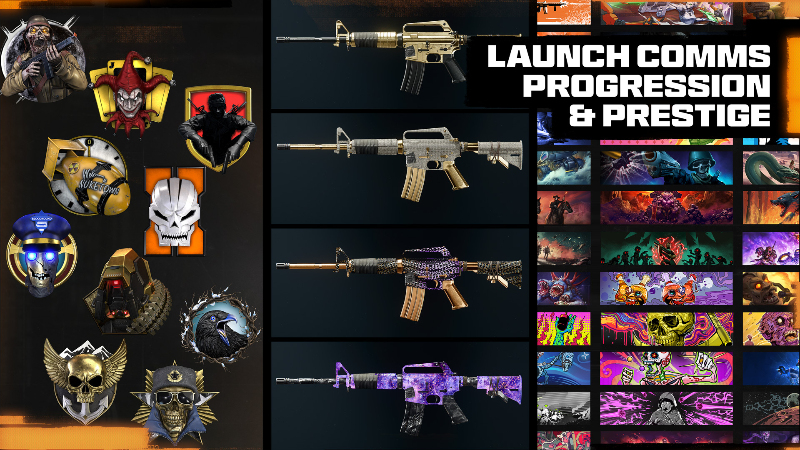
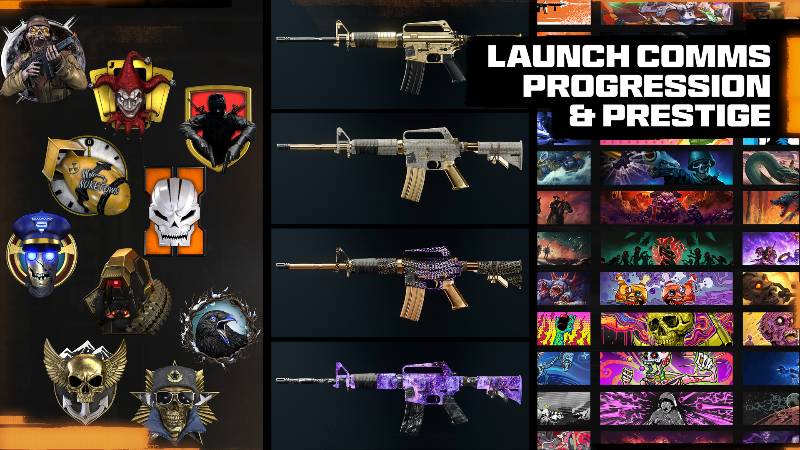
Black Ops 6 Progression: Overview & GoalsCall of Duty®: Black Ops 6 marks the anticipated return of Classic Prestige, back in Call of Duty and bigger than ever…but that’s not the only Progression system that’s gotten a major upgrade this year. The Treyarch team has set out to build the most rewarding Progression and Challenge systems ever delivered in a Call of Duty game, meaning Black Ops 6 packs a ton of unlockable content into the game on Day 1! This blog details everything you’ll need to know about Progression and Unlocks in Black Ops 6 including: Prestige, Calling Card Challenges, Camos, Reticles, the all-new Mastery Badge System, and Medals. There’s always something to grind for and unlock in Black Ops 6: Systems Covered in this Blog Here’s a summary of the Progression, Challenge, and Customization systems covered in this blog: Level Unlocks: Earn XP in Multiplayer and Zombies (and in Season 01: Call of Duty: Warzone™) to progress through 55 Levels of unlockable Weapons, Equipment, Scorestreaks, and more. Prestige: Classic Prestige is BACK in Black Ops 6 and bigger than ever! Players who reach and complete Max Level 55 will be presented with the choice to enter Prestige and restart their Leveling journey in exchange for a bit of Prestige and exclusive rewards. Read on to learn more about the return of Prestige and the valuable rewards up for grabs. Calling Card Challenges: Complete sets of Challenges in Multiplayer, Zombies, Campaign, and Call of Duty: Warzone (Season 01) to unlock Calling Cards to equip to your Profile and Calling Card Showcase. It wouldn’t be a Black Ops game without hidden-criteria Dark Ops Challenges to discover and unlock. Chase after the “100 Percenter” Calling Cards in each mode for the ultimate Challenge bragging rights. Weapon Camos: The Weapon Camo grind has been overhauled in Black Ops 6 and is bigger than ever. Learn more about the new update to how you’ll be progressing through Camos on the quest to earn dynamic Dark Matter Camo in Multiplayer, Nebula Camo in Zombies, and the first ever Call of Duty: Warzone Mastery Camo: Abyss (Season 01). Reticle Challenges: Customizable Reticles and Reticle Challenges return to Call of Duty in Black Ops 6. Learn about how you’ll be unlocking and customizing Reticles in Multiplayer, Zombies, in Call of Duty: Warzone (Season 01). Mastery Badges: All-new for Black Ops 6, every Weapon, Equipment, Field Upgrade, and Scorestreak in your Loadout has a set of Multiplayer and Zombies Mastery Badges to progress through as you master each piece of Gear. Use and Master each piece of content to unlock its Mastery Badge and Stat Tracker and prove your mettle by revealing your top three Badges in-game and in your Social Showcase. Medal Collection: View your top Medals and the accumulation of Medals you’ve earned in Multiplayer and Zombies. The Collection will also let you know what’s needed to unlock Medals you haven’t seen yet. Level UnlocksGlobal System (MP, RBZ, WZ) Barracks > Progression > Level Unlocks “Earn XP to progress through 55 Level Unlocks and gain access to Weapons, Equipment, Scorestreaks, Operators, and more.” Level Unlocks: System OverviewHere’s an overview of the main Progression System available for Multiplayer and Zombies at launch, and Call of Duty: Warzone at the start of Season 01. Progression Access: Access Progression while in the Lobby via the Barracks tab at the top of the screen. Here, you’ll see a brief preview of your next Progression Reward and have the choice to dig into the “Progression” button for more info on Level Unlocks & Prestige. Leveling Up: Level UnlocksPlayer Levels 1-55 You begin your Black Ops 6 Progression with a clear goal to accomplish: progress through Level Unlocks by climbing from “Private I” (Level 1) all the way to “Commander” (Level 55). This is achieved by earning XP in Multiplayer and Zombies (and in Season 01: Call of Duty: Warzone). Earn XP by performing well, playing the Objective, earning Medals, and completing Challenges (more on Challenges later). At every step from 1-55 you’ll unlock a variety of new content to use in your Loadouts in Multiplayer and Zombies: Weapons Lethal & Tactical Equipment Field Upgrades Scorestreaks Perks (Multiplayer Only) Wildcards (Multiplayer Only) Ammo Mods (Zombies Only) GobbleGums (Zombies Only)Additionally, Black Ops 6 players will unlock eight Base Operators and a selection of Emotes as they progress through the 1-55 Level Unlocks. Relocked Content Note: Both Operators and Emotes do not relock once you choose to embark on your Prestige journey. Consult the Prestige section of this blog for details. Black Ops 6 Items in Call of Duty: Warzone Note: Any compatible items from Black Ops 6 that you unlock during your Player Leveling will become available in Call of Duty: Warzone at the start of Season 01, later this year. GobbleGums Note: All GobbleGums are unlocked from the start of the game. The ones listed in the Level Unlocks (1-55) are simply bonus GobbleGums that give you an extra one-time use item. Level Unlocks: Player Level 1-55The linked table lists all the items you’ll unlock on your levelling journey from Level 1 (Private I) to Level 55 (Commander). Click here to view the entire Player Level journey! Level Unlocks: Highlights The Launch Comms Blogs related to Weapons and Gear have tables showing the specific item type (Weapons, Field Upgrades, or Scorestreaks for example), so you can track unlockable content via Item rather than by Level (as shown in the Player Level table linked to previously). This becomes increasingly important as you decide which items to permanently unlock once you’ve chosen to Prestige. PrestigeGlobal System (MP, RBZ, WZ)Barracks > Progression > Prestige Complete Level 55 and reach Max Level and you’ll face the option to take your grind to the next level: Welcome to Black Ops 6 Prestige. Not only has “Classic Prestige” returned in Black Ops 6, but it’s also the most rewarding version of Prestige that Call of Duty has ever seen – with rewards and each Prestige themed around a title in Black Ops history. The Prestige Hub Enter the Prestige Hub via the “Progression” button in the Barracks tab to view the full Prestige journey, preview rewards, and check in on your Prestige stats and Challenges. Select a Prestige, and you’ll be able to view all that Prestige’s rewards (and your progress through them depending on your current level). Choosing to PrestigeIt wouldn’t be “Classic Prestige” if it wasn’t just a little...dangerous. Choosing to Prestige in past Call of Duty titles wasn’t without its risks, and that’s no different in Black Ops 6. Make the choice to enter Prestige and you’ll get promoted to Prestige 1, but it will also be: Reset to Player Level 1. All Level Unlocks will be relocked and must be unlocked again, except for Base Operators, Emotes, and Zombies GobbleGums, as well as anything you Permanently Unlock (more on that later). Your Loadouts will be reset. Lifetime stats will remain viewable in the Combat Record, but your stats elsewhere in the game will only show stats for your current Prestige.However, the following items WILL NOT be relocked or reset: Weapon Progression, Camos, & Reticles. Weapon Builds - your favorite Weapon may be relocked but all the Builds you’ve created for it will be waiting for you when you reach the level needed to unlock it again. Challenge Progress & Unlocks. Store and Battle Pass Content. Operator and Emote Unlocks. Zombies GobbleGums.Additionally, any item you have a Blueprint or Skin for will remain Permanently Unlocked through Prestige. This means that if you have a Blueprint for the AS Val Assault Rifle, it won’t be relocked when you Prestige. The same goes for any Equipment, Field Upgrades, or Scorestreaks you possess Skins for. When you choose to enter Prestige 1, you’ll immediately receive the following: Prestige 1 Icon: Your first Prestige icon, which slots into the center of your Level insignia for all players to see! “Nacht Raider” Weaver Operator Skin. Access to the Prestige 1 Multiplayer and Zombies Calling Card Challenge Sets (more on Calling Card Challenges later in the blog). One Permanent Unlock (continue reading for more information).Additionally, as you start leveling through Prestige 1, you’ll unlock a unique Prestige reward every 10 Levels (at Level 10, 20, 30, 40, and 50). Permanent Unlocks Each time you Prestige, you' acquire a “Permanent Unlock;”; an advantage with immense power that can only be used once! Here’s how this works: You can use it to unlock a single item of your choice within the Player Levels. You obtain a total of ten Permanent Unlocks, one per Prestige. Once you complete Prestige 10, Permanent Unlocks provide no further function as your Level Unlocks Progression becomes fully available once you’ve entered Prestige Master.Permanent Unlock Example: If you don’t want to wait until you’ve progressed back to Level 49 to unlock the Kompakt 92 SMG, you can utilize the Permanent Unlock at any time to gain immediate access to the weapon. You’re encouraged to make strategic choices about which items to permanently unlock, so you have more control over your gameplay experience by ensuring access to your preferred gear. Prestige Rewards: As previously noted, once you’ve Prestiged, you gain access to earn otherwise-unobtainable Prestige Rewards, Prestige Challenges, and an increased XP bonus for completing each day’s three Daily Challenges. Stats Reset: Your stats – such as your current Elimination/Death Ratio – start fresh every time you Prestige. However, you can always view your Lifetime Career stats in the Barracks > Stats > Combat Record menu. Prestige LevelingIf you took the plunge and entered Prestige, your level resets to Level 1, Prestige 1. The date you entered Prestige is recorded, and you receive an instant reward. Now, as you level up and re-unlock the Level rewards, you also unlock the Prestige rewards as well. Welcome to Black Ops History! In Black Ops 6, each Prestige is themed around a game in Black Ops history, featuring a variety of rewards inspired by and paying homage to moments and elements found in each Black Ops title. For example, Prestige 1 features rewards inspired by the first game in the Black Ops timeline: 2008’s Call of Duty: World at War, the origin of Zombies in Call of Duty. Prestige 1: Rewards Showcase For the veterans that fondly remember the very first time Zombies appeared in a Call of Duty, as well as players who crave some of the coolest exclusive earnable items around, Prestige 1’s rewards have you covered. Here’s a fully unredacted look: Instant Reward: Prestige 1 IconYour first Prestige icon is animated and takes the form of a World at War soldier, but with a menacing, zombified appearance. Instant Reward: “Nacht Raider” Weaver Operator SkinInspired by the origins of Zombies from Call of Duty: World at War, this Zombified Weaver is clad in tattered and bloody WWII soldier fatigues, with glowing eyes. Prestige 1, Level 10: “Der Riese” Loading Screen & Social WallpaperReturn to Group 935’s base of operations with this artwork inspired by the Der Riese Zombies map. Prestige 1, Level 20: “Perk-A-Cola” GobbleGum Pack (Premium-only*)A one-hour XP Token plus a GobbleGum Pack, ready for use in Black Ops 6 Zombies. Expect the following GobbleGums in this Pack: Perkaholic: Gives the player all available Perks. On the House: Spawns a Random Perk Power-Up. Soda Fountain: The next Perk purchased gives an additional random Perk. Who’s Keeping Score: Spawns a Double Points Power-Up. Stock Option: Ammo is taken from the player's stockpile instead of their weapon's magazine.Prestige 1, Level 30: “Zombie Breach” Animated EmblemA yellow-eyed undead shambler breaks through some hastily constructed defenses in this Animated Emblem. Prestige 1, Level 40: “Insta-kill Power-Up” CharmA gleaming gold skull symbolizing the powerful Zombies Insta-Kill Power-Up. Prestige 1, Level 50: “Teddy is a Liar” C9 Blueprint (SMG, Premium-only*)Featuring the eerie "Teddy is a Liar" Easter egg from Call of Duty: World at War Zombies and inspired by an infamous submachine gun from World at War, this Blueprint will add a touch of mystery and nostalgia to your arsenal. *BO6 Required Rewards: Though the Black Ops 6 Prestige Progression System is global across Multiplayer, Zombies, and Call of Duty: Warzone, players who own Black Ops 6 will have access to additional rewards not available to free-to-play Call of Duty: Warzone players. Call of Duty: Warzone players who decide to purchase Black Ops 6 will instantly unlock any “BO6 Required” Prestige rewards they previously earned but did not receive. Future Prestiges: Rewards Teaser Should you decide to continue your epic journey and climb through all ten Prestiges, expect a similar level of rewards and reminiscence. The previous image shows only a few of the additional rewards to earn. Prestige 3, Level 50: “My Name is…” Payne Operator SkinOperator Callum Payne has become a mysterious figure cloaked in a hood, evoking the intense legacy of Alex Mason and Victor Reznov from Call of Duty: Black Ops. Prestige 4, Level 50: “Atomic Commando” XM4 Assault Rifle BlueprintA vibrant and nostalgic design, capturing the colorful essence of the iconic Nuketown map from the original Call of Duty: Black Ops. Prestige 5, Level 50: “Absolute Loss” Toro Operator SkinOperator Toro wears a jacket infused with symbols of rage, embodying the fury and vengeance of Raul Menendez against the Black Ops team in Call of Duty: Black Ops II. Prestige 6, Level 50: “Robot Abomination” SWAT 556 Marksman Rifle BlueprintInspired by the legendary giant robot from Call of Duty: Black Ops II Zombies, this weapon evokes both immense power and mystery. Prestige 7, Level 50: “Specialist Fan” Maya Operator SkinMaya showcases her love for Call of Duty: Black Ops III with a mixture of gear inspired by the Specialist Operator Battery, and a shirt proudly displaying the Black Ops III logo. Become a Legend: Prestige Master LevelsThere are 10 Prestiges in Call of Duty: Black Ops 6. If you’re dedicated enough to complete all of them, you’ll automatically graduate into Prestige Master and enter the final phase of Black Ops 6 Career Progression. In Prestige Master, your Level rises above 55 for the first time as you are now able to climb up all the way to Level 1,000 and gain additional rewards in the process. Still cloaked in mystery, the rewards for ascending all the way to Prestige Master are well worth the grind. Who will be the first to unlock theirs? Prestige Master Instant Reward: “Sitting Bull Reborn” Marshall Operator SkinMarshall rocks an outfit inspired by the cover art of Black Ops 6, capturing the essence of the ‘sitting bull’ pose and the 90s military era. Prestige Master Level 90: “Classified Arsenal” AMES 85 Animated BlueprintRedacted bits cover the weapon in a striking pattern, symbolizing the covert and secretive world of Black Ops 6. Prestige Master: Legacy Prestige Icons and More The Legacy Prestige 1 Icons. Can you name all the games they first appeared in? Players who reach Prestige Master Level 100 will gain the ability to customize their Prestige via access to Legacy Prestige Icons from past Call of Duty titles. Equipping one of these Legacy Prestige Icons replaces your Prestige Master icon and changes the way your Prestige Master status appears to other players anywhere it’s seen in-and-out of game. At Prestige Master Level 100, access to Legacy Prestige 1 icons becomes available. From this point forward, gain access to a new set of Legacy Prestige Icons every 100 Prestige Master Levels: Prestige Master Level 100: Equip any Legacy Prestige 1 Icon Prestige Master Level 200: Equip any Legacy Prestige 2 Icon Prestige Master Level 300: Equip any Legacy Prestige 3 Icon Prestige Master Level 400: Equip any Legacy Prestige 4 Icon Prestige Master Level 500: Equip any Legacy Prestige 5 Icon Prestige Master Level 600: Equip any Legacy Prestige 6 Icon Prestige Master Level 700: Equip any Legacy Prestige 7 Icon Prestige Master Level 800: Equip any Legacy Prestige 8 Icon Prestige Master Level 900: Equip any Legacy Prestige 9 Icon Prestige Legend (Level 1,000): Equip any Legacy Prestige 10 icon (or above)Prestige Master players who’ve reached Level 100 or above can select a Legacy Prestige Icon via the “Customize” menu in the Barracks. Become a Legend: As you reach the zenith of your Black Ops 6 career and become a “Prestige Legend” at the game’s maximum Level (1,000), expect additional, Classified rewards for your incredible progress, only unlocked and redacted when you reach Level 1,000. Calling Card ChallengesGlobal System (SP, MP, RBZ, WZ) Barracks > Challenges > Calling Card Challenge Menu Calling Cards: System OverviewRecap: Calling Card Challenges are back in Black Ops 6, with over 450 Calling Cards available to be earned by completing a variety of Challenges in Campaign, Multiplayer, Zombies and (in Season 01) Call of Duty: Warzone. Access Calling Card Challenges via the “Challenges” button in the Barracks tab. Here you can view Challenges for all four modes, split out into different categories: Career. Battle Hardened. Prestige (Multiplayer, Zombies and Call of Duty: Warzone only). Dark Ops.© 2024 Activision Publishing, Inc. ACTIVISION, CALL OF DUTY, , and CALL OF DUTY BLACK OPS are trademarks of Activision Publishing, Inc. All other trademarks and trade names are the property of their respective owners. For more information, please visit http://www.callofduty.com/ and http://www.youtube.com/callofduty, and follow @Activision and @CallofDuty on X (formerly Twitter), Instagram, and Facebook. For Call of Duty Updates, follow @CODUpdates on X (formerly Twitter). View the full article
-
Armaments Intel: Primary, Secondary, and Melee Weapons (MP, RBZ, WZ) At launch, expect Black Ops 6 to offer an exceptional arsenal of 33 different armaments to utilize, including 12 weapons all new to the franchise. As you begin to build your favorite Loadouts within a streamlined Weapons menu, and prepare for the Weapon Leveling to come, it’s worth considering the different types of weaponry available to you, how they unlock, and a closer look into a more accessible Gunsmith. Primary Weapons (25) Your main and usually hardest-hitting weapon utilized for most of your time in combat. Expect a varied and interesting selection of weapons in each category, as well as the individual Attachments for each Primary Weapon, which are – except for some Optics – unlocked as you level each weapon up. The Gunsmith is available for all Primary Weapons. Run the Wildcard “Overkill” if you wish to equip a second Primary Weapon in the Secondary Weapon slot. Choose from: Assault Rifles (7) SMGs (6) Shotguns (2) LMGs (3) Marksman Rifles (4) Sniper Rifles (3)Secondary Weapons (6) Your back-up weapon, used in emergency or context-specific situations. These weapons are carried in addition to the Primary Weapon you pick, and more adept Operators tend to choose a Secondary Weapon that complements their Primary Weapon in some way. Running the Overkill Wildcard will allow players to equip two Primary weapons, as well. The Gunsmith is available for Secondary Weapons. Choose from: Pistols (4) Launchers (2)Melee Weapons (2) Your third weapon is a close-quarters armament with no ranged ordnance. Bring out your Melee weapon using the same key or button press as Melee (for controllers, this is the Right thumbstick). Tap this for a gun butt melee. Hold to bring out your Melee weapon, which will remain equipped until you swap back to your Primary or Secondary. There’s also the Weapon Cycle setting (accessed via Controller > Combat > Dedicated Melee Weapon Activation > Hold Melee/Weapon Cycle), which allows players to use the weapon swap button to cycle between Primary, Secondary, and Melee weapons if they so choose. The Gunsmith is available for Melee Weapons (Cosmetics only). Choose from: Knife (1) Baseball Bat (1)Player Levels: Weapon Unlock Criteria All the launch weaponry in Black Ops 6 have specific unlock criteria, and this is related to your Player Progression (accessed via the Progression tab in the Barracks Menu). Gain Experience Points as you play matches to level up, then unlock weapons once you reach a particular Player Progression Level, as shown in the following table. Note that one weapon from each type or class is always immediately available in Default Loadouts and the rest are unlocked as you level up. Look for more information on Player Leveling later in this blog, and full details on all the Player Level Unlocks in the Launch Comms: Progression Blog. Perk Notes: Equip the following to affect the use of your weaponry in a variety of different ways: Gung-Ho (Enforcer) reduces movement penalties when reloading or using Equipment and allows reloading while Tactical Sprinting. Dexterity (Enforcer) reduces weapon motion while jumping, sliding, and diving. Scavenger (Enforcer) allows ammo resupply from downed enemies. Bruiser (Enforcer) enables Melee kills to replenish health and earn extra score. Tracker (Recon) enables auto-pinging enemies when you ADS. Cold-Blooded (Recon) prevents thermal optics from targeting you. Fast Hands (Strategist) allows you to swap weapons faster.Wildcard Notes: Equip the following to affect the use of your weaponry in a variety of different ways: Overkill allows you to equip any non-melee weapon in Primary and Secondary slots. Gunfighter allows you to receive three extra Attachment points for your Primary Weapon.Primary Weapons (25) Assault Rifles (7) Attachment Types: Optic, Muzzle*, Barrel, Underbarrel, Magazine, Rear Grip, Stock, Laser, Fire Mods. (*AS VAL has no Muzzle Attachment) Medium range Primary Weapons. Average mobility, hard-hitting and versatile due to the available attachment options. Usually full-auto, with iron sights and ADS options for Optics. XM4 MAGS: 3 MAG SIZE: 30 Available: Unlocked Immediately Full-auto assault rifle. A well-rounded weapon with average accuracy, mobility, and power among its counterparts. AK-74 MAGS: 3 MAG SIZE: 30 Available: Unlocked at Player Level 10 Full-auto assault rifle. Imposing firepower with high damage at mid-to-long range balanced by a slower rate of fire and heavier recoil. AMES 85 MAGS: 3 MAG SIZE: 30 Available: Unlocked at Player Level 19 Full-auto assault rifle. Impressive accuracy and a suitable rate of fire make this an excellent weapon for mid to long range engagements. GPR 91 MAGS: 3 MAG SIZE: 30 Available: Unlocked at Player Level 28 Full-auto assault rifle. What this rifle lacks in raw power, it makes up for in spades with best-in-class handling and a decent rate of fire. MODEL L MAGS: 3 MAG SIZE: 30 Available: Unlocked at Player Level 40 Full-auto assault rifle. Slow-firing and controllable with respectable damage, the Model L shines in calculated engagements at mid-range. GOBLIN MK 2 MAGS: 4 MAG SIZE: 20 Available: Unlocked at Player Level 46 Semi-auto assault rifle. The Goblin Mk2 excels at short to mid ranges where its operator can take full advantage of its handling and impressive rate of fire. AS VAL MAGS: 5 MAG SIZE: 20 Available: Unlocked at Player Level 55 Full-auto assault rifle. Leads the way in stealth while remaining suitable for urban combat through its integrated suppressor and improved mobility. SMGS (6) Attachment Types: Optic, Muzzle, Barrel, Underbarrel*, Magazine, Rear Grip, Stock, Laser, Fire Mods. (*PP-919 has no Underbarrel Attachment) Medium to short-range Primary Weaponry, with good mobility and handling, though not quite as accurate as an AR. Iron sights and ADS options are available for Optics. C9 MAGS: 4 MAG SIZE: 30 Available: Unlocked Immediately Full-auto submachine gun. The C9 is a well-balanced weapon that performs reliably in all close to mid-range situations. KSV MAGS: 4 MAG SIZE: 30 Available: Unlocked at Player Level 7 Full-auto submachine gun. Fast to aim with manageable recoil and good damage. Perfect for a dexterous operator seeking broad proficiency. TANTO .22 MAGS: 4 MAG SIZE: 30 Available: Unlocked at Player Level 16 Full-auto submachine gun. Slow-firing, but hard-hitting, the Tanto .22 is an easy-to-handle SMG with impressive mid-range performance. PP-919 MAGS: 2 MAG SIZE: 64 Available: Unlocked at Player Level 37 Full-auto submachine gun. The PP-919 has the highest ammo counts in class, at the cost of some mobility and fire rate. JACKAL PDW MAGS: 4 MAG SIZE: 30 Available: Unlocked at Player Level 43 Full-auto submachine gun. Great mobility and handling make this an easy choice for operators who aggressively seek CQB engagements. KOMPAKT 92 MAGS: 4 MAG SIZE: 30 Available: Unlocked at Player Level 49 Full-auto submachine gun. Chambered in 9mm with the fastest fire rate in class, the Kompakt 92 excels in close-range encounters. Shotguns (2) Attachment Types: Optic, Muzzle, Barrel, Underbarrel, Magazine*, Rear Grip*, Stock, Laser, Fire Mods. (*ASG-89 only) Advantageous at very close ranges, offering iron sights and ADS via Optics, and with correct Attachments, the ability to spray. Incredible firepower at the expense of range and accuracy. Marine SP MAGS: 4 MAG SIZE: 6 Available: Unlocked Immediately Pump-action shotgun. Powerful and versatile with a short cycling time that allows for rapid target acquisition. Hand loaded with one-shot kill potential in close quarters. ASG-89 MAGS: 4 MAG SIZE: 6 Available: Unlocked at Player Level 31 Semi-automatic shotgun. Capable of taking down multiple targets in quick succession thanks to its decent magazine size and solid rate of fire. LMGs (3) Attachment Types: Optic, Muzzle, Barrel, Underbarrel, Magazine, Rear Grip, Stock, Laser, Fire Mods. Primary Weapons with increased ammo capacity and a focus on medium to long-range takedowns. Iron sights and ADS available via Optics. Though Accuracy, Mobility and Handling are sacrificed (compared to ARs), this is balanced by impressive fire rates and fast sustained fire capabilities. PU-21 MAGS: 3 MAG SIZE: 75 Available: Unlocked Immediately Full-auto light machine gun. Deceptively lightweight and easy to aim with high damage. Rewards vigilance and careful recoil control. XMG MAGS: 3 MAG SIZE: 100 Available: Unlocked at Player Level 13 Full-auto light machine gun. Belt-fed with best-in-class ammo capacity, the XMG has a slower fire rate, but powerful sustained fire accuracy. GPMG-7 MAGS: 3 MAG SIZE: 50 Available: Unlocked at Player Level 52 Full-auto light machine gun. Unparalleled ability to quickly neutralize threats thanks to a blistering fire rate and suitable long-range damage. Marksman Rifles (4) Attachment Types: Optic, Muzzle, Barrel, Underbarrel, Magazine, Rear Grip, Stock, Laser, Fire Mods. Favoring an Operator with over-average skill, these burstor semi-auto Primary Weapons are optimal at medium to long ranges. ADS or iron sights available for Optics. Projectiles are hard-hitting and accuracy counts. SWAT 5.56 MAGS: 3 MAG SIZE: 30 Available: Unlocked Immediately Three-round burst DMR. The Swat 5.56 pairs strong stopping power with a fast burst cooldown for excellence at medium ranges. Tsarkov 7.62 MAGS: 3 MAG SIZE: 20 Available: Unlocked at Player Level 22 Semi-auto DMR. The Tsarkov 7.62 sacrifices only some power in exchange for excellent handling, making it lethal in the hands of an accurate and mobile Operator. AEK-973 MAGS: 3 MAG SIZE: 30 Available: Unlocked at Player Level 34 Three-round burst DMR. Great stability and a fast rate of fire within each burst allows the AEK-973 to land multiple shots on target even at long ranges. DM-10 MAGS: 3 MAG SIZE: 20 Available: Unlocked at Player Level 43 Semi-auto DMR. Best in class stability and power make this the ideal marksman weapon for mid to long range engagements. Sniper Rifles (3) Attachment Types: Optic, Muzzle, Barrel, Magazine, Comb, Stock, Laser, Fire Mods, Stock Pad*. (*LW3A1 Frostline only) Normally set up to take down targets at extremely long ranges, these Primary Weapons favor ADS over iron sights when using Optics. Low mobility, and favoring a stable, patient Operator with a steady aim. Extremely high Firepower indicates one-shot takedown potential. LW3A1 Frostline MAGS: 4 MAG SIZE: 5 Available: Unlocked Immediately Bolt-action sniper rifle. The LW3A1 Frostline has decent rate of fire and handling speeds, but substantial recoil. One shot kill to the head, upper chest, and upper arms. Hold the Left Thumbstick while ADS to steady. SVD MAGS: 3 MAG SIZE: 10 Available: Unlocked at Player Level 25 Semi-auto sniper rifle. Gas-operated Soviet sniper with modest vertical kick. Capable of landing precise follow-up shots. One skill kill to the head. Hold the Left Thumbstick while ADS to steady. LR 7.62 MAGS: 4 MAG SIZE: 5 Available: Unlocked at Player Level 49 Bolt-action sniper rifle. The LR 7.62 delivers high damage with minimal recoil and slower handling. One shot kill to the head, chest, and arms. Hold the Left Thumbstick while ADS to steady. Secondary Weapons (6) Pistols (4) Attachment Types: Optic, Muzzle, Barrel, Magazine, Rear Grip, Stock, Laser, Fire Mods. Full or semi-auto Secondary Weapons, these excel at closer-range takedowns. Iron sights or ADS is available via Optics. Quick to swap to during a fight, and worth considering when finishing off an opponent. 9mm PM MAGS: 3 MAG SIZE: 10 Available: Unlocked Immediately Semi-auto pistol. With a decent rate of fire and standard handling, the 9mm PM is a masterclass in reliability and the easy choice for all close-quarter engagements. Grekhova MAGS: 3 MAG SIZE: 20 Available: Unlocked at Player Level 13 Full-auto pistol. Surprising accuracy combined with a fast rate of fire offsets the lower damage and smaller effective range of the Grekhova. GS45 MAGS: 3 MAG SIZE: 10 Available: Unlocked at Player Level 28 Semi-auto pistol. The GS45’s .45 Auto rounds make this sidearm unmatched in close range stopping power. Stryder .22 MAGS: 2 MAG SIZE: 30 Available: Unlocked at Player Level 40 Semi-auto pistol. The Stryder .22 excels at finishing off damaged opponents in the heat of combat thanks to its fast semi-automatic rate of fire and best in class handling. Launchers (2) Attachment Types: None. Available in lock-on or free-fire variants, these bulky Secondary Weapons are useful for clearing groups of Operators, or against vehicles or technology such as Scorestreaks. Single load, with a sizeable bulk. CIGMA 2B MAGS: 2 MAG SIZE: 1 Available: Unlocked Immediately Lock-on capable launcher. Can lock onto enemy Scorestreaks and vehicles. Fires a high-explosive 110-mm warhead for massive damage. HE-1 MAGS: 3 MAG SIZE: 1 Available: Unlocked at Player Level 19 Free-fire rocket launcher. Fires a high-explosive 110-mm warhead for massive damage. Melee Weapons (2) Attachment Types: None. Close-quarter battle (CQB) combat armaments offering vicious damage potential and arguably the fastest Mobility of any armament. No range capabilities. Knife MAGS: 1 MAG SIZE: 1 Available: Unlocked Immediately One hit kill. Military-issue tactical knife well-suited for CQC scenarios where stealth, speed, and lethality are required. Baseball Bat MAGS: 1 MAG SIZE: 1 Available: Unlocked at Player Level 52 Two-hit kill. The aluminum bat is light enough for quick swings and heavy enough to inflict serious, blunt trauma on victims. Weapon Menus: Loadouts, Gunsmith, and Attachments (MP, RBZ, WZ) Loadouts Your Loadout screen is familiar yet updated. Menus are mainly vertical, and the slots within a Loadout involve choosing armaments that differ slightly depending on the Mode you’re playing: Multiplayer: Choose three types of weapons (Primary, Secondary, Melee), three types of Equipment (Tactical, Lethal, and an MP-only Field Upgrade), three Perks (MP), an optional Specialty related to your Perk choice, and a Wildcard. Zombies: Choose two types of weapons (Primary or Secondary, and Melee), three types of Equipment (Tactical, Lethal, and a Zombies-only Field Upgrade), and a GobbleGum Pack (Zombies only). This blog details the first three Loadout slots (the Primary, Secondary, and Melee Weapons). You can add Loadouts, creating a maximum of ten. You can set one Loadout as your favorite. This Loadout acts as your default spawn class in games, and your Operator will carry the Primary Weapon in the Lobby. You can Rename, Duplicate, or Delete any Loadout.Content Unlocks You begin your Black Ops 6 journey with most of your Loadout items locked. There’s a wide variety of functional content to unlock on your journey through the 55 Player Levels. Every time you level up, be sure to check the Barracks > Progression > Level Unlocks menu (shown above) to ensure you’re aware of the unlocks you now have available to you. Expect between one and three unlocks per level. Each specific unlock box in this menu has the game mode it applies to, or simply the BO6 logo if the item is available in all modes. The following type of content is unlockable, and usually adds to your existing item pools: Loadouts (Default) (MP) Loadouts (Custom) (MP) Weapons (Primary) (MP, RBZ, WZ) Weapons (Secondary) (MP, RBZ, WZ) Weapons (Melee) (MP, RBZ, WZ) Tacticals (MP, RBZ, WZ) Lethals (MP, RBZ, WZ) Field Upgrades (MP, WZ) Field Upgrades (RBZ) Perks (MP) Wildcards (MP) Scorestreaks (MP, RBZ, WZ) Ammo Mods (RBZ) GobbleGums (RBZ) Operators (MP, RBZ, WZ) Emotes (MP, RBZ, WZ) Features (MP, RBZ, WZ) Expect a full and thorough overview of how all your items unlock in the Launch Comms Blog 5: Progression. The Firing Range A familiar location to test your equipped Loadout weapons is available, and this comes with a few additions to help you continuously adjust a weapon build until you’re happy with it. Expect to utilize the following: Practice dummies to shoot at, at 10-, 25-, and 50-meter intervals. Dummies can have 0, 1, 2, or 3 Armor Plates added to them. You have almost limitless ammunition. The upper-left corner features a target elimination tracker, an accuracy tracker, and a damage tracker. A toggle feature allows you to optionally activate a Moving Target dummy, or a Recoil metal plate. Toggle Feature: Moving Target: A dummy drops down from the ceiling on a conveyor belt, and automatically moves back through the range as you connect with it using your weapon. Once you hit it at maximum range, it moves back to its initial position, and the process can be repeated. Toggle Feature: Recoil Target: A metal plate hangs from the ceiling around seven meters from your booth, allowing you to fire your weapon and view the bullet spread.© 2024 Activision Publishing, Inc. ACTIVISION, CALL OF DUTY, , and CALL OF DUTY BLACK OPS are trademarks of Activision Publishing, Inc. All other trademarks and trade names are the property of their respective owners. For more information, please visit http://www.callofduty.com/ and http://www.youtube.com/callofduty, and follow @Activision and @CallofDuty on X (formerly Twitter), Instagram, and Facebook. For Call of Duty Updates, follow @CODUpdates on X (formerly Twitter). View the full article
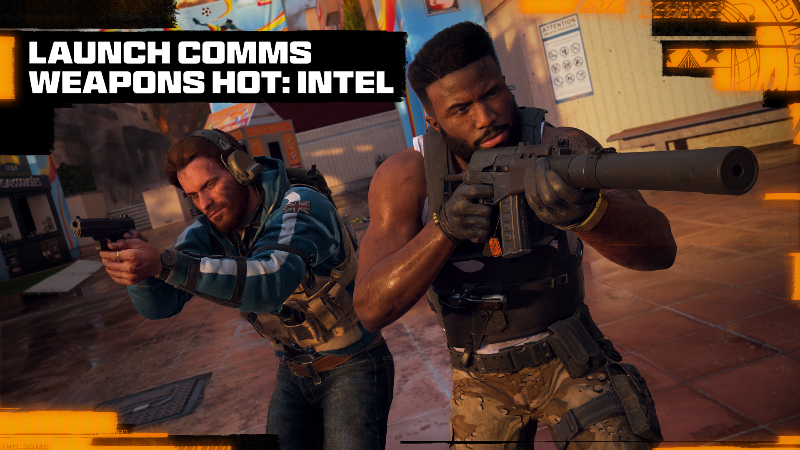
-
Global Weapon Builds Whether you’re playing Black Ops 6 Multiplayer, Round Based Zombies or Call of Duty®: Warzone™ (at Season 1), you can utilize a weapon build you’ve created across all three game modes. This time-saving innovation allows you to make a change to any Build or Blueprint in any game, and it permeates out everywhere the gun is equipped. Here’s an example of how this works. Let’s say you want to create an AMES 85 Variant. In the Loadout Menu (MP, RBZ, or WZ though MP is shown above), simply complete the following: Select the weapon in question and go to “+ Create New Build.” Choose the Base Weapon, or any of the Blueprints you’ve collected, as the basis of your new Weapon Build. Enter the Gunsmith, and perfect your weapon by adding Attachments, Cosmetics, and testing the weapon out in the Firing Range. Move back to the Custom Loadout screen, where your weapon has a default name, and select “Build Options.” Rename your weapon (you can also duplicate or reset it, too). Your weapon is automatically saved. Now, when you access the Loadout Menus in your other game modes (in this example, RBZ or WZ), the weapon, along with the Attachments, Cosmetics, and name, appears. All builds are saved within the menu of the individual weapon type.Gunsmith: Attachments Intel (MP, RBZ, WZ) Recap: As detailed at Call of Duty: NEXT, the focus for Black Ops 6 is to condense and streamline Attachments so you can easily understand the bonuses when it comes to utilizing the Gunsmith. Here are some of the changes: Gaining the Advantage: Attachments almost always come with a benefit (Pro), and not a detriment (Con), so you know you’re creating a weapon more potent than the base version. Optics for All... : Almost all Optic Attachments are shared across all weapons in a Weapon Class. For example, unlock the Red Dot Sight with a SMG and you’ll be able to equip it to all SMGs in the Weapon Class. ...Everything Else is Unique: All other Attachment Types – Muzzle, Barrel, Underbarrel, Magazine, Rear Grip, Stock, Laser, and Fire Mods – are unique to the weapon in question in terms of unlocking and usage. Getting Specific: Instead of having a weapon function – such as ADS speed – being affected by multiple attachments that are difficult to keep track of, they are related to a single Attachment type. For example, equipping a “Rear Grip” Attachment will always improve your handling, and the grip you choose will boost a unique combination of handling stats (to Sprint to Fire Speed, Slide to Fire Speed, Dive to Fire Speed, ADS Speed, or a combination thereof). All the different grips are designed to improve the weapon’s potency, not reduce it. Information is Power: The net result of this new system is that it allows players to make informed weapon-building decisions easily and create effective Builds without constantly needing looking up “meta” builds online.Details Matter: Don’t mistake this streamlining as “dumbing down” the Gunsmith, as your Firepower, Accuracy, Handling, and Mobility statistics can also be seen in an expanded view, with individual elements like Reload Quickness, Recoil Gun Kick, and Bullet Velocity all available to compare in granular detail. Attachment Types As always, Attachments are divided into types, and each type provides a basic advantage when placed onto your weapon, along with specific additional benefits based on the unique nature of each specific part. The following table shows the 11 different Attachment Types available at launch, and which Weapon Types utilize them: Key: The preceding table has the following information related to Weapon and Attachment Types, as follows: YES: Every weapon within the Weapon Type uses this Attachment Type. SOME: Most, but not all, of the Weapon Type uses this Attachment Type. NO: This Attachment Type is not available for the Weapon Type. For example, the “Comb” Attachment Type is only available on Sniper Rifles. Note: Attachment Type Descriptions are detailed throughout the rest of this Blog, so you know what each one does. See below. Five Attachments Per Weapon. Eight if You’re a Gunfighter Along with the weapon’s current level, the Attachments Menu also indicates the number of Attachments you can place, and have placed, on your weapon. These are known as “Attachment Points.” There are five points available, for Assault Rifles, SMGs, Shotguns, LMGs, Marksman Rifles, Sniper Rifles, and Pistols. You can pick none, or up to five Attachment Points, though the more slots used, the better the weapon is likely to perform. Each weapon type has more available Attachment types than points. For example, you can choose up to five points when building out an SMG, but there are nine Attachment Types. Launchers and Melee Weapons do not have Attachment points. You can increase the number of Attachment Points from five to eight by selecting the Gunfighter Wildcard, available when you reach Player Level 33.Attachments: Main Statistics and Details Four Main Statistics: Each weapon has a baseline value related to one of four key attributes: Firepower, Accuracy, Mobility, and Handling. These are each represented by a grey bar in the bottom-right corner of the Gunsmith Attachments Menu. In each case, the higher the value, the better. As you’d expect, some weapons are intrinsically more proficient when it comes to one or more of these statistics. For example, a Sniper Rifle has the best “Firepower” of all weapon types. Each aspect of a weapon’s performance is related to these four statistics: Firepower: The fire rate, damage, range, and firing ping on the Mini-Map. Accuracy: The minimum and maximum Hip Fire Spread, Recoil Gun Kick, Horizontal and Vertical Recoil, bullet velocity, and Flinch Resistance. Mobility: The Movement Speed (Crouch, normal, Sprint, and ADS). Handling: Reload quickness (both with rounds and empty), ADS Speed, Sprint to Fire Time, and Weapon Swap Speed.Every time you add an attachment to your weapon, it affects one (or more) of the above statistics. In Black Ops 6, adding an attachment usually grants you more pronounced advantages (“Pros”), and limited disadvantages (“Cons”) compared to the weapon without the attachment fitted. Statistical Details: For those requiring nuanced analytical data regarding every single Attachment, you can toggle “Details” on and off, which enables you to see how each attachment affects the weapon specifically, and numerically. Attachments: A Deep Dive The following showcases a variety of visuals for each Attachment type, along with notes on which weapons you can affix them to. The statistical benefits (and drawbacks as appropriate) are discussed, along with any further pertinent notes. Note: Any listing of a weapon type with an asterisk next to it (*) that you see indicates that some (but not all) of a weapon type use this Attachment. Optic Available on: Assault Rifles, SMGs, Shotguns, LMGs, Marksman Rifles, Sniper Rifles, Pistols. Not Available on: Launchers, Melee Weapons. Stat Benefit: Accuracy Sights or scopes attached to the top of a weapon, designed to improve accuracy during target engagement. Occasionally improves Recoil Gun Kick. More powerful scopes (usually designed for Sniper Rifles) may reduce ADS Speed. Note: Optics are a unique type of Attachment as they are universal. This means that once you unlock an Optic, it becomes available for every weapon in the same class, not just the one you unlocked it for. Note: Optics come with Reticles; markings and dots that further delineate your targets and aid in your aiming. Your Optics can be further customized by unlocking a variety of Reticles via Reticle Challenges. Muzzle Available on: Assault Rifles*, SMGs, Shotguns, LMGs, Marksman Rifles, Sniper Rifles, Pistols. Not Available on: Launchers, Melee Weapons. Stat Benefit: Accuracy Usually attached to the end of the weapon barrel, Muzzles are used to redirect gasses (as necessary) and serve to reduce or control recoil. Barrel Available on: Assault Rifles, SMGs, Shotguns, LMGs, Marksman Rifles, Sniper Rifles, Pistols. Not Available on: Launchers, Melee Weapons. Stat Benefit: Firepower The front section of the weapon where the projectile travels through once the trigger has been pulled. Attachments tend to improve damage range and velocity, enabling you to hit a target more rapidly. Underbarrel Available on: Assault Rifles, SMGs*, Shotguns, LMGs, Marksman Rifles. Not Available on: Sniper Rifles, Pistols, Launchers, Melee Weapons. Stat Benefit: Firepower, Accuracy Attached to the base of the barrel, Underbarrels come in two main varieties: Foregrips and Launchers. Foregrips are handles that can reduce recoil and sway (Accuracy). Launchers increase your firepower by adding an alt-fire capacity to the weapon, usually an explosive charge or grenade. Magazine Available on: Assault Rifles, SMGs, Shotguns*, LMGs, Marksman Rifles, Sniper Rifles, Pistols. Not Available on: Launchers, Melee Weapons. Stat Benefit: Firepower or Handling Magazines hold a weapon’s ammunition and are generally available in two types: Extended Mags allow you to carry more rounds, increasing Firepower sometimes at the expense of Handling. Fast or Flip Mags reduce your Firepower as you have fewer bullets but improve your Handling. Comb Available on: Sniper Rifles Not Available on: Assault Rifles, SMGs, Shotguns*, LMGs, Marksman Rifles, Pistols, Launchers, Melee Weapons. Stat Benefit: Handling Also known as a Cheek Riser, Combs are Sniper Rifle-only head rests attached to the top of the Stock, and offer improved Handling, mainly decreasing the time it takes you to fire or ADS. This can come at the expense of Accuracy, depending on the specific Comb. Rear Grip Available on: Assault Rifles, SMGs, Shotguns*, LMGs, Marksman Rifles, Pistols. Not Available on: Sniper Rifles, Launchers, Melee Weapons. Stat Benefit: Handling A rubber handle behind the weapon trigger. Attachments offer a variety of Handling improvements, usually decreasing the time it takes you to ADS, or fire under specific circumstances. Stock Available on: Assault Rifles, SMGs, Shotguns, LMGs, Marksman Rifles, Sniper Rifles, Pistols. Not Available on: Launchers, Melee Weapons. Stat Benefit: Accuracy or Mobility These are braces enabling the Operator to support the armament against their shoulder and attach to the rear of the weapon. Generally, the lighter the stock Attachment, the more focused on increasing your Mobility (usually movement speed). Heavier stocks offer more benefits to your Accuracy (usually flinch resistance). Laser Available on: Assault Rifles, SMGs, Shotguns, LMGs, Marksman Rifles, Sniper Rifles, Pistols. Not Available on: Launchers, Melee Weapons. Stat Benefit: Accuracy These side-mounted lasers (or under-mounted for Pistols) emit a beam of usually red or green light usually visible to the enemy. However, your Accuracy is significantly improved or augmented. NOTE: The Tactical Laser enables Tactical Stance, allowing you to balance your mobility and accuracy. This is the method to utilize the Modern Warfare® III firing technique in Black Ops 6. Fire Mods Available on: Assault Rifles, SMGs, Shotguns, LMGs, Marksman Rifles, Sniper Rifles, Pistols. Not Available on: Launchers, Melee Weapons. Stat Benefit: Firepower, Accuracy, or Handling (Varies depending on Fire Mod) A “catch-all” of other Attachments, Fire Modifications have a variety of uses and are mainly focused into two subsets; improvements to parts of a weapon (examples include rapid fire triggers, pump guide rods, and recoil springs) and specific ammunition types (examples include FMJ or Overpressured rounds). Stock Pad Available on: Sniper Rifles* Not Available on: Assault Rifles, SMGs, Shotguns*, LMGs, Marksman Rifles, Pistols, Launchers, Melee Weapons. Stat Benefit: Accuracy This Buttstock Pad Attachment is only available for the LW3A1 Frostline Sniper Rifle. Fitting into the shoulder of the Operator, the Stock Pads available improve Accuracy in discernable ways (improving Speed, Sway, or Recoil). Black Ops 6: Unredacted Launch Comms Incoming! Expect further critical intel to be unredacted in the coming days as we confirm additional launch content across Multiplayer and Zombies. Look for the following missives: Launch Comms Blog 1: Multiplayer and More: Essential Intel on the Multiplayer Modes, Maps, Factions, and Operators Coming to Black Ops 6. Launch Comms Blog 2: Zombies Mode Prep: Full Equipment, Power-Ups, Augments, GobbleGums, a Full Tour of Terminus and Liberty Falls, and Confirmed Launch Changes. Launch Comms Blog 3: Weapons Hot: Primary, Secondary, and Melee Weapons Detail for Black Ops 6. Includes new details on the latest innovations across Gunsmith and Attachments. You’re reading this blog now! Launch Comms Blog 4: Gear Up: Ensure you’re fully equipped for Black Ops 6 launch as we confirm all the launch Equipment (Tacticals, Lethals, Field Upgrades), Perks, Specialties, Wildcards, and Scorestreaks available. Launch Comms Blog 5: Progression: Unlock your true potential as we detail the critical Player Level equipment you’ll need on day one, detailed intel on Classic Prestige and the available rewards, full info on Calling Cards, Reticles, and Mastery Badges Challenges. Plus: Are You Ready for a Deep Dive into the Weapon Camo System? The Truth Lies. © 2024 Activision Publishing, Inc. ACTIVISION, CALL OF DUTY, , and CALL OF DUTY BLACK OPS are trademarks of Activision Publishing, Inc. All other trademarks and trade names are the property of their respective owners. For more information, please visit http://www.callofduty.com/ and http://www.youtube.com/callofduty, and follow @Activision and @CallofDuty on X (formerly Twitter), Instagram, and Facebook. For Call of Duty Updates, follow @CODUpdates on X (formerly Twitter). View the full article

-
Gear Up: Confirmation on Your Loadouts (MP, RBZ) Recap: Perfecting your Loadouts in Black Ops 6 is both quick and easy. This includes a reworking of the Weapon Gunsmith to make it much more approachable, allowing you to choose from the vast array of unlockable weapon attachments with a renewed set of confidence that the build you’re making is suited to your exact style of play. It all starts in the Weapons Menu, and it’s here you’ll choose your Loadouts. Black Ops 6 is set to bring an exceptional arsenal of weaponry and equipment to the game – including 12 weapons all-new to the franchise – and the following information details the available Equipment (Tacticals, Lethals, Field Upgrades) Scorestreaks, Perks, Combat Specialties, and Wildcards available at the game’s launch. Weapons Detail Note: The Primary, Secondary, and Melee Weapons you can choose from, along with Gunsmith and Attachment Intel, is covered in the Weapons Detail Blog, available here. Zombies Detail Note: Round-Based Zombies Mode utilizes some (but not all) of the Equipment detailed in this blog. Where appropriate, this will be flagged. Expect a Launch Comms: Zombies-focused blog prior to game release that confirms all Equipment available at launch for this mode. Mastery Badges Note: Every Equipment set – Tacticals, Lethals, Field Upgrades, and Scorestreaks – have their own Medal Challenge (with associated XP Reward), and all individual Equipment items have a specific set of Mastery Badge Challenges to complete. Consult the Launch Comms: Progression Blog for more Intel. Accessing Loadouts Loadouts are the key to accessing all the wealth of Operator equipment in the game. At the very start of your Black Ops 6 Multiplayer journey, you’re able to access Default Loadouts (that are pre-built for a specific style of play), but the entire Loadout content opens once you hit Player Level 4, and Custom Loadouts become available, as shown below: Progression: Loadout Unlocks Loadout - Player Level ENFORCER 1 RECON 1 STRATEGIST 1 COMMANDO 2 OVERWATCH 3 CUSTOM 4 Overview: Tacticals (8) (MP, RBZ) Mastery Badges available for this Equipment Type Recap: Tacticals are limited-per-life and reusable items that range from intel-gathering sensors to healing or disorientation devices, designed to offer a non-lethal advantage in combat. Wildcard Note: Equip the Tactical Expert Wildcard, and you spawn with two additional Tacticals of the same type (a total of three). Progression: Tacticals Unlocks Tactical - Player Level CONCUSSION 0 FLASHBANG 6 SPY CAM 12 SMOKE 17 PROX ALARM 23 STIM SHOT 30 DECOY 35 SHOCK CHARGE 42 Available Tacticals Concussion Grenade (MP, RBZ) Available: Unlocked Immediately Grenade that slows victim’s movement and aiming. Flashbang Grenade (MP) Available: Unlocked at Player Level 6 Grenade that blinds targets for a duration. For players with photosensitivity concerns, the flash effect of this grenade can be displayed as a low-light black effect if you change it at the Options > Graphics > View > Inverted Flashbang menu. Spy Cam (MP) Available: Unlocked at Player Level 12 Quickly mark enemies and hostile Equipment and Scorestreaks for your team. Smoke Grenade (MP, RBZ) Available: Unlocked at Player Level 17 Deploys a smoke screen that blocks vision and automated targeting systems. Prox Alarm (MP) Available: Unlocked at Player Level 23 Set of two sticky alarms that ring and flash when an enemy is nearby. Tripped alarms show on allied minimaps. Stim Shot (MP, RBZ) Available: Unlocked at Player Level 30 Combat stim that heals wounds and refreshes Tactical Sprint. Decoy Grenade (MP, RBZ) Available: Unlocked at Player Level 35 Grenade that simulates footsteps and gunfire sounds to confuse enemies. Sticks to surfaces. Shock Charge (MP, RBZ) Available: Unlocked at Player Level 42 Electrical trap that sticks to surfaces and electrocutes enemies, stunning them. Overview: Lethals (9) (MP, RBZ) Mastery Badges available for this Equipment Type Recap: Lethals are limited-per-life items that harm enemies, usually via an explosion. Wildcard Note: Equip the Danger Close Wildcard, and you spawn with two additional Lethals of the same type (a total of three). Progression: Lethals Unlocks Lethal Player Level FRAG 0 STICKY GRENADE 9 C4 14 THERMO GRENADE 21 IMPACT GRENADE 26 MOLOTOV 32 BLAST TRAP 41 DRILL CHARGE 50 COMBAT AXE 53 Available Lethals Frag Grenade (MP, RBZ) Available: Unlocked Immediately Cookable fragmentation grenade. Sticky Grenade (MP, RBZ) Available: Unlocked at Player Level 9 Reliable sticky grenade with a timed fuse. C4 (MP, RBZ) Available: Unlocked at Player Level 14 Sticky explosive with large damage radius. Detonate remotely with your Lethal Equipment Button. Double-tap your Interact Button for a quick detonation. Thermo Grenade (MP, RBZ) Available: Unlocked at Player Level 21 Creates a large fuel-air cloud that explodes after a duration. Impact Grenade (MP, RBZ) Available: Unlocked at Player Level 26 Precision grenade that explodes on impact. Molotov (MP, RBZ) Available: Unlocked at Player Level 32 Thrown incendiary weapon creates a patch of flames. Blast Trap (MP, RBZ) Available: Unlocked at Player Level 41 Planted explosive device detonates when enemies come near. Drill Charge (MP) Available: Unlocked at Player Level 50 Explosive charge that burrows into a surface and explodes, damaging enemies on the other side. Combat Axe (MP, RBZ) Available: Unlocked at Player Level 53 Thrown axe that kills enemies in one hit. Bounces off surfaces. Overview: Field Upgrades (11) (MP) Mastery Badges available for this Equipment Type Recap: Impressive tactical or lethal devices that are powerful and recharge during a match after use. RBZ Note: Zombies Field Upgrades are entirely different, and those available at game launch are covered in the Launch Comms: Zombies Blog. Wildcard Note: Equip the Prepper Wildcard, and you spawn with two different Field Upgrades (a total of two). Progression: Field Upgrades Unlocks Field Upgrade Player Level ASSAULT PACK 0 SCRAMBLER 18 SIGNAL LURE 27 MORPHINE INJECTOR 44 WAR CRY 35 SPRING MINE 0 TACTICAL INSERTION 39 TROPHY SYSTEM 12 NEUROGAS 48 ACOUSTIC AMP 41 SLEEPER AGENT 51 Available Field Upgrades Assault Pack (MP) Available: Unlocked Immediately Deploy a box of extra ammo and equipment to resupply your team. Spring Mine (MP) Available: Unlocked Immediately Deploy an anti-infantry mine. Trophy System (MP) Available: Unlocked at Player Level 12 Deployable defense system that destroys enemy projectiles in the air. Scrambler (MP) Available: Unlocked at Player Level 18 Creates an area that disrupts enemy equipment, Field Upgrades, Scorestreaks, and minimaps. Signal Lure (MP) Available: Unlocked at Player Level 27 Reveal your position to enemies but earn bonus score for kills and for surviving. War Cry (MP) Available: Unlocked at Player Level 35 Rally your team, improving nearby allies’ movement speed and health regen speed for a duration. Tactical Insertion (MP) Available: Unlocked at Player Level 39 Marks a location as your next spawn point. Acoustic Amp (MP) Available: Unlocked at Player Level 41 Personal audio amplifier that makes enemy footsteps louder for a duration. Morphine Injector (MP) Available: Unlocked at Player Level 44 For a duration, fatal damage puts you into a Last Stand state. Teammates can revive you or get a kill to self-revive. Neurogas (MP) Available: Unlocked at Player Level 48 Deployed trap which emits a neurotoxic gas cloud, causing severe hallucinations, which disorients and damages victims. Sleeper Agent (MP) Available: Unlocked at Player Level 51 Infiltrate the enemy team, appearing as a friendly to them for a short duration. Kills extend the time. Gunfire and enemy content reveal your true identity. Overview: Perks (21), Specialties (3), and Wildcards (6) (MP) Recap: The Black Ops 6 Multiplayer Perk system brings innovation, familiarity, and streamlining to your initial choices when choosing the three abilities you bring to each MP match, with added depth as you ponder the advantages of Combat Specialties, as well as the Wildcard feature you can pick to fully flesh out your Operator. Perk Slots 1, 2, 3: You have a selection from all the available Perks to choose from in each of three different available slots. You pick one Perk per slot, for a total of three Perks that activate immediately at the start of every match. Combat Specialty: In addition to the name and combat capabilities, each Black Ops 6 Perk has color associated with it. This visual reference denotes the Combat Specialty the Perk offers, but only if grouped with two other Perks of the same color (or Specialty). The three colors are Red (Enforcer), Blue (Recon), and Green (Strategist). For example, “Engineer” (Perk 2) is color-coded blue, meaning it grants the Recon Combat Specialty, but only if your two other Perks (from Perk selections 1 and 3) are also color-coded blue (i.e., they are also grant the “Recon” Specialty). Choose three Perks of the same color in slots 1, 2, and 3, and you’re able to pick an additional Specialty.Note on RBZ: Zombies Perks are entirely different, and those available at game launch are covered in the Launch Comms Zombies Blog. Wildcard Note: Equip the Perk Greed Wildcard, and you can choose a fourth Perk. This opens up a special fourth Perk Slot; the Perk can be chosen from any Specialty (you have the choice of any of the 21 available Perks). This perk also counts towards obtaining your Combat Specialty, allowing for tactical placement and choice across all four slots. Progression: Perks Unlocks Perk - Slot - Specialty - Player Level DEXTERITY 1 Enforcer 20 GUNG-HO 1 Enforcer 0 SCAVENGER 1 Enforcer 26 ASSASSIN 2 Enforcer 5 BRUISER 2 Enforcer 53 BANKROLL 3 Enforcer 23 DOUBLE TIME 3 Enforcer 14 GHOST 1 Recon XXX NINJA 1 Recon 35 ENGINEER 2 Recon 0 FORWARD INTEL 2 Recon 47 TRACKER 2 Recon 29 COLD-BLOODED 3 Recon 41 VIGILANCE 3 Recon 6 FLAK JACKET 1 Strategist 8 TAC MASK 1 Strategist 44 DISPATCHER 2 Strategist 11 FAST HANDS 2 Strategist 38 GEARHEAD 3 Strategist 50 GUARDIAN 3 Strategist 32 QUARTERMASTER 3 Strategist 0 Enforcer Perks (7) (Perk Slots 1, 2, 3) Enforcer Perks: Slot 1 Pick one of the following three Perks from the Enforcer type for this slot or choose from Slot 1 Recon or Strategist Perks. Gung-Ho Available: Unlocked Immediately Reduced movement penalties when reloading or using Equipment. Reload while Tactical Sprinting. Dexterity Available: Unlocked at Player Level 20 Reduced weapon motion while jumping, sliding, and diving. Take less fall damage. Scavenger Available: Unlocked at Player Level 26 Resupply ammo and Equipment from killed enemies. Enforcer Perks: Slot 2 Pick one of the following two Perks from the Enforcer type for this slot or choose from Slot 2 Recon or Strategist Perks. Assassin Available: Unlocked at Player Level 5 Enemies on a kill streak get a unique minimap marker and drop Bounty Packs when killed. Pick up the Packs for more Score. Bruiser Available: Unlocked at Player Level 53 Melee kills and finishing moves replenish health and earn extra score. Enforcer Perks: Slot 3 Pick one of the following two Perks from the Enforcer type for this slot or choose from Slot 3 Recon or Strategist Perks. Double Time Available: Unlocked at Player Level 14 Greatly increased duration of Tactical Sprint. Bankroll Available: Unlocked at Player Level 23 Start each life with +150 score towards Scorestreaks (non-lethal). Recon Perks (7) (Perk Slots 1, 2, 3) Recon Perks: Slot 1 Pick one of the following two Perks from the Recon type for this slot or choose from Slot 1 Enforcer or Strategist Perks. Ghost Available: Unlocked at Player Level 17 Undetectable by enemy Scout Pulse (Scorestreak) and UAV (Scorestreak) when moving, planting, defusing, or controlling Scorestreaks. Undetectable by Prox Alarm (Tactical). Ninja Available: Unlocked at Player Level 35 Move more quietly. Recon Perks: Slot 2 Pick one of the following three Perks from the Recon type for this slot, or choose from Slot 2 Enforcer or Strategist Perks. Engineer Available: Unlocked Immediately See enemy Equipment and Scorestreaks through walls and enemy Scorestreak icons on the minimap. Tracker Available: Unlocked at Player Level 29 See enemy footsteps. ADSing auto-pings enemies. Long cooldown between pings. Forward Intel Available: Unlocked at Player Level 47 Increases minimap area and shows direction indicators for revealed enemies. Recon Perks: Slot 3 Pick one of the following two Perks from the Recon type for this slot or choose from Slot 3 Enforcer or Strategist Perks. Vigilance Available: Unlocked at Player Level 6 Displays a HUD icon whenever you appear on enemy minimaps. Immune to CUAV (Scorestreak) and Scrambler (Field Upgrade). Immune to Sleeper Agent (Field Upgrade). Cold-Blooded Available: Unlocked at Player Level 41 Undetectable by AI targeting and thermal optics. Player-controlled Scorestreaks don’t highlight you. Strategist Perks (7) (Perk Slots 1, 2, 3) Strategist Perks: Slot 1 Pick one of the following two Perks from the Strategist type for this slot or choose from Slot 1 Enforcer or Recon Perks. Flak Jacket Available: Unlocked at Player Level 8 Reduces incoming explosive and fire damage. Tac Mask Available: Unlocked at Player Level 44 Resistance to enemy flash and concussion grenades (Tacticals) and enemy Neuro Gas (Field Upgrade). Strategist Perks: Slot 2 Pick one of the following two Perks from the Strategist type for this slot or choose from Slot 2 Enforcer or Recon Perks. Dispatcher Available: Unlocked at Player Level 11 Reduced score cost for non-lethal Scorestreaks. Stacks with Bankroll (Slot 3 Enforcer Perk). Fast Hands Available: Unlocked at Player Level 38 Swap weapons faster and extend fuses when throwing back grenades. Strategist Perks: Slot 3 Pick one of the following three Perks from the Strategist type for this slot or choose from Slot 3 Enforcer or Recon Perks. Quartermaster Available: Unlocked Immediately Recharge Equipment uses over time. Guardian Available: Unlocked at Player Level 32 Faster healing while capturing and holding objectives. Revive downed teammates faster. Gearhead Available: Unlocked at Player Level 50 Two Field Upgrade charges. Increased Field Upgrade charge rate. Hack enemy Equipment and Field Upgrades. Combat Specialties (3) Recap: Equip three Perks of the same Combat Specialty (Enforcer, Recon, or Strategist, denoted by the red, blue, or green color) to activate its Combat Specialty in-game. There are three, which are automatically added to the Specialty slot. If your three Perks are of differing colors (or Specialties), no Specialty is granted. Black Ops 6 has the following Specialties available: Enforcer Available: When three Enforcer Perks are equipped Killing enemies grants a temporary buff to movement speed and health regeneration rate. Recon Available: When three Recon Perks are equipped Enemies can be seen through walls for a short time after respawn; a HUD edge indicator flashes when an enemy is outside your view; leave no death skulls when killing enemies. Strategist Available: When three Strategist Perks are equipped Earn a score bonus for objectives and destroying enemy Equipment; see Equipment through walls; deploy Equipment and Field Upgrades faster. Wildcards (6) Recap: Lastly, you can further augment your favorite Loadouts by adding a single Wildcard. Last utilized in Black Ops Cold War, these allow you to add a modifier that would normally bend or break the rules of the Create-a-Class system. Expect the following Wildcards at launch: Tactical Expert Available: Unlocked at Player Level 15 Spawn with two extra Tacticals. Overkill Available: Unlocked at Player Level 24 Equip any non-melee weapon in Primary and Secondary slots. Gunfighter Available: Unlocked at Player Level 33 Get three extra attachment points for your Primary weapon. Danger Close Available: Unlocked at Player Level 38 Spawn with an extra lethal. Prepper Available: Unlocked at Player Level 45 Equip two different Field Upgrades. Perk Greed Available: Unlocked at Player Level 54 Equip an extra Perk. Overview: Scorestreaks (18) (MP, RBZ) Mastery Badges available for this Equipment Type Recap: As well as bringing a Loadout to battle, you’re able to choose three Scorestreaks, some of the most powerful recon, tactical, or destructive tools at your disposal. These are earned by increasing your score count during a single life, as score resets if you die. Note that Scorestreaks in Black Ops 6 are not grouped into subsets that you must pick between; you can choose any three Scorestreaks you like, no matter how little or large the points cost. These are then unlocked during a match from lowest to highest points, as normal. Note on RBZ: Zombies Mode allows you to craft or loot a small selection of the following Scoresteaks, known as “Support” equipment in-game. Consult the Launch Comms: Zombies Blog for more information. Perk Note: When equipped, the Dispatcher Perk reduces the Scorestreak cost for non-lethal (i.e., tactical) Scorestreaks. This stacks with Bankroll. Perk Note: When equipped, the Bankroll Perk automatically awards you +150 score towards Scorestreaks at the start of a match. This stacks with Dispatcher. Progression: Scorestreaks Unlocks Scorestreak Player Level SCOUT PULSE 0 RC-XD 5 ARCHANGEL LAUNCHER 9 UAV 15 COUNTER UAV 17 SAM TURRET 33 CARE PACKAGE 24 NAPALM STRIKE 30 SENTRY TURRET 12 LDBR 21 WATCHDOG HELO 0 A.G.R. MK 1 27 HELLSTORM 0 INTERCEPTORS 47 STRATEGIC BOMBER 36 HARP 42 CHOPPER GUNNER 45 DREADNOUGHT 54 Available Scorestreaks Scout Pulse (MP) Type: Non-lethal Score: 400 (Dispatcher Perk: 300) Available: Unlocked Immediately Radar ping that reveals nearby enemies on the user’s minimap. RCXD (MP) Type: Lethal Score: 450 Available: Unlocked at Player Level 5 Deploy a small remote controlled, remote detonated explosive vehicle. SAM Turret (MP) Type: Non-lethal (to Operators) Score: 550 (Dispatcher Perk: 500) Available: Unlocked at Player Level 33 Launch a targeted missile strike against air vehicles. UAV (MP) Type: Non-lethal Score: 600 (Dispatcher Perk: 500) Available: Unlocked at Player Level 15 Aerial recon drone that reveals enemy locations on the minimap for your team. Archangel Launcher (MP) Type: Lethal Score: 650 Available: Unlocked at Player Level 9 Rocket launcher that fires remote-piloted rockets. Magazine size of two. Counter UAV (MP) Type: Non-lethal Score: 700 (Dispatcher Perk: 550) Available: Unlocked at Player Level 17 Launch a drone that scrambles enemy minimaps. Care Package (MP) Type: Non-lethal Score: 750 (Dispatcher Perk: 700) Available: Unlocked at Player Level 24 Call in an airdrop that contains a random Scorestreak. Napalm Strike (MP) Type: Lethal Score: 900 Available: Unlocked at Player Level 30 Launch a targeted strike of explosive napalm. LDBR (MP, RBZ) Type: Lethal Score: 950 Available: Unlocked at Player Level 21 Launch a missile bombardment in a targeted area for a duration. Sentry Turret (MP, RBZ) Type: Lethal Score: 1,000 Available: Unlocked at Player Level 12 Automated turret that scans for and attacks nearby enemies in a forward-facing cone. Hellstorm (MP, RBZ) Type: Lethal Score: 1,050 Available: Unlocked Immediately Control a long-range missile with brake and boost capabilities and secondary missiles. Watchdog Helo (MP) Type: Lethal Score: 1,100 Available: Unlocked Immediately Watchdog Helo that engages enemies and pings enemy locations for your team. A.G.R. Mk 1 (MP) Type: Lethal Score: 1,200 Available: Unlocked at Player Level 27 Remotely piloted quick assault tank armed with a machine gun and grenade launcher. Interceptors (MP) Type: Non-lethal (to Operators) Score: 1,250 (Dispatcher Perk: 1,050) Available: Unlocked at Player Level 47 Call in a fighter jet squadron that eliminates enemy air targets. Strategic Bomber (MP) Type: Lethal Score: 1,300 Available: Unlocked at Player Level 36 Stealth plane that carpet bombs a large targeted area. HARP (MP) Type: Non-lethal Score: 1,450 (Dispatcher Perk: 1,200) Available: Unlocked at Player Level 42 High altitude recon plane reveals enemy position and direction on the minimap in real time. Chopper Gunner (MP, RBZ) Type: Lethal Score: 1,600 Available: Unlocked at Player Level 45 Take control of the door gun turret on an assault chopper. Dreadnought (MP) Type: Lethal Score: 1,800 Available: Unlocked at Player Level 54 Heavily modified gunship equipped with multiple cannons, rocket pods, and a Daisy Cutter bomb. Black Ops 6: Unredacted Launch Comms Incoming! Expect further critical intel to be unredacted in the coming days as we confirm additional launch content across Multiplayer and Zombies. Look for the following missives: Launch Comms Blog 1: Multiplayer and More: Essential Intel on the Multiplayer Modes, Maps, Factions, and Operators Coming to Black Ops 6. Launch Comms Blog 2: Zombies Mode Prep: Full Equipment, Power-Ups, Augments, GobbleGums, a Full Tour of Terminus and Liberty Falls, and Confirmed Launch Changes. Launch Comms Blog 3: Weapons Hot: Primary, Secondary, and Melee Weapons Detail for Black Ops 6. Includes new details on the latest innovations across Gunsmith and Attachments. Launch Comms Blog 4: Gear Up: Ensure you’re fully equipped for Black Ops 6 launch as we confirm all the launch Equipment (Tacticals, Lethals, Field Upgrades), Perks, Specialties, Wildcards, and Scorestreaks available. You’re reading this blog now! Launch Comms Blog 5: Progression: Unlock your true potential as we detail the critical Player Level equipment you’ll need on day one, detailed intel on Classic Prestige and the available rewards, full info on Calling Cards, Reticles, and Mastery Badges Challenges. Plus: Are You Ready for a Deep Dive into the Weapon Camo System? The Truth Lies. © 2024 Activision Publishing, Inc. ACTIVISION, CALL OF DUTY, , and CALL OF DUTY BLACK OPS are trademarks of Activision Publishing, Inc. All other trademarks and trade names are the property of their respective owners. For more information, please visit http://www.callofduty.com/ and http://www.youtube.com/callofduty, and follow @Activision and @CallofDuty on X (formerly Twitter), Instagram, and Facebook. For Call of Duty Updates, follow @CODUpdates on X (formerly Twitter). View the full article
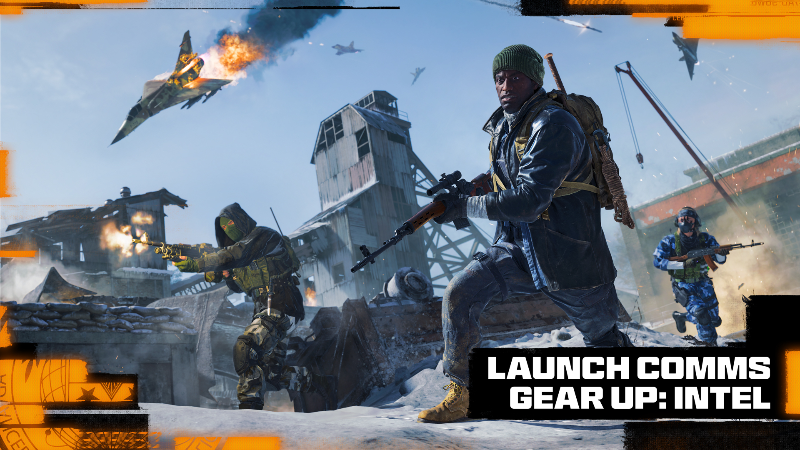
-
[data-focus-scheme="dark"] { color-scheme: none; } Lord Captains! The Grim Darkness challenge is here! What is The Grim Darkness Challenge? It is an intense competitive event for streamers, where, over the course of two weeks, participants will compete live in beating (or making it as far as they can in!) Warhammer 40,000: Rogue Trader on Daring difficulty in Grim Darkness mode - a newly introduced brutal gameplay mode where only a single save is allowed and is rewritten every time a player exits the game. All decisions and consequences in this mode are final, reloading is impossible, and if the party is defeated—the game is over! The challenge will begin in just a few hours, on 00:00 GMT October 22, and last for 2 weeks until 23:59 GMT November 4, or until all players have successfully completed their playthroughs or were eliminated. Participants: Amm0ni (Twitch) Arkcard (Twitch) ArmiaStars (Twitch) (Youtube) BearlyTactical (Twitch) BringItDon (Youtube) coredumped (Youtube) Daily Dose of Warhammer (Twitch)(Youtube) Flynnflytaggart (Twitch) Game kNight Plays (Twitch) (Youtube) GruntarTV (Twitch) (Youtube) Kaerenai (Twitch) Kommissar Azura (Twitch) kormakrtv (Twitch) Mirianatir (Twitch) (Youtube) Mortismal Gaming (Youtube) Nightharrow (Youtube) Otrod1e (Twitch) Remortis Gaming (Youtube) Revan (Youtube) Slandered Gaming (Youtube) TangerineBlade (Twitch) TheCriticallyClueless (Youtube) Unknownhost (Twitch) The Station (Twitch) (Youtube) Watch your favourite streamer best the hardest trial or fail on the road to the grand prize! Full rules of the challenge can be found here! May luck follow our Grim Darkness Challenge contestants!Vezi articolul complet
-
[data-focus-scheme="dark"] { color-scheme: none; } Lord Captains! The Grim Darkness challenge is here! What is The Grim Darkness Challenge? It is an intense competitive event for streamers, where, over the course of two weeks, participants will compete live in beating (or making it as far as they can in!) Warhammer 40,000: Rogue Trader on Daring difficulty in Grim Darkness mode - a newly introduced brutal gameplay mode where only a single save is allowed and is rewritten every time a player exits the game. All decisions and consequences in this mode are final, reloading is impossible, and if the party is defeated—the game is over! The challenge will begin in just a few hours, on 00:00 GMT October 22, and last for 2 weeks until 23:59 GMT November 4, or until all players have successfully completed their playthroughs or were eliminated. Participants: Amm0ni (Twitch) Arkcard (Twitch) ArmiaStars (Twitch) (Youtube) BearlyTactical (Twitch) BringItDon (Youtube) coredumped (Youtube) Daily Dose of Warhammer (Twitch)(Youtube) Flynnflytaggart (Twitch) Game kNight Plays (Twitch) (Youtube) GruntarTV (Twitch) (Youtube) Kaerenai (Twitch) Kommissar Azura (Twitch) kormakrtv (Twitch) Mirianatir (Twitch) (Youtube) Mortismal Gaming (Youtube) Nightharrow (Youtube) Otrod1e (Twitch) Remortis Gaming (Twitch) (Youtube) Revan (Youtube) Slandered Gaming (Youtube) TangerineBlade (Twitch) TheCriticallyClueless (Youtube) Unknownhost (Twitch) The Station (Twitch) (Youtube) Watch your favourite streamer best the hardest trial or fail on the road to the grand prize! Full rules of the challenge can be found here! May luck follow our Grim Darkness Challenge contestants!Vezi articolul complet
-
Amazon Prime Video se lansează în lumea jocurilor video cu cel mai recent serial al său, Secret Level, cu unele dintre cele mai mari nume de la Hollywood, inclusiv Arnold Schwarzenegger, Keanu Reeves, Temuera Morrison și Kevin Hart. Amazon anunță Secret Level la Gamescom 2024 https://youtu.be/wvm-xMVt4BsVideo can’t be loaded because JavaScript is disabled: Secret Level Interview with Tim Miller | GAMESCOM Opening Night Live 2024 (https://youtu.be/wvm-xMVt4Bs) Anunțul Secret Level a fost făcut de Tim Miller, regizorul primului film Deadpool și Terminator: Dark Fate, în timpul galei de deschidere a Gamescom 2024. Cunoscut pentru munca sa la filmul Netflix Love, Death + Robots, noul proiect al lui Miller își propune să aducă la viață jocuri video iconice într-un serial antologic animat unic. Secret Level va avea premiera pe Prime Video pe 10 decembrie 2024 și va cuprinde 15 episoade, fiecare concentrându-se pe diferite titluri de jocuri video, inclusiv God of War, Mega Man, Sifu și Spelunky. O echipă plină de vedete Potrivit unei dezvăluiri recente raportate de Eurogamer, un trailer acum șters a dezvăluit că Secret Level va prezenta o listă impresionantă de talente de la Hollywood. Arnold Schwarzenegger și Keanu Reeves se numără printre vedetele notabile care dau viață personajelor animate, subliniind angajamentul Amazon de a oferi o serie de înaltă calitate. Lista completă a actorilor care ar fi implicați include: Arnold Schwarzenegger Kevin Hart Keanu Reeves Temuera Morrison Heaven Hart Ariana Greenblatt Emily Swallow Gabriel Luna Ricky Whittle Patrick Schwarzenegger Merle Dandridge Claudia Doumit Adewale Akinnuoye-Agbaje Clive Standen Laura Bailey Michael Beach Viziunea lui Amazon pentru Secret Level Vernon Sanders, șeful televiziunii la Amazon MGM Studios, și-a exprimat entuziasmul pentru serial. „Secret Level creează o rețea de jocuri emblematice pe mai multe medii pentru a spune o serie de povești unice și captivante”, a spus Sanders. Acesta a subliniat implicarea lui Tim Miller, a Blur Studio și a regizorului supervizor Dave Wilson, lăudând animația uimitoare și povestea inovatoare a serialului. Fiecare episod din Secret Level promite să ducă telespectatorii într-o nouă călătorie, explorând diverse universuri de jocuri video prin perspective noi și imaginative. Jocuri video adaptate https://youtu.be/gLihxsmI_OUVideo can’t be loaded because JavaScript is disabled: Secret Level – Teaser Trailer | Prime Video (https://youtu.be/gLihxsmI_OU) Seria va adapta o gamă largă de jocuri video, inclusiv: Armored Core Concord Crossfire Dungeons & Dragons Exodus Honor of Kings Mega Man New World: Aeternum PAC-MAN Titluri PlayStation precum God of War Sifu Spelunky The Outer Worlds Unreal Tournament Warhammer 40,000 Deși rolurile exacte ale actorilor nu au fost încă dezvăluite, fanii așteaptă cu nerăbdare lansarea oficială a trailerului șters, care este de așteptat să ofere mai multe detalii despre personajele pe care aceste vedete le vor portretiza. Concluzie Cu amestecul său de talente hollywoodiene de profil înalt și francize de jocuri video îndrăgite, Secret Level se prefigurează a fi un serial revoluționar pentru Amazon Prime Video. Fanii atât ai jocurilor, cât și ai animației pot aștepta cu nerăbdare data de 10 decembrie 2024, când Secret Level va începe difuzarea, oferind o nouă formă de divertisment care îmbină cultura jocurilor cu povestirile cinematografice. The post Arnold Schwarzenegger și Keanu Reeves se alătură noului serial de jocuri Amazon Secret Level appeared first on Need4Games. Citește mai departe !