Release Date:
Apr 30, 2025
Early Access Release Date:
Aug 29, 2024
About This Game
Memoriapolis
is a city-builder where you shape your town across time. Manage resources, make political decisions, and deal with the different factions moving in.
Your ultimate goal?
Stay in power until the end of the Age of Enlightenment... and leave your mark in history by building a grand
City's Fair
during the Industrial Revolution.
But beware—your citizens have needs, factions grow in influence, and historical events can shake everything up. Lose control, and it's game over!
Time moves forward—whether you're ready or not. Your adventure spans
five historical eras
: Antiquity - Middle Ages - Renaissance - Age of Enlightenment and Industrial Revolution.
Each age lasts a number of in-game cycles before transitioning automatically. As your city evolves, so must your strategy. Some buildings can be upgraded to match a new era... others may need to go.
Think carefully: what will you preserve, and what will you sacrifice to shape the future?
In
Memoriapolis
, there's no fixed grid or rigid control. Your city grows
organically
, and your citizens decide where they settle. This makes each playthrough feel natural, dynamic, and unique. You’ll need to adapt to their choices—while gently guiding them.
Use
cultural buildings
to influence the surrounding area and attract more people to grow your districts smartly.
There are 6 cultures in game (Military - Religion - Trade - Education - Production - Politics)
These cultures shape not just the buildings but also the citizens in your city. Over time, citizens will form factions. And as your city grows, so do these
factions
—and they’ll become your political partners… or rivals.
A strong faction unlocks new buildings and boosts growth. But if a faction becomestoo powerful, it may block your key decisions or worse...
remove you from power.
Stay smart. Stay flexible. And always keep your influence in check.
Build Wonders that stand the test of time — from the Library of Alexandria to the Notre-Dame, the Leaning Tower of Pisa, and beyond.
Each Age holds its iconic masterpiece, tied to a culture, offering powerful bonuses to shape your legacy.
Let your city be remembered for centuries to come!
Descrierea conținutului pentru adulți indisponibilă.


Genre: Indie , Simulation , Strategy
Early Access Release Date: Aug 29, 2024
About This Game
Memoriapolis is a city-builder where you shape your town across time. Manage resources, make political decisions, and deal with the different factions moving in.
Your ultimate goal? Stay in power until the end of the Age of Enlightenment... and leave your mark in history by building a grand City's Fair during the Industrial Revolution.
But beware—your citizens have needs, factions grow in influence, and historical events can shake everything up. Lose control, and it's game over!
Time moves forward—whether you're ready or not. Your adventure spans five historical eras : Antiquity - Middle Ages - Renaissance - Age of Enlightenment and Industrial Revolution.
Each age lasts a number of in-game cycles before transitioning automatically. As your city evolves, so must your strategy. Some buildings can be upgraded to match a new era... others may need to go.
Think carefully: what will you preserve, and what will you sacrifice to shape the future?
In Memoriapolis , there's no fixed grid or rigid control. Your city grows organically , and your citizens decide where they settle. This makes each playthrough feel natural, dynamic, and unique. You’ll need to adapt to their choices—while gently guiding them.
Use cultural buildings to influence the surrounding area and attract more people to grow your districts smartly.

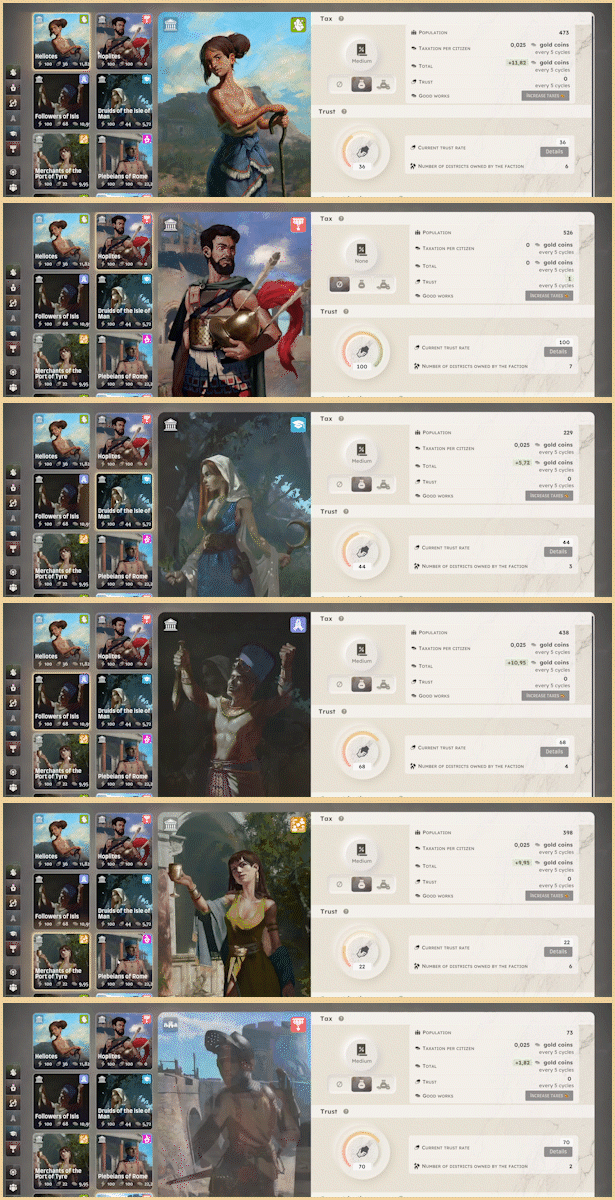
There are 6 cultures in game (Military - Religion - Trade - Education - Production - Politics)
These cultures shape not just the buildings but also the citizens in your city. Over time, citizens will form factions. And as your city grows, so do these factions —and they’ll become your political partners… or rivals.
A strong faction unlocks new buildings and boosts growth. But if a faction becomestoo powerful, it may block your key decisions or worse... remove you from power. Stay smart. Stay flexible. And always keep your influence in check.
Build Wonders that stand the test of time — from the Library of Alexandria to the Notre-Dame, the Leaning Tower of Pisa, and beyond.
Each Age holds its iconic masterpiece, tied to a culture, offering powerful bonuses to shape your legacy.
Let your city be remembered for centuries to come!
System Requirements
Windows
View the full article